UEFITool logo

UEFITool A75

  • User Rating:
    ★★★★★
    ★★★★★
    0.0 ★ 0Votes
  • Requirements:
    Windows
  • Version: A75
  • Latest updated: 2 weeks ago
  • License: Open Source  
  • Publisher: CodeRush
  • Size: 7 MB
× app stores

UEFITool is a specialized system utility designed for analyzing, extracting, and modifying UEFI firmware images. It allows users to inspect the internal structure of BIOS files, including UEFI volumes and flash descriptor information, making it a useful tool for advanced firmware analysis and editing tasks.

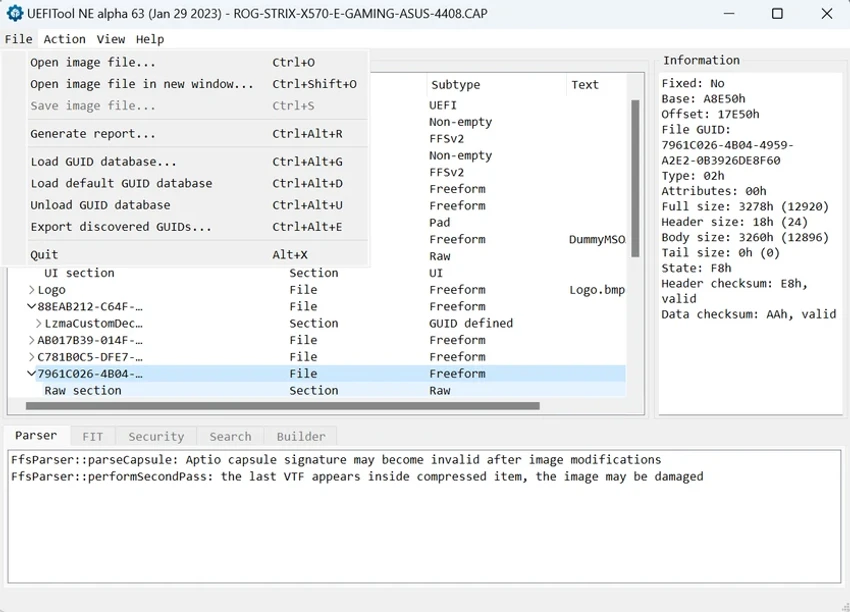
The software supports a wide range of BIOS image formats, including ROM, BIN, FD, CAP, BIO, WPH, and EFI files. When a firmware image is loaded, UEFITool displays detailed information about its contents, including names, types, subtypes, and available text data. This structured view makes it easier to examine the components contained within complex firmware files. Beyond viewing firmware information, UEFITool provides tools for extracting data from firmware images, inserting new items into the image structure, and removing unwanted components. After modifications are completed, users can export the edited firmware image for further use.

Designed primarily for experienced users working with UEFI firmware, BIOS development, hardware customization, or firmware research, UEFITool focuses on providing detailed access to firmware structures rather than offering a general-purpose editing experience. Its support for multiple image formats and detailed parsing capabilities make it a useful utility for users who need to examine or manage UEFI-based firmware files.

Features of UEFITool

  • Parse and analyze UEFI firmware images
  • Extract data from firmware image files
  • Modify UEFI image structures
  • Insert new items into firmware images
  • Remove unwanted firmware components
  • Support for multiple BIOS image formats:
    • ROM
    • BIN
    • FD
    • CAP
    • BIO
    • WPH
    • EFI
  • Display firmware details including name, type, subtype, and text information
  • Support analysis of UEFI volumes and flash descriptor data
  • Export modified firmware images

Interface and Usability

UEFITool provides a technical interface focused on displaying firmware structures and their associated information. When users load a compatible BIOS image, the application organizes the contents into a structured view, showing details such as component names, types, subtypes, and text information.

The workflow is designed around firmware analysis tasks rather than general file editing. Users can browse image contents, extract specific data, make structural changes, and export the resulting firmware file. Due to the specialized nature of UEFI editing, the software is best suited for users who already understand BIOS and firmware concepts. For experienced users, the organized presentation of firmware components helps make complex UEFI images easier to inspect and manage.

Who Should Use UEFITool?

  • Firmware developers and researchers
  • Advanced users working with BIOS images
  • Hardware customization enthusiasts
  • Professionals analyzing UEFI structures
  • Users who need to extract or modify firmware components

Conclusion

UEFITool is a powerful utility for users who need detailed access to UEFI firmware images. With support for multiple BIOS formats, structured firmware parsing, extraction tools, and image editing capabilities, it provides valuable functionality for firmware analysis and customization.

Because firmware modification carries technical risks, UEFITool is best recommended for experienced users who understand UEFI structures and BIOS components. For developers, researchers, and advanced hardware users, it offers a focused set of tools for working directly with firmware images.

Pros & Cons

✓

Pros

  • Supports many common BIOS image formats
  • Provides detailed UEFI structure analysis
  • Allows firmware extraction and modification
  • Can insert or remove image components
  • Displays detailed firmware metadata
  • Lightweight application size
✕

Cons

  • Designed for advanced users
  • Requires knowledge of UEFI firmware structures
  • Incorrect firmware modifications may cause system issues
  • Not intended as a general BIOS update utility

Frequently Asked Questions

What is UEFITool used for?

UEFITool is used to analyze, extract, and modify UEFI firmware images. It allows users to inspect firmware structures and make changes to supported BIOS image files.

Which BIOS file formats does UEFITool support?

UEFITool supports multiple BIOS image formats, including ROM, BIN, FD, CAP, BIO, WPH, and EFI files.

Can UEFITool extract files from firmware images?

Yes. UEFITool allows users to extract data and components from supported UEFI firmware images.

Can I edit a BIOS image with UEFITool?

Yes. UEFITool provides functions for inserting items into firmware structures, removing components, and exporting modified images.

Is UEFITool suitable for beginners?

UEFITool is mainly designed for advanced users who understand UEFI firmware structures. Beginners may find firmware editing concepts difficult to work with.

Does UEFITool update BIOS firmware?

No. UEFITool is a firmware analysis and editing tool, not a standard BIOS update application. It is used for examining and modifying firmware images rather than automatically updating system BIOS.

Recommended apps [Freeware]:
  • QontrolPanel 1.18.2 QontrolPanel logo system tray audio tool for quickly switching output devices, managing inputs, and controlling app volume on Windows
  • DriverHub 2.1.5 DriverHub logo scans your PC and installs the latest drivers automatically, helping keep hardware updated and stable on Window
  • Jux 4.900 Jux logo fractal explorer for Mandelbrot and Julia sets with advanced coloring, lighting effects, and high-resolution rendering tools
  • WindowTop 5.32.3 WindowTop logo Manage desktop windows with WindowTop using Picture-in-Picture, transparency, dark mode, and always-on-top features
  • HP Easy Start 17.5.11 HP Easy Start logo Install and configure HP printer drivers easily with automatic device detection, network support, and streamlined setup tools.
  • Wireshark 4.6.7 Wireshark logo Analyze network traffic, inspect packets, and troubleshoot connections with a powerful protocol analysis tool for professionals.
Recommended apps [Shareware]:
  • EF Duplicate Files Manager 26.05 EF Duplicate Files Manager logo finds and removes duplicate files by name, size, or content to reclaim storage space.
  • Lyric Video Studio 1.5.49 Lyric Video Studio logo a Windows app for creating lyric videos with AI tools, subtitles, motion tracking, and 4K video editing
  • CyberLink PhotoDirector 2026 v17.6.1826.0 CyberLink PhotoDirector logo Edit, retouch, and enhance photos with CyberLink PhotoDirector, featuring AI tools, layer editing, and professional effects
  • Catalyst Production Suite 2026.1.1 Catalyst Production Suite logo a professional media tool for browsing, preparing, transcoding, and managing Pro video formats.
  • Wise Care 365 8.0.4.732 Wise Care 365 logo Optimize Windows performance with system cleanup, registry tools, privacy protection, and hardware monitoring features.
  • Actual Installer 10.8 Actual Installer logo Create reliable Windows installers quickly with a form-based setup tool supporting shortcuts, registry edits, prerequisites, and uninstall options.