tinyMediaManager logo

tinyMediaManager 5.3.0

  • User Rating:
    ★★★★★
    ★★★★★
    0.0 ★ 0Votes
  • Requirements:
    Windows
  • Version: 5.3.0
  • Latest updated: 1 month ago
  • License: Freemium  
  • Publisher: tinyMediaManager
  • Size: 127 MB
× app stores

tinyMediaManager is a portable freeware application designed to help users organize, clean up, and maintain their movie and TV show collections. Instead of manually managing folders, artwork, and information for every title, the software provides tools to automatically collect and manage important media details from online databases.

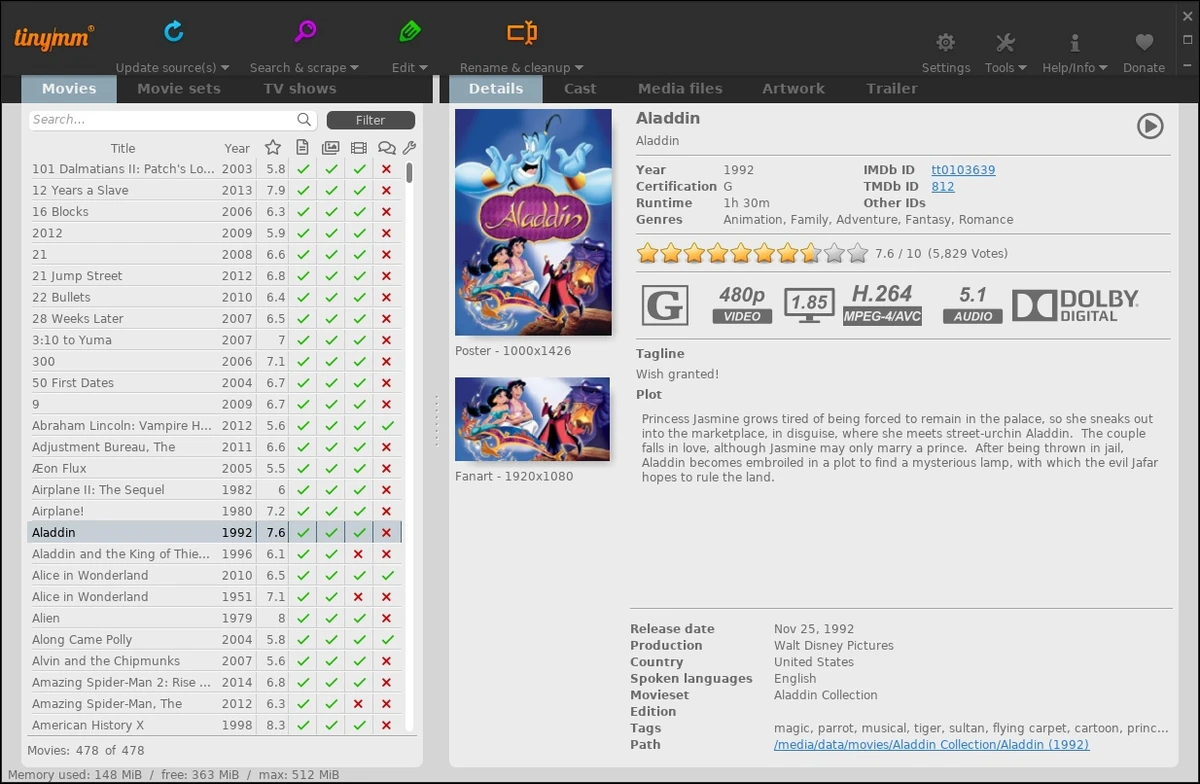
The application can scan selected folders containing movies or TV shows and retrieve metadata from sources such as TheMovieDB.org, IMDb.com, and OFDb.de. It can download artwork, background images, cast information, plot details, genres, ratings, and other related media information to create a more complete and organized library.

tinyMediaManager is especially useful for users who maintain large video collections and want compatibility with media center applications. It can create Kodi and MediaPortal-compatible NFO files, import existing NFO data, and organize movies into collections. The software also supports technical media information retrieval through MediaInfo and helps identify TV seasons and episodes automatically.

Beyond metadata management, tinyMediaManager allows users to rename movies and folders, arrange titles into movie sets, and customize artwork for collections. Its combination of automatic scraping tools, search functions, filtering options, and manual editing features makes it a practical solution for keeping digital media libraries structured and easy to browse.

Features of tinyMediaManager

  • Edit and manage movie and TV show metadata manually
  • Automatically retrieve media information from supported online sources
  • Download movie artwork and collection images
  • Create Kodi and MediaPortal-compatible NFO files
  • Import existing NFO files from other media management tools
  • Extract technical media information using MediaInfo
  • Detect TV seasons and episode details
  • Organize movies into movie sets
  • Automatically assign movies to collections
  • Rename movie files and folders for better organization
  • Use powerful searching, sorting, and filtering tools
  • Import large media libraries through file structure scanning

Interface and Usability

tinyMediaManager focuses on functionality and organization rather than a minimal design approach. The interface provides access to media management tools, metadata editing options, searching, filtering, and library organization features from one application.

Setting up a collection is straightforward: users select folders containing their movies or TV shows, and the software can analyze the content and retrieve available information. The ability to manually adjust metadata gives users more control when automatic results need corrections.

The workflow is practical for users managing large collections because features such as movie set organization, file renaming, and NFO management reduce the amount of manual work required. The portable design also makes it convenient for users who prefer software that does not require a traditional installation process.

Who Should Use tinyMediaManager?

  • Maintain large movie or TV show collections
  • Use Kodi or MediaPortal and need compatible library files
  • Want to organize video folders with proper metadata
  • Prefer having control over artwork, descriptions, and media information
  • Need a tool for cleaning up and structuring personal media librarie

Conclusion

tinyMediaManager is a capable solution for users who want better control over their movie and TV show collections. With metadata scraping, artwork management, NFO support, and powerful organization tools, it simplifies many of the tasks involved in maintaining a digital media library.

Pros & Cons

✓

Pros

  • Supports extensive movie and TV library organization
  • Retrieves metadata from multiple online sources
  • Creates Kodi and MediaPortal-compatible NFO files
  • Includes artwork and collection management tools
  • Helps automate file and folder organization
  • Portable freeware application
✕

Cons

  • May require time to configure and organize large libraries
  • Primarily focused on media management rather than playback

Frequently Asked Questions

What is tinyMediaManager used for?

tinyMediaManager is a media library management tool designed to organize and maintain movie and TV show collections. It helps users collect metadata, manage artwork, edit media information, and prepare organized libraries for media center applications.

Can tinyMediaManager organize TV shows and episodes?

Yes. tinyMediaManager can identify TV seasons and episodes, helping users organize TV show content stored in subdirectories. It can also retrieve related media information to keep collections properly structured.

Does tinyMediaManager support Kodi and MediaPortal?

Yes. tinyMediaManager can create Kodi and MediaPortal-compatible NFO files. It can also import NFO files created by other media management tools, making it easier to move existing libraries.

Where does tinyMediaManager get movie and TV metadata?

tinyMediaManager can retrieve metadata from online sources including TheMovieDB.org, IMDb.com, and OFDb.de. It can collect information such as movie details, cast information, plots, genres, and other media data.

Can tinyMediaManager download artwork for movies?

Yes. tinyMediaManager can retrieve artwork for movies and movie sets from supported sources. Users can use these images to personalize and improve the appearance of their media collections.

Can tinyMediaManager rename and organize video files?

Yes. The software allows users to rename movies and their folders, helping create a cleaner and more consistent file structure for large media collections.

Recommended apps [Freeware]:
  • FluentTweaker 26.06.02 FluentTweaker logo a Windows utility for safe, reversible system tweaks focused on UI, privacy, and performance control.
  • Microsoft Edge 150.0.4078.83 Microsoft Edge logo modern Chromium-based browser offering fast performance, strong security, privacy controls, and cross-platform support
  • Adobe Acrobat Reader DC 2026.002.21900 Adobe Acrobat Reader DC logo trusted PDF viewer for reading, printing, and annotating PDFs with strong security and cloud sync support
  • 7-Zip 26.02 7-Zip logo free file compression tool with high compression ratio, strong encryption, and wide format support on Windows
  • Xreveal 2.9.9 Xreveal logo a lightweight disc decryption tool that removes supported Blu-ray, UHD, DVD, and CD protections for compatible media
  • Winget-AutoUpdate 2.12.0 Winget-AutoUpdate logo Automatically update Windows applications with scheduled Winget tasks, notifications, app filters, and detailed update logs.
Recommended apps [Shareware]:
  • Syncovery 12.3.4 Syncovery logo fast backup and file synchronization tool with real-time sync, versioning, and advanced automation features
  • GiliSoft Private Disk 11.8 GiliSoft Private Disk logo Protect sensitive files with AES 256-bit encryption, hidden disk images, and portable encrypted storage
  • Coolutils Total Doc Converter 5.1.0.403/176 Coolutils Total Doc Converter logo Convert DOC, DOCX, RTF, and TXT files into PDF, HTML, images, and more with fast batch processing
  • VovSoft Batch Audio Converter 2.1 VovSoft Batch Audio Converter logo a Windows tool for fast bulk audio conversion with drag-and-drop simplicity and format flexibility
  • UniFab 4.1.7.0 UniFab logo Enhance videos with AI using UniFab. Upscale footage, reduce noise, boost frame rates, convert HDR, and improve audio quality
  • Actual Window Rollup 8.15.4 Actual Window Rollup logo adds a roll-up button to Windows, letting you collapse windows into title bars for faster workspace management