PointerStick logo

PointerStick 7.17

  • User Rating:
    ★★★★★
    ★★★★★
    0.0 0Votes
  • Requirements:
    Windows
  • Version: 7.17
  • Latest updated: 1 week ago
  • License: Freeware  
  • Publisher: Nenad Hrg
  • Size: 1 MB
× app stores

PointerStick is a lightweight and portable Windows utility designed to improve visibility during presentations by displaying a virtual pointer stick on the desktop. The software makes it easier for audiences to follow mouse movements on projectors, large monitors, LED displays, and presentation screens. Rather than relying solely on the standard mouse cursor, PointerStick adds a larger and more visible pointer that helps presenters emphasize specific areas of the screen while maintaining audience focus.

Features of PointerStick

Virtual Presentation Pointer

  • Displays a virtual pointer stick on the Windows desktop
  • Enhances mouse visibility during presentations
  • Helps highlight important on-screen content

Customization Options

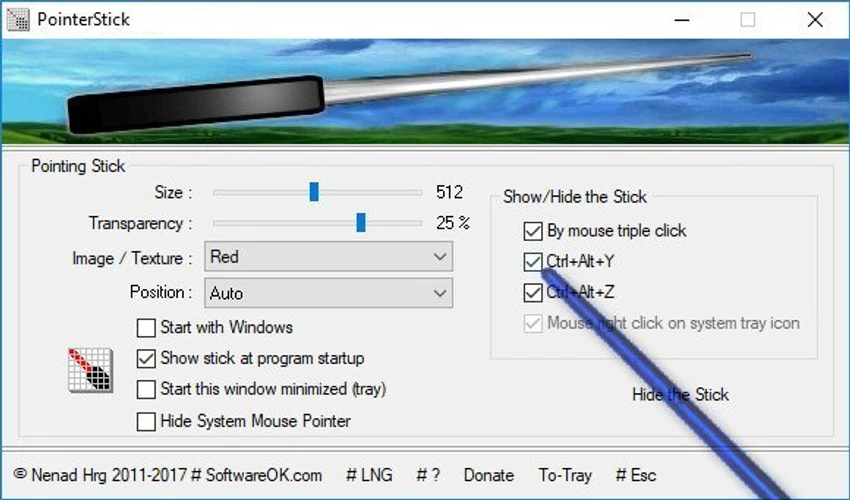
  • Adjustable pointer size
  • Multiple pointer stick textures (bitmaps)
  • Optional alpha transparency settings
  • Customizable visual appearance

Smart Behavior Controls

  • Optional deactivation through mouse input
  • Optional deactivation through keyboard input
  • Hide system mouse cursor feature

Performance & Portability

  • Lightweight application
  • Low CPU usage
  • Portable design with no complex installation required

Additional Features

  • Multilingual support
  • Translation capabilities
  • Compatible with projectors, LED displays, and LCD screens

User Experience

PointerStick focuses on a single task and performs it effectively: making the mouse pointer easier to see during presentations. The application launches quickly and immediately adds a visible pointer stick that follows mouse movement. This can be particularly useful in conference rooms, classrooms, training sessions, demonstrations, and webinars where audiences may struggle to see a standard cursor on a large screen. The customization options are straightforward and practical. Users can adjust the size of the pointer to match the display environment and select from multiple pointer textures. Transparency settings also allow the pointer to remain visible without becoming distracting.

One useful feature is the ability to hide the standard Windows mouse cursor. This helps maintain a cleaner presentation appearance while ensuring the larger virtual pointer remains the primary focus. Because the software is portable and consumes very few system resources, it can easily be carried on a USB drive and used on different presentation systems without affecting performance. The interface is intentionally simple, making it accessible even for users who are not technically inclined. Most settings can be configured within seconds, allowing presenters to focus on their content rather than software setup.

Who Should Use PointerStick?

  • Business presenters
  • Teachers and educators
  • Trainers and instructors
  • Webinar hosts
  • Conference speakers
  • Users working with projectors
  • Anyone presenting on large monitors or display walls

Conclusion

PointerStick is a focused utility that solves a common presentation problem: making the mouse pointer easier to see. Its lightweight footprint, portability, and simple customization options allow presenters to quickly improve audience engagement without installing complex software.

Pros & Cons

Pros

  • Lightweight and portable
  • Extremely low CPU usage
  • Improves cursor visibility during presentations
  • Adjustable pointer size
  • Multiple pointer styles available
  • Transparency customization
  • Can hide the standard mouse cursor
  • Easy to configure
  • Suitable for projectors and large displays
  • Supports multiple languages

Cons

  • Focused on a single specialized function
  • Limited usefulness outside presentation environments
  • Visual customization options are basic compared to full presentation suites

Frequently Asked Questions

What is PointerStick?

PointerStick is a Windows utility that displays a virtual pointer stick on the desktop to make mouse movements more visible during presentations.

Why would I use PointerStick?

It helps audiences follow your cursor more easily on projectors, large monitors, LED screens, and presentation displays.

Can I customize the virtual pointer?

Yes. PointerStick allows users to adjust pointer size, select different pointer textures, and configure transparency settings.

Does PointerStick hide the normal mouse cursor?

Yes. The software includes an option to hide the standard Windows mouse pointer.

Is PointerStick portable?

Yes. PointerStick is a portable application that can be used without a traditional installation process.

Does PointerStick affect system performance?

No. The software is designed to use very little CPU and system resources.

Which Windows versions are supported?

PointerStick supports Windows 7, Windows 8, Windows 10, and Windows 11.

Recommended apps [Freeware]:
  • Smadav 2026 v15.8.2 Smadav logo a lightweight antivirus for Windows that provides USB protection, malware cleaning, and additional security
  • QuadSpinner Gaea 2.3.0.1 QuadSpinner Gaea logo a procedural terrain design tool for creating realistic landscapes with advanced erosion tools.
  • BDtoAVCHD 3.2.0 BDtoAVCHD logo convert Blu-ray and MKV files into AVCHD or MKV for DVD or USB high-definition backups
  • Markdown Monster 4.4.3 Markdown Monster logo a powerful Windows Markdown editor with live preview, HTML/PDF export, Git integration, and blogging tools
  • Disk Drill 6.3.1398.0 Disk Drill logo advanced data recovery software for Windows to restore deleted files from drives, USB, and partitions
  • Dashlane 6.2626.1 Dashlane logo secure password manager that stores credentials, autofills forms, and enhances online security with encryption and alerts
Recommended apps [Shareware]:
  • Syncovery 12.2.1 Syncovery logo fast backup and file synchronization tool with real-time sync, versioning, and advanced automation features
  • RadioCaster 3.7.2.0 RadioCaster logo Allows you to broadcast any computer or analog audio online using Icecast, Shoutcast, and many other formats.
  • Disk Savvy 18.2.36 Disk Savvy logo analyze disk space usage, network shares, NAS storage, and generate detailed reports on Windows
  • DP Animation Maker 3.5.51 DP Animation Maker logo a simple Windows tool for creating animated images, GIFs, and videos with effects, objects, and music.
  • SysTools SQL Backup Recovery 12.0.0 SysTools SQL Backup Recovery logo Repair and recover corrupt SQL Server BAK files, restore database objects, and export recovered data with ease.
  • CloudMounter 3.7.2137 CloudMounter logo mounts cloud storage and remote servers like local drives for easy file access and management on Windows