


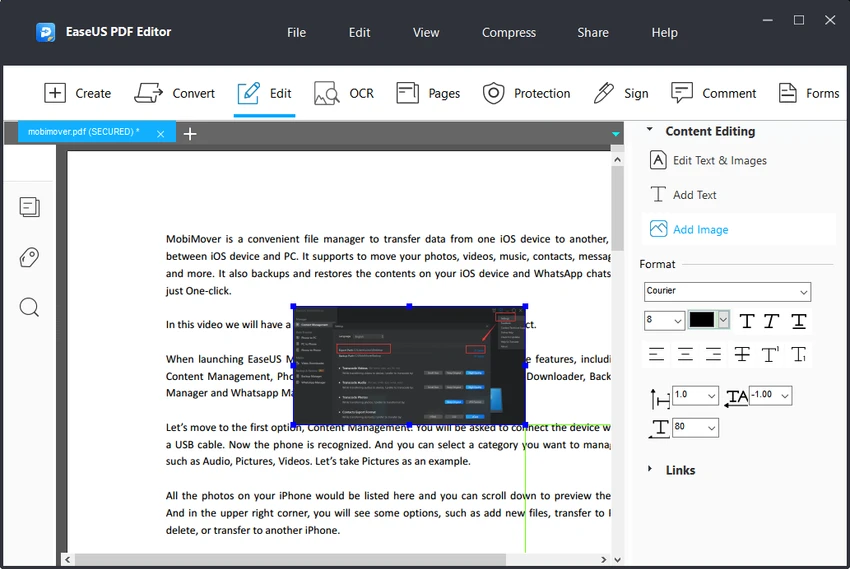

EaseUS PDF Editor is a Windows-based PDF management application designed to help users create, edit, convert, organize, and secure PDF documents. The software combines essential PDF tools into a single application, allowing users to work with digital documents without relying on multiple separate utilities.
The application supports converting PDFs to and from common file formats, including DOCX, XLSX, PPTX, JPG, PNG, TXT, and HTML. Users can transform documents into PDF files or extract PDF content into editable formats while maintaining the original structure and layout.
Beyond conversion, EaseUS PDF Editor provides a complete set of document editing features. Users can modify text, add images, insert links, annotate documents with highlights, stamps, and shapes, and manage PDF pages by splitting, merging, or compressing files.
The software also includes OCR technology, allowing users to recognize text from scanned documents and images. This makes scanned invoices, forms, and archived documents searchable and editable while supporting multiple languages.
For business and professional workflows, EaseUS PDF Editor includes tools for handling interactive forms, adding electronic signatures, applying watermarks, and protecting documents with passwords. These features make it suitable for users managing contracts, administrative documents, reports, and other digital paperwork. With a balance of editing tools, conversion options, and document security features, EaseUS PDF Editor provides a practical PDF solution for personal, academic, and professional use.
Features of EaseUS PDF Editor
- Edit PDF text, images, and document elements
- Convert PDFs to and from common file formats
- Support for DOCX, XLSX, PPTX, JPG, PNG, TXT, and HTML formats
- OCR support for scanned documents
- Search and edit recognized text from scanned files
- Add annotations, highlights, stamps, and shapes
- Fill out and create interactive PDF forms
- Add electronic signatures
- Apply watermarks to documents
- Split, merge, and compress PDF files
- Protect PDFs with passwords
- Batch conversion support in the Pro version
Interface and Usability
EaseUS PDF Editor provides a straightforward interface designed around common PDF tasks. The layout makes it easy to access editing, conversion, annotation, and document management tools without requiring advanced PDF knowledge.
Editing documents is handled through familiar controls, allowing users to add text, modify content, insert images, and apply formatting adjustments. The annotation tools provide practical options for reviewing and marking up documents.
The conversion workflow is also simple, with clear options for changing PDFs into other file formats or creating PDFs from different document types. OCR features add extra flexibility when working with scanned files. For users who regularly work with digital documents, the combination of editing, conversion, and security tools creates a convenient all-in-one PDF workspace.
Who Should Use EaseUS PDF Editor?
- Freelancers handling digital paperwork
- Small business owners managing contracts and forms
- Students editing and organizing PDF documents
- Office workers working with reports and documents
- Users converting scanned files with OCR
- Anyone looking for a Windows PDF editing solution
Conclusion
EaseUS PDF Editor is a versatile PDF toolkit that provides the essential features many users need for working with digital documents. From editing text and converting files to processing scanned documents with OCR, the software covers a wide range of PDF-related tasks in one application. Its combination of document editing, conversion, annotation, form handling, and security features makes it suitable for both personal and professional use. Users who only need occasional PDF adjustments can start with the free version, while those handling larger document workflows may benefit from the expanded Pro features.


