NTLite logo

NTLite 2026.06.11200

  • User Rating:
    ★★★★★
    ★★★★★
    0.0 0Votes
  • Requirements:
    Windows
  • Version: 2026.06.11200
  • Latest updated: 1 day ago
  • License: Freemium  
  • Publisher: Nlitesoft
  • Size: 21 MB
× app stores

NTLite is an advanced Windows customization and deployment tool designed to help users modify Windows installation images before or after deployment. It allows users to remove unnecessary components, integrate drivers and updates, and create optimized, lightweight versions of Windows tailored to specific needs. By working with image formats such as WIM, ESD, and SWM, NTLite provides deep control over Windows installations, making it a powerful solution for IT professionals, system builders, and advanced users who want full control over their operating system environment.

Features of NTLite

  • Customize Windows installation images (WIM, ESD, SWM)
  • Remove unnecessary Windows components and features
  • Integrate drivers, updates, and language packs
  • Create bootable ISO images from customized installations
  • Convert between image formats (WIM, ESD, SWM)
  • Support for unattended Windows setup configuration
  • Post-install automation and customization
  • Apply system tweaks before deployment
  • Host hardware compatibility checks
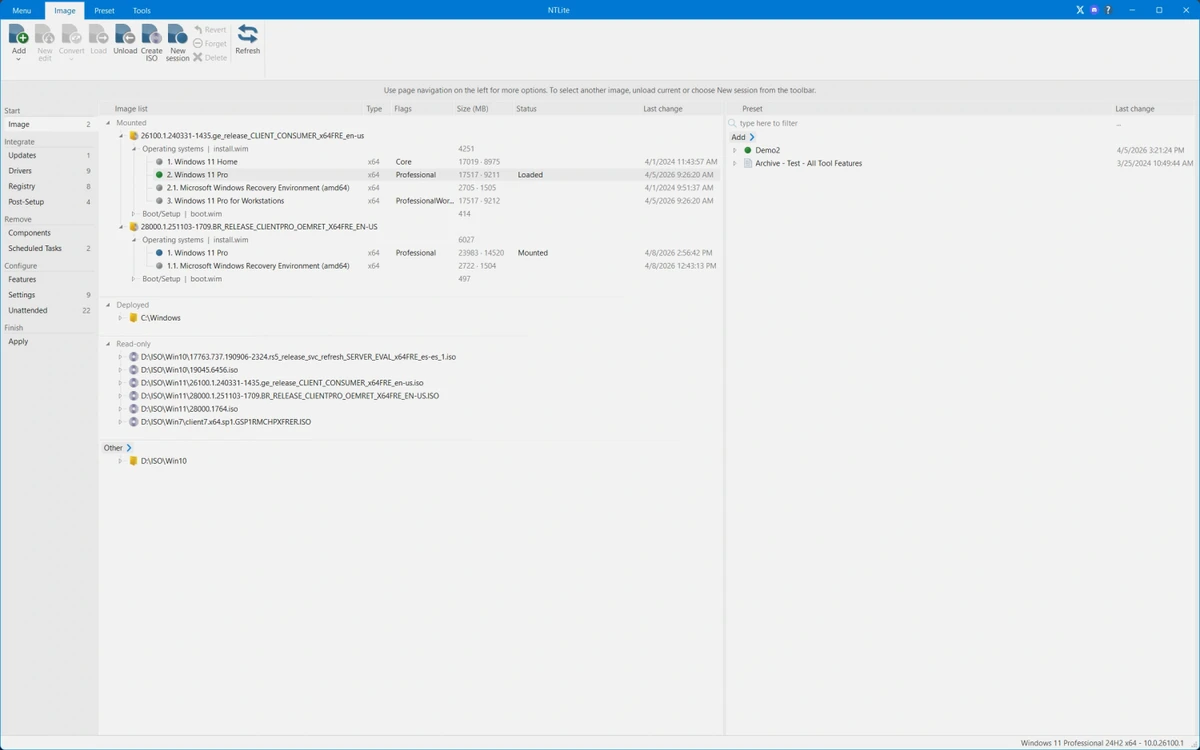
  • Dynamic toolbar and image management interface
  • Preset configuration support for repeated workflows
  • Modify already installed Windows systems (advanced feature set)
  • Driver management and integration tools (licensed features)
  • Component cleanup and WinSxS optimization (licensed features)

User Experience

NTLite presents a structured and feature-rich interface designed for users who need precise control over Windows installations. The workflow is centered around loading a Windows image and then customizing it by removing components, adding drivers, or applying system tweaks before deployment. One of its strongest aspects is flexibility. Users can work with various image formats and even convert between them, which is especially useful when preparing installation media for different hardware or deployment scenarios. The ability to create bootable ISOs directly from customized images simplifies the deployment process.

For advanced users, NTLite offers deep system customization options, including unattended installation configuration and post-setup automation. These features significantly reduce manual setup time when deploying Windows across multiple systems.

While the interface is designed to be accessible, the depth of available options means there is a learning curve, especially for users unfamiliar with Windows deployment concepts. However, once understood, NTLite becomes a highly efficient tool for building optimized Windows environments. The free version provides basic functionality for personal use and evaluation, while advanced features such as full component removal, live editing, and expanded driver management require a paid license.

Who Should Use NTLite?

  • IT professionals managing Windows deployments
  • System administrators configuring multiple machines
  • Advanced users customizing Windows installations
  • PC builders creating optimized Windows ISOs
  • Users looking to debloat or streamline Windows setups

Conclusion

NTLite provides exceptional control over Windows installation and customization, allowing users to build highly optimized system images tailored to specific hardware or use cases. From removing unnecessary components to integrating drivers and automating installation workflows, it is a comprehensive solution for advanced Windows management.

Pros & Cons

Pros

  • Powerful Windows customization capabilities
  • Supports multiple Windows image formats
  • Allows removal of unnecessary system components
  • Driver and update integration tools
  • Bootable ISO creation support
  • Automation and unattended setup features
  • Useful for system builders and IT professionals
  • Free version available for basic use

Cons

  • Steep learning curve for beginners
  • Advanced features require a paid license
  • Not intended for casual or everyday users
  • Risk of system instability if used incorrectly

Frequently Asked Questions

What is NTLite used for?

NTLite is used to customize Windows installation images by removing components, adding drivers, integrating updates, and creating bootable ISOs.

Is NTLite free?

NTLite offers a free version for personal and trial use, but advanced features require a paid license.

Can NTLite remove Windows components?

Yes. NTLite allows users to remove unnecessary Windows components to create lightweight installations.

Does NTLite support driver integration?

Yes. It can integrate drivers into Windows installation images and manage hardware compatibility.

Is NTLite suitable for beginners?

It can be challenging for beginners due to its advanced features and Windows deployment concepts, but it is manageable with learning.

Recommended apps [Freeware]:
  • K-Lite Codec Pack Mega 19.8.2 K-Lite Codec Pack Mega logo Play all audio and video formats on Windows with K-Lite Codec Pack Mega, a full multimedia codec and filter package
  • BDtoAVCHD 3.2.0 BDtoAVCHD logo convert Blu-ray and MKV files into AVCHD or MKV for DVD or USB high-definition backups
  • Blank And Secure 8.41 Blank And Secure logo a portable Windows tool that securely deletes files by overwriting data to prevent recovery.
  • SoundVolumeView 2.52 SoundVolumeView logo displays, manages, saves, and restores Windows audio settings with powerful profile and command-line support
  • Media Player Codec Pack 5.1.2.625 Media Player Codec Pack logo enables smooth playback of audio and video formats on Windows by adding essential codecs and filters.
  • Howard Email Notifier 2.17 Howard Email Notifier logo simple desktop notifications for multiple email services with quick inbox access.
Recommended apps [Shareware]:
  • Adobe Illustrator 2026 Adobe Illustrator logo professional vector graphic editor for creating logos, illustrations, and scalable designs.
  • SkyDemon 4.3.1 SkyDemon logo Plan flights with real-time aeronautical data, dynamic charts, NOTAMs, METAR, TAF, and intelligent route planning using SkyDemon
  • GiliSoft USB Lock 11.2 GiliSoft USB Lock logo restricts USB, disk, program, and website access to prevent data leaks and misuse
  • EF Mailbox Manager 26.05 EF Mailbox Manager logo Manage multiple POP3 email accounts, remove spam on the server, and download messages securely
  • Net Monitor for Employees Professional 6.6.6 Net Monitor for Employees Professional logo track screen activity, usage, and productivity in business environments.
  • FastStone Image Viewer 8.5 FastStone Image Viewer logo a fast and user-friendly tool for viewing, editing, converting, and managing images on Windows