Phoenix Customizer logo

Phoenix Customizer 1.1.13

  • User Rating:
    ★★★★★
    ★★★★★
    0.0 ★ 0Votes
  • Requirements:
    Windows
  • Version: 1.1.13
  • Latest updated: 3 weeks ago
  • License: Freeware  
  • Publisher: ComputerSluggish
  • Size: 2.4 MB
× app stores

Phoenix Customizer is a Windows personalization tool designed to help users modify the appearance and usability of their Windows 11 or Windows 10 systems. The software provides several customization options, including changing folder colors and visual effects, adjusting taskbar appearance, adding a floating widget for quick access to shortcuts, and modifying the Windows context menu. By bringing multiple personalization settings together in one application, Phoenix Customizer helps users create a more organized and visually customized workspace. It is aimed at users who want more control over the look and layout of their Windows environment without relying only on the default system settings.

Features of Phoenix Customizer

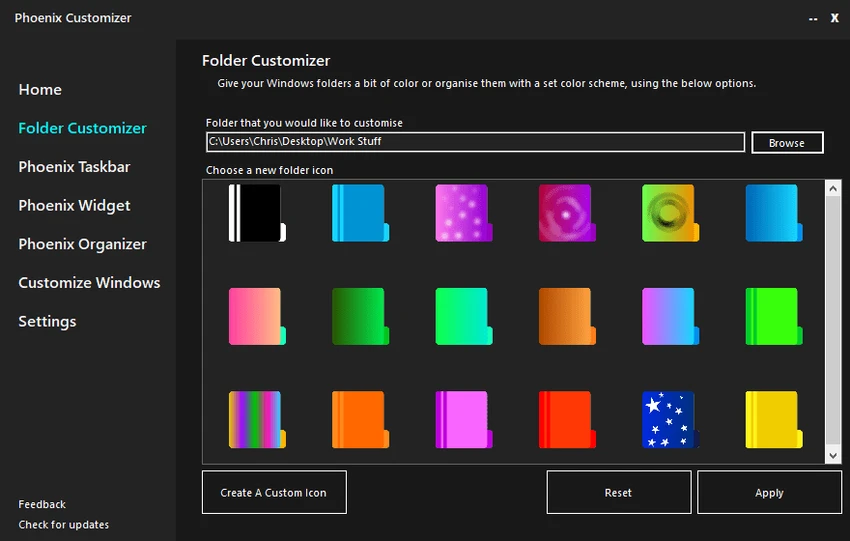
  • Windows folder customization: Change folder colors and visual effects to create a more personalized file organization system.
  • Taskbar personalization: Adjust taskbar appearance, including visual elements and available shortcuts, to better match personal preferences.
  • Floating widget: Access frequently used shortcuts and items through a customizable floating widget placed on the desktop.
  • Context menu modifications: Add or remove Windows context menu options to create a more streamlined workflow.
  • Windows compatibility: Designed for Windows 11, Windows 10, Windows 8, and Windows 7 systems.

Interface and Usability

Phoenix Customizer focuses on providing direct access to Windows personalization options in a single tool. The available features are organized around practical customization tasks, such as changing folder appearance, adjusting the taskbar, managing shortcuts, and editing context menu options.

From a usability perspective, the software is designed for users who want to personalize Windows beyond the default settings. The customization options provide a straightforward way to make the desktop environment feel more personal and better suited to individual workflows. Users looking for visual and functional Windows adjustments may find the tool useful for organizing frequently used elements and improving the overall desktop experience.

Who Should Use Phoenix Customizer?

Phoenix Customizer is suitable for Windows users who enjoy customizing their desktop environment and want more control over the appearance of folders, taskbar elements, widgets, and context menus. It can be useful for users who prefer a personalized workspace instead of the standard Windows layout. The software may also appeal to users who want to organize their frequently accessed shortcuts and create a more efficient desktop setup through additional customization options.

Conclusion

Phoenix Customizer is a practical choice for users who want to personalize their Windows experience with additional appearance and workflow adjustments. Its ability to customize folders, taskbars, widgets, and context menus makes it a useful System Tool for creating a more individual desktop environment.

Pros & Cons

✓

Pros

  • Provides multiple Windows customization options in one tool
  • Supports folder appearance changes with colors and effects
  • Allows taskbar personalization
  • Includes a floating widget for quick access to shortcuts
  • Offers Windows context menu modifications
✕

Cons

  • Focused mainly on customization rather than broader system management features

Frequently Asked Questions

What is Phoenix Customizer?

Phoenix Customizer is a Windows customization tool that allows users to personalize different parts of their Windows system. It provides options for customizing folders, taskbar appearance, floating widgets, and context menu settings.

Which versions of Windows does Phoenix Customizer support?

Phoenix Customizer supports Windows 11, Windows 10, Windows 8, and Windows 7 according to the available software information.

Can Phoenix Customizer customize Windows folder appearance?

Yes. Phoenix Customizer allows users to change Windows folder colors and apply visual effects, helping create a more personalized and organized file management experience.

Does Phoenix Customizer include taskbar customization options?

Yes. The software allows users to personalize the Windows taskbar by adjusting visual elements and customizing shortcuts according to their preferences.

What is the floating widget feature in Phoenix Customizer?

The floating widget provides quick access to frequently used shortcuts and items. Users can position it on their desktop or screen to make commonly accessed resources easier to reach.

Can Phoenix Customizer modify the Windows context menu?

Yes. Phoenix Customizer allows users to customize the Windows context menu by adding or removing options, helping create a workflow that better matches their needs.

Recommended apps [Freeware]:
  • Adobe DNG Converter 18.4 Adobe DNG Converter logo Convert camera-specific RAW files to Adobe DNG format for improved compatibility and flexible photo workflows
  • Vektorrazor 2.2 Vektorrazor logo converts logos and image sources into clean, CAD-friendly vector contours for technical workflows
  • SoundVolumeView 2.53 SoundVolumeView logo displays, manages, saves, and restores Windows audio settings with powerful profile and command-line support
  • QuickImageComment 5.02 QuickImageComment logo Edit IPTC, EXIF, and XMP metadata quickly, a lightweight tool for image comments and photo tagging on Windows
  • Howard Email Notifier 2.17 Howard Email Notifier logo simple desktop notifications for multiple email services with quick inbox access.
  • Multi Commander 16.1 Build 3190 Multi Commander logo Manage files faster with a dual-panel, multi-tab file manager offering advanced tools for sorting, searching, scripting, and archives.
Recommended apps [Shareware]:
  • Gilisoft SnapID 8.8.0 Gilisoft SnapID logo Edit, enhance, retouch, and transform images with powerful tools in Gilisoft SnapID for Windows
  • VideoPad Video Editor 18.38 VideoPad Video Editor logo a Windows movie maker for editing videos, adding effects, transitions, audio, and exporting to social platforms
  • MobiKin Backup Manager for Android 2.0.30 MobiKin Backup Manager for Android logo Back up and restore Android data with one click using MobiKin Backup Manager for Android for Windows PCs
  • MusConv 4.10.471 MusConv logo music transfer tool that helps users move playlists between Spotify, Apple Music, and other streaming services easily
  • Vehicle Manager 4.10.2000.1 Vehicle Manager logo tracks vehicle maintenance, expenses, fuel usage, parts, and fleet data
  • Apowersoft Screen Capture Pro 1.6.1.0 Apowersoft Screen Capture Pro logo Capture screenshots and record screens with flexible modes, editing tools, scheduling features, and image sharing options.