TunnelBear logo

TunnelBear 4.3.0

  • User Rating:
    ★★★★★
    ★★★★★
    0.0 ★ 0Votes
  • Requirements:
    Windows
  • Version: 4.3.0
  • Latest updated: 3 weeks ago
  • License: Freemium  
  • Publisher: TunnelBear Inc.
  • Size: 180 MB
× app stores

TunnelBear is a user-friendly VPN application designed to help protect your online privacy by encrypting your internet connection and masking your IP address. Whether you're browsing on public Wi-Fi or simply want an extra layer of privacy, TunnelBear routes your internet traffic through secure VPN servers, making it more difficult for unauthorized third parties to intercept your data. One of TunnelBear's biggest strengths is its approachable design. Instead of overwhelming users with complex networking settings, it focuses on providing a straightforward VPN experience that is accessible even for beginners. Users can choose a virtual server location, receive an alternative IP address, and browse the web through an encrypted connection with just a few clicks.

The free version includes a monthly data allowance of 500 MB, making it suitable for occasional secure browsing, although heavier users may find the limit restrictive.

Features of TunnelBear

  • Encrypts internet traffic for more secure browsing
  • Masks your real IP address with a virtual location
  • Anonymous internet browsing
  • Simple server location selection
  • Protects data transmitted between your device and remote servers
  • Helps reduce the risk of unauthorized interception of internet traffic
  • Displays statistics about blocked trackers during browsing sessions, including analytics, advertising trackers, scripts, and social media buttons
  • Easy-to-use interface suitable for beginners

Interface and Usability

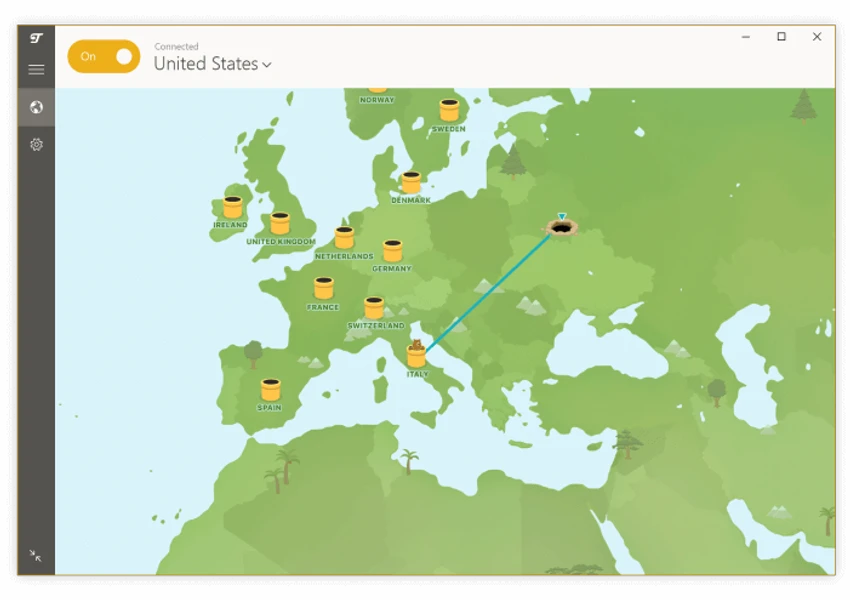
TunnelBear is clearly designed with simplicity in mind. From the moment I launched the application, the interface felt welcoming and uncomplicated. Connecting to a VPN server requires only a few clicks, making it an excellent option for users who may be unfamiliar with VPN technology. Selecting a server location is straightforward, and the connection process is quick and intuitive. Rather than exposing advanced networking settings, the application emphasizes ease of use, allowing users to focus on secure browsing instead of configuration. The built-in tracker statistics also provide useful insight into how many tracking elements are encountered during browsing, giving users a better understanding of their online privacy.

Who Should Use TunnelBear?

  • VPN beginners
  • Users seeking anonymous web browsing
  • Travelers using public Wi-Fi networks
  • People who want to mask their IP address
  • Users looking for a simple VPN without complicated configuration
  • Anyone who needs occasional encrypted internet access

Conclusion

TunnelBear succeeds by making VPN technology approachable for everyday users. Its clean interface, encrypted connections, and IP masking capabilities provide an easy way to improve online privacy without requiring technical expertise.

Pros & Cons

✓

Pros

  • Very easy to use
  • Encrypts internet traffic
  • Masks your IP address
  • Beginner-friendly interface
  • Multiple virtual server locations
  • Displays blocked tracker statistics
  • Suitable for improving privacy on public networks
✕

Cons

  • Free plan is limited to 500 MB of data per month
  • Advanced configuration options are limited
  • Heavy users may quickly exceed the free data allowance

Frequently Asked Questions

What is TunnelBear used for?

TunnelBear is a VPN application that encrypts your internet connection and masks your IP address to help improve online privacy and protect your data while browsing.

Is TunnelBear free?

Yes. TunnelBear offers a free plan that includes 500 MB of VPN data per month. Additional usage requires a paid subscription.

Does TunnelBear hide my IP address?

Yes. When connected to TunnelBear, your internet traffic is routed through a VPN server, replacing your visible IP address with one associated with the selected server location.

Is TunnelBear suitable for public Wi-Fi?

Yes. Encrypting your internet traffic can help reduce the risk of unauthorized interception when using public or unsecured Wi-Fi networks.

Can I choose a VPN server location?

Yes. TunnelBear allows you to select from available VPN server locations, enabling your connection to appear as though it originates from the chosen location.

Does TunnelBear block online trackers?

TunnelBear displays statistics about trackers encountered and blocked during your browsing sessions, including analytics, advertising trackers, scripts, and certain social media tracking elements.

Recommended apps [Freeware]:
  • Vektorrazor 2.2 Vektorrazor logo converts logos and image sources into clean, CAD-friendly vector contours for technical workflows
  • Prime95 31.06 Build 1 Prime95 logo CPU stress testing tool used for overclocking stability checks and Mersenne prime number calculations
  • TinyWall 3.5.1 TinyWall logo a lightweight Windows firewall manager offering simple controls, blocking rules, and zero ads
  • Krita 6.0.2.1 Krita logo a free digital painting software for artists, offering advanced brushes, layers, and professional drawing tools
  • HP Easy Start 17.5.11 HP Easy Start logo Install and configure HP printer drivers easily with automatic device detection, network support, and streamlined setup tools.
  • Fire Toolbox 45.1 Fire Toolbox logo Customize Amazon Fire tablets with tools for app management, interface changes, backups, troubleshooting, and Android feature support.
Recommended apps [Shareware]:
  • Topaz Photo 1.6.1 Topaz Photo logo advanced AI to sharpen photos, remove noise, and enhance image quality with ease
  • Driver Easy 7.1.3.5200 Driver Easy logo Windows utility for scanning, updating, and managing hardware drivers with offline support
  • Advanced ETL Processor Professional 6.5.1.5 Advanced ETL Processor Professional logo a powerful ETL tool for database automation and data integration
  • Easy Duplicate Finder 8.1.0.1 Easy Duplicate Finder logo Find and remove duplicate files quickly with advanced scanning, file management tools, and safe deletion options.
  • Actual Installer 10.8 Actual Installer logo Create reliable Windows installers quickly with a form-based setup tool supporting shortcuts, registry edits, prerequisites, and uninstall options.
  • WinTools.one 26.7.1 WinTools.one logo Maintain and optimize your PC with powerful cleanup, diagnostic, registry, file management, and system tweaking tools.