


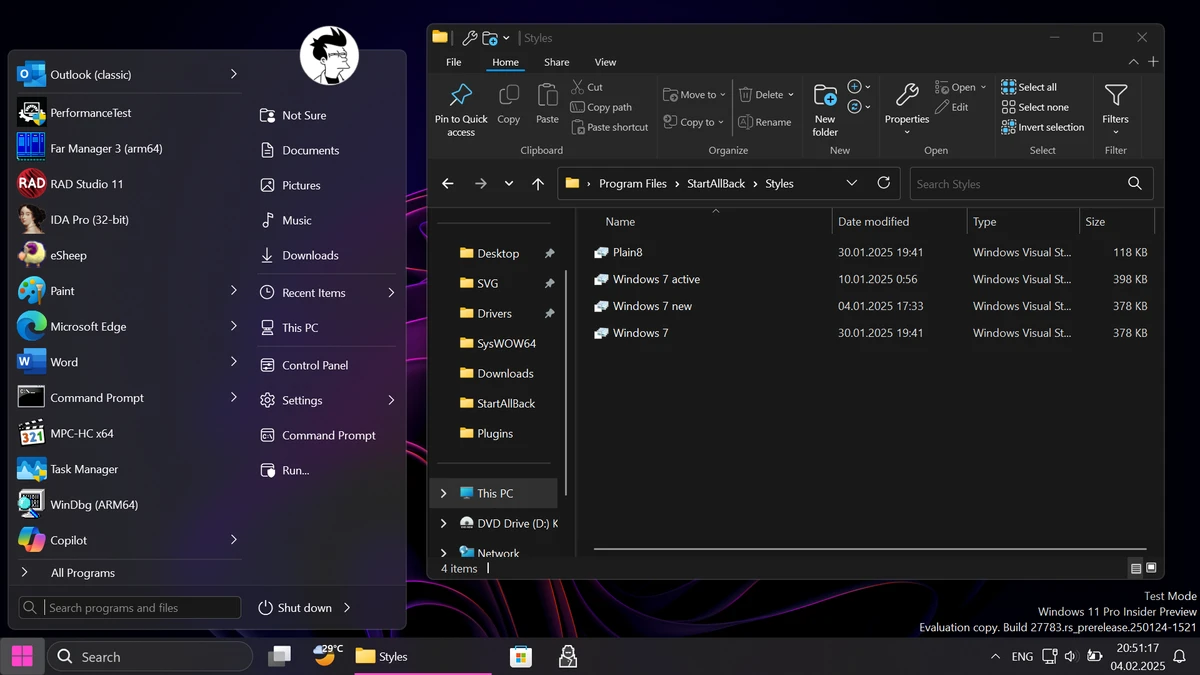

StartAllBack is a Windows 11 customization utility designed to restore and enhance familiar Windows interface elements while improving usability and consistency. The software focuses on bringing back classic desktop experiences inspired by Windows 7 and Windows 10 while keeping compatibility with the modern Windows 11 environment.
The application allows users to customize the taskbar, Start menu, File Explorer interface, and context menus. It provides options to adjust taskbar placement, icon appearance, menu layouts, and other visual elements that were changed in Windows 11. Users can move the taskbar to different screen edges, display icon labels, modify icon sizes and spacing, and maintain a more traditional desktop workflow.
StartAllBack also improves File Explorer by restoring familiar interface components, including a redesigned ribbon and command bar, a bottom details pane, an older-style search box, and expanded dark mode support for additional dialogs. The software also updates context menus with a refreshed appearance, improved responsiveness, and better touch support.
Designed as a lightweight interface enhancement tool, StartAllBack aims to provide greater control over the Windows 11 experience without requiring major system modifications. It supports Windows 11 systems and is intended for users who prefer a more classic and customizable desktop environment.
Features of StartAllBack
- Restores and improves the Windows 11 taskbar experience
- Displays labels on task icons
- Adjusts taskbar icon sizes and spacing
- Allows taskbar placement on the top, left, or right edges of the screen
- Supports dragging and dropping items onto the taskbar
- Keeps the Start button on the left while centering task icons
- Provides customizable taskbar segments and translucency effects
- Restores and improves File Explorer features
- Includes redesigned ribbon and command bar elements
- Adds a bottom details pane in File Explorer
- Provides a classic-style search box
- Supports dark mode for more dialogs
- Improves Windows context menus with updated styling
- Offers Windows 7, Windows 10, and third-party interface styles
- Helps improve UI consistency across Win32 applications
- Allows Windows app interface color customization
- Designed to use fewer resources and processes
Interface and Usability
StartAllBack focuses on making Windows 11 feel more familiar for users who prefer previous Windows interface designs. The software integrates directly with the desktop environment and provides customization options for commonly used areas such as the taskbar, Start menu, File Explorer, and context menus.
The available settings allow users to adjust the appearance and behavior of interface elements without changing their everyday workflow. Features such as taskbar positioning, icon adjustments, classic menu layouts, and improved File Explorer options provide more flexibility compared with the default Windows 11 interface.
The software is designed for users who want more control over the operating system’s appearance while maintaining a lightweight approach. Its focus on interface improvements makes it accessible for users familiar with Windows customization tools.
Who Should Use StartAllBack?
- Windows 11 users who prefer a classic Windows interface
- Users who want more control over taskbar and Start menu appearance
- People who miss Windows 7 or Windows 10-style desktop layouts
- Users looking to improve Windows interface consistency
- Anyone seeking additional File Explorer and context menu customization options
Conclusion
StartAllBack is a practical solution for Windows 11 users who want a more traditional desktop experience. With customization options for the taskbar, Start menu, File Explorer, and context menus, it provides greater control over the Windows interface while keeping the system experience familiar.


