Valentina Studio logo

Valentina Studio 17.5

  • User Rating:
    ★★★★★
    ★★★★★
    0.0 0Votes
  • Requirements:
    Windows
  • Version: 17.5
  • Latest updated: 1 day ago
  • License: Freeware  
  • Publisher: Paradigma Software
  • Size: 74.6 MB
×

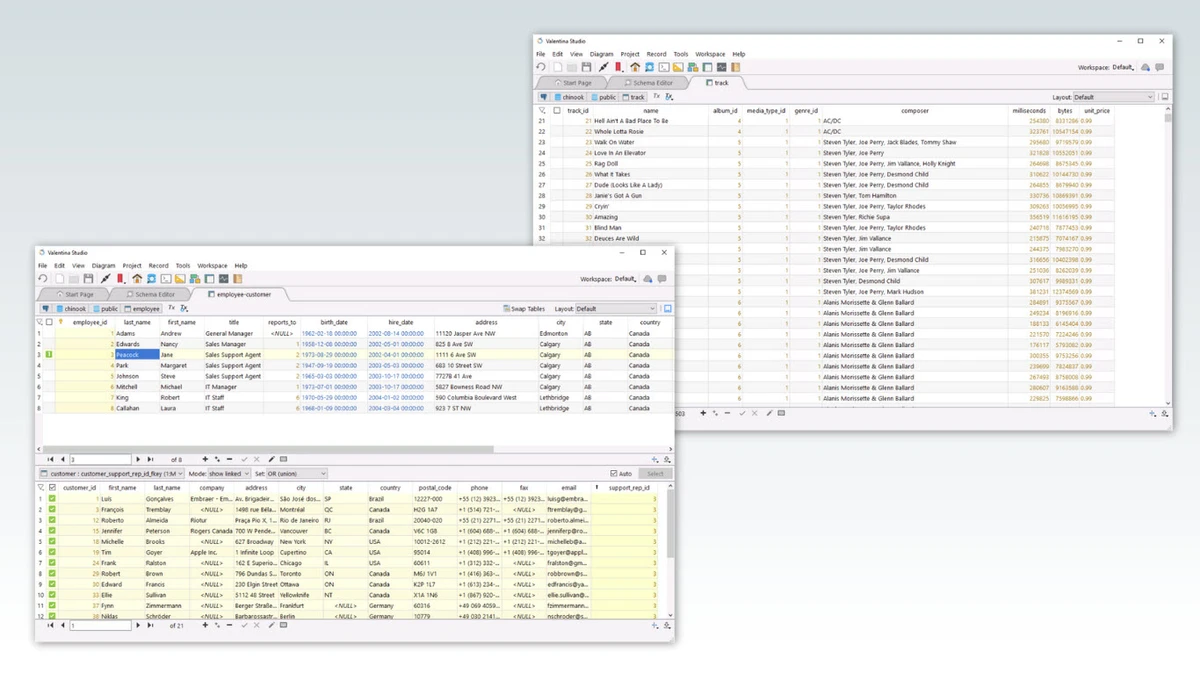
Valentina Studio is a cross-platform database management and development tool designed for developers, database administrators, and data professionals. It supports both SQL and NoSQL databases, offering a wide range of features for designing schemas, managing data, executing queries, and administering database servers in a single environment.

Valentina Studio provides a unified interface for working with multiple database systems, including MySQL/MariaDB, PostgreSQL, SQLite, Microsoft SQL Server, MongoDB, DuckDB, and ValentinaDB. It is built for professionals who need both visual and code-based tools to manage complex database structures. The software includes tools for schema design, SQL editing, server administration, data visualization, and reporting. It also extends into advanced functionality such as diagram-based database design, query optimization, and cross-database data transfer. Available on Windows, macOS, and Linux, it is positioned as a full-featured database environment suitable for both learning and enterprise-level workflows.

Features of Valentina Studio

  • Cross-platform database management (Windows, macOS, Linux)
  • Supports SQL and NoSQL databases (MySQL, PostgreSQL, MongoDB, SQLite, etc.)
  • Visual diagram editor for database design
  • Schema editor for tables, views, indexes, triggers, and procedures
  • Advanced SQL editor with auto-completion and syntax highlighting
  • Data editor with inline editing, filtering, and binary preview support
  • Server administration tools (users, privileges, logs, diagnostics)
  • Related data navigation with linked record management
  • Report creation and reporting tools (Valentina Reports integration)
  • Form designer for building data-driven interfaces
  • Data import/export (CSV, Excel, JSON, SQL)
  • Database synchronization and schema comparison tools
  • Cloud sync support (Google Cloud, iCloud, Dropbox)
  • AI-assisted SQL editor features (Studio AI in newer versions)
  • Backup, dump, and database migration utilities

Who Should Use Valentina Studio?

  • Database administrators (DBAs) managing multiple systems
  • Developers working with SQL and NoSQL databases
  • Data architects designing complex schemas
  • Students learning database structure and queries
  • Professionals needing cross-platform database tools

Conclusion

Valentina Studio is a comprehensive database management solution that combines visual design tools, SQL editing, and administrative features in one platform. Its flexibility and broad database support make it a strong choice for professionals who work across multiple database environments.

Pros & Cons

Pros

    • Supports a wide range of SQL and NoSQL databases
    • Strong visual schema and diagram tools
    • Feature-rich SQL editor with AI assistance
    • Cross-platform support (Windows, macOS, Linux)
    • Advanced reporting and form design capabilities
    • Includes data migration and synchronization tools

Cons

    • Steep learning curve for beginners
    • Feature-rich interface may feel complex
    • Advanced tools may require time to master
    • Some features depend on additional components or editions

Frequently Asked Questions

What is Valentina Studio used for?

Valentina Studio is used for managing, designing, and querying SQL and NoSQL databases across multiple platforms.

Does Valentina Studio support MongoDB?

Yes, it supports MongoDB along with other databases like MySQL, PostgreSQL, SQLite, and SQL Server.

Is Valentina Studio free?

It offers a free version with core features, while advanced functionality is available in Pro editions.

Can I design databases visually?

Yes, it includes a diagram editor and schema tools for visual database design.

Does Valentina Studio work on Mac and Linux?

Yes, it is available on Windows, macOS, and Linux systems.

Recommended apps [Freeware]:
  • Trillian 6.6 Build 15 Trillian logo all-in-one chat software designed to simplify online communication
  • HWMonitor 1.64 HWMonitor logo a free system tool that monitors CPU, GPU, voltages, temperatures, and fan speeds in real time.
  • FastCopy 5.11.3 FastCopy logo a lightweight Windows tool for ultra-fast file copying, syncing, and error-resilient data transfer
  • Easy Gamer Utility 1.3.106 Easy Gamer Utility logo a Windows tool that optimizes gaming performance, clears cache, and fixes common game issues.
  • OCCT 16.1.11.99 OCCT logo hardware monitoring and stress testing tool for CPU, GPU, memory, and power supply performance analysis.
  • BitTorrent 7.11.0.47255 BitTorrent logo peer-to-peer file sharing client for fast, decentralized downloads with bandwidth control and resume support
Recommended apps [Shareware]:
  • Audio Transcoder 2.12.24 Audio Transcoder logo all-in-one audio converter and CD ripper supporting MP3, FLAC, AAC, WMA, and more
  • Coolutils Print Maestro 4.2.0.0 Coolutils Print Maestro logo print folder contents, export directory trees, and generate detailed file reports quickly
  • iBackup Viewer 4.3.14.2 iBackup Viewer logo extract contacts, messages, photos, and app data from iPhone backups
  • Internet Download Manager (IDM) 6.42 Build 64 Internet Download Manager (IDM) logo boosts download speeds up to 5x, schedules downloads, and supports all major browsers and protocols
  • Adobe After Effects 2026 Adobe After Effects logo advanced motion graphics, visual effects, compositing, and animation tools for creators.
  • Secret Disk 2026 v323 Secret Disk logo create hidden, password-protected virtual drives to securely store private files on Windows