


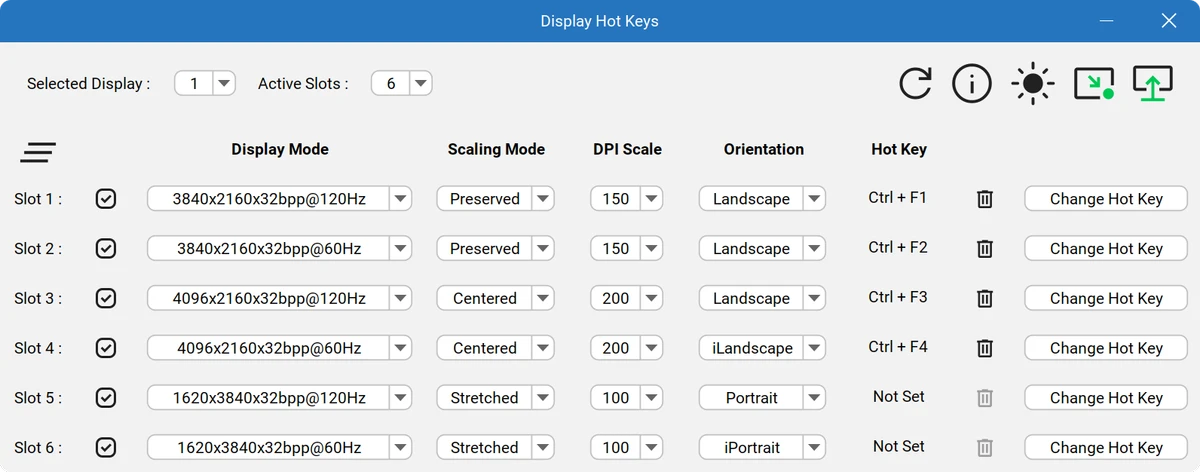

Display Hot Keys is a lightweight Windows utility designed to make switching between different display settings faster and more convenient. Instead of manually opening Windows display menus and adjusting settings each time, users can create custom hotkeys that instantly apply predefined display modes.
The application is designed for users who frequently change monitor configurations depending on their activity. For example, gamers may prefer different display settings compared with users watching videos or working with various types of content. Display Hot Keys simplifies this process by allowing users to assign keyboard shortcuts to specific display profiles.
Each monitor can have up to 12 customizable hotkey slots. Every slot can store a display mode with settings such as screen resolution, color bit depth, refresh rate, scaling mode, and DPI. Once configured, users can quickly switch between these saved modes by pressing the assigned hotkey.
Display Hot Keys also supports multi-monitor setups, allowing users to configure and manage display modes across multiple screens. This makes it useful for people who regularly work with different monitor arrangements or need fast transitions between display configurations. With its straightforward approach and focus on accessibility, Display Hot Keys provides a practical way to manage display settings without repeatedly navigating through system menus.
Features of Display Hot Keys
- Create custom hotkeys for switching display settings
- Quickly change between saved display modes
- Supports up to 12 hotkey slots per monitor
- Customize resolution, bit depth, refresh rate, scaling mode, and DPI
- Works with multi-monitor configurations
- Helps optimize display settings for gaming, video playback, and productivity
- Reduces the need to manually navigate Windows display settings
- Provides a simple way to manage multiple display profiles
Interface and Usability
Display Hot Keys focuses on efficiency rather than complexity. The main advantage of the application is the ability to access frequently used display configurations through keyboard shortcuts instead of manually adjusting settings.
Setting up profiles allows users to create different display modes for specific tasks. Once hotkeys are assigned, switching between configurations becomes a quick process. This approach is especially convenient for users who frequently change refresh rates, resolutions, or scaling settings.
The software is also designed with multi-monitor users in mind. Managing different display modes across several screens can normally require multiple steps, but Display Hot Keys provides a more direct method for applying preferred configurations. The learning curve is relatively simple, making the tool accessible for users who want more control over their display settings without dealing with complicated configuration processes.
Who Should Use Display Hot Keys?
- Gamers who switch between different monitor settings
- Users with multiple display configurations
- People who frequently adjust refresh rates or resolutions
- Professionals who use different display modes for different tasks
- Multi-monitor users who want faster configuration switching
Conclusion
Display Hot Keys provides a simple and effective way to manage changing display configurations through customizable keyboard shortcuts. Its support for multiple monitors, saved display profiles, and detailed display options makes it a useful utility for users who need frequent access to different screen settings.


