Sequence Generator Pro logo

Sequence Generator Pro 4.5.0.1649

  • User Rating:
    ★★★★★
    ★★★★★
    0.0 0Votes
  • Requirements:
    Windows
  • Version: 4.5.0.1649
  • Latest updated: 1 day ago
  • License: Free Trial  
  • Publisher: Sequence Software
  • Size: 66 MB
×

Sequence Generator Pro is a Windows-based astrophotography capture suite designed to automate complex imaging workflows. It focuses on helping users coordinate telescopes, cameras, filters, and focus systems through structured sequencing, reducing manual intervention during long imaging sessions under the night sky.

Overview

Sequence Generator Pro is built for astrophotographers who need reliable automation for deep-sky imaging sessions. The software allows users to create and manage detailed capture sequences involving different types of frames such as light, dark, bias, and flat frames. Its core idea is to simplify the complexity of managing multiple astronomy devices while enabling long, unattended imaging runs. From equipment coordination to autofocus routines and automated mount operations, it is designed to keep imaging sessions running smoothly with minimal user input.

Features of Sequence Generator Pro

  • Powerful sequencing engine for coordinating cameras, telescopes, filters, and focus controllers
  • Support for multiple frame types: light, dark, bias, and flat frames
  • Equipment profile manager for saving and reusing hardware configurations
  • Automated focusing system with temperature-based adjustments
  • Meridian flip automation with guiding pause and resume
  • Flexible focusing patterns based on time, temperature, or frame intervals
  • Target framing and auto-centering tools for accurate object positioning
  • Mosaic planning tool for creating multi-frame imaging projects (add-on module)
  • Built-in calibration and flat frame creation tools
  • Dithering support compatible with multiple autoguiding tools (PHD, Astroart, MetaGuide)
  • Customizable user interface with modular layout support
  • Temperature management features including cool down and warm up routines
  • Extensive documentation and instructional resources

User Experience

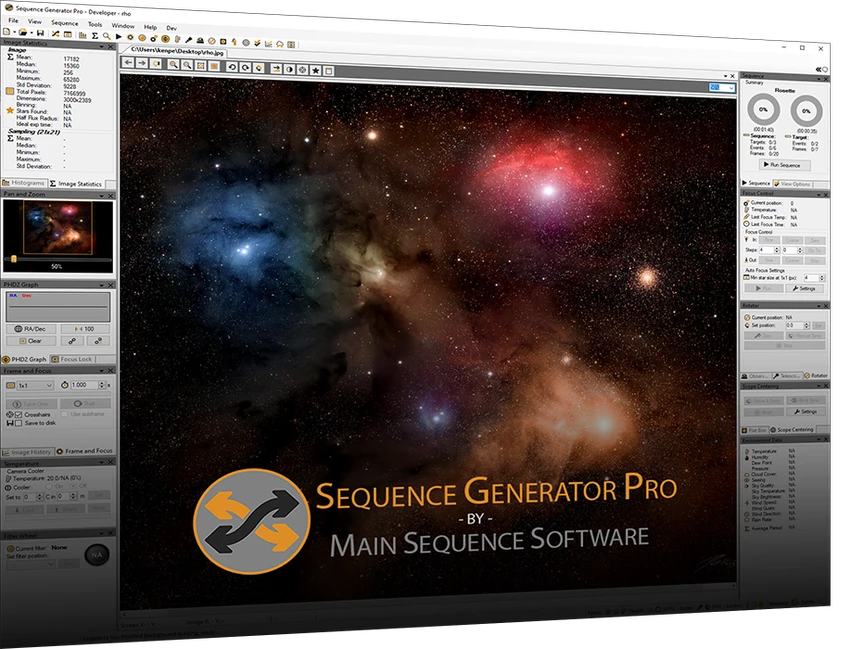
Using Sequence Generator Pro feels like working with a dedicated control center for astrophotography sessions. The interface is structured around modular tools, allowing users to arrange panels for guiding, imaging, and temperature control based on personal workflow preferences.

The sequencing system is the core experience. Once configured, users can run long imaging sessions with minimal interaction, relying on automation for focus adjustments, mount flips, and frame capture. Features like auto-centering and equipment profiles help reduce repetitive setup tasks, especially for multi-night projects.

Who Should Use Sequence Generator Pro?

Sequence Generator Pro is best suited for astrophotography enthusiasts and advanced users who regularly work with telescopes, CCD or DSLR cameras, and guiding systems. It is particularly valuable for users running long, unattended deep-sky imaging sessions or multi-night projects that require precise automation and repeatable setups.

Conclusion

Sequence Generator Pro delivers a robust and highly automated solution for managing astrophotography sessions on Windows. If you work with complex imaging setups and need reliable sequencing, focus control, and equipment coordination, it is a strong candidate worth considering.

Pros & Cons

Pros

    • Highly detailed automation for astrophotography workflows
    • Strong support for multiple imaging devices and configurations
    • Advanced sequencing and framing tools
    • Reliable autofocus and meridian flip automation
    • Flexible and customizable interface

Cons

    • Requires familiarity with astrophotography equipment
    • Can feel complex for beginners
    • No provided built-in rating or community score in the data

Frequently Asked Questions

What is Sequence Generator Pro used for?

Sequence Generator Pro is used to automate astrophotography imaging sessions, including camera control, telescope coordination, and frame sequencing.

Does it support automated focusing?

Yes, it includes an autofocus system that adjusts based on imaging conditions and temperature changes.

Can it handle long imaging sessions?

Yes, it is designed specifically for long, unattended imaging sequences with automation features like meridian flips and frame scheduling.

Is it suitable for beginners?

It is more suited for users with some experience in astrophotography due to its advanced configuration and hardware integration requirements.

Recommended apps [Freeware]:
  • WinScan2PDF 9.77 WinScan2PDF logo scan documents and save them as PDFs or JPEGs with minimal setup and low CPU usage.
  • StaxRip 2.52.4 StaxRip logo powerful Windows GUI for video/audio encoding using FFmpeg, x265, AviSynth+, VapourSynth, and more.
  • All in One Runtimes 2.5.0 All in One Runtimes logo Package essential Windows runtime environment packages to improve software compatibility and system stability.
  • UltraSearch 4.9.2.1208 UltraSearch logo locates files and folders on local NTFS drives in seconds without building an index. Fast, precise, and lightweight.
  • Android Studio 2026.1.1.9 Android Studio logo Google’s official IDE for Android, offering intelligent coding, fast emulators, and cloud integration.
  • Visual Studio Code 1.124.2 Visual Studio Code logo Free and powerful code editor from Microsoft with extensions, debugging, Git support, and multi-language development
Recommended apps [Shareware]:
  • iBackup Viewer 4.3.14.2 iBackup Viewer logo extract contacts, messages, photos, and app data from iPhone backups
  • Topaz Photo 1.6.1 Topaz Photo logo advanced AI to sharpen photos, remove noise, and enhance image quality with ease
  • COAA PlanePlotter 6.7.5.9 COAA PlanePlotter logo a Windows tool that decodes live aircraft data like ADS-B and ACARS and displays real-time radar-style tracking
  • Total Audio Converter 6.1.0.296 Total Audio Converter logo convert MP3, WAV, FLAC, AAC and more with batch processing, CD ripping, and Windows integration.
  • Total Excel Converter 7.1.0.126 Total Excel Converter logo convert Excel, ODS, CSV, DBF, and more into PDF, DOC, HTML, SQL, and other formats on Windows.
  • Fast Video Cataloger 10.0.4.0 Fast Video Cataloger logo Organize, search, browse, and manage large video collections with Fast Video Cataloger for Windows