Diffractor logo

Diffractor 126.3

  • User Rating:
    ★★★★★
    ★★★★★
    0.0 ★ 0Votes
  • Requirements:
    Windows
  • Version: 126.3
  • Latest updated: 3 weeks ago
  • License: Freeware  
  • Publisher: Diffractor
  • Size: 28 MB
× app stores

Diffractor is a lightweight media management tool designed to help users organize, view, and manage digital photos, videos, and audio files in one place. It focuses on simplifying large media collections by providing fast browsing, powerful metadata search, and easy sorting tools. Whether you're importing files from cameras, smartphones, or external drives, Diffractor helps you keep everything organized with support for multiple formats and metadata standards.

Features of Diffractor

  • View photos, play videos, and listen to audio files in one application.
  • Supports a wide range of file formats, including RAW images.
  • No additional codecs required.
  • Search using metadata such as EXIF, XMP, IPTC, and ID3 tags.
  • Filter and browse media by date, location, or file type.
  • Compare images and videos side-by-side.
  • Rate, tag, and flag media files for better organization.
  • Simple photo editing tools (resize, crop, rotate, color adjustments).
  • Automatically detect and track media files in your collection.
  • Sync media collections with NAS or network drives (two-way sync supported).
  • Supports importing from cameras, smartphones, and external storage devices.

User Experience

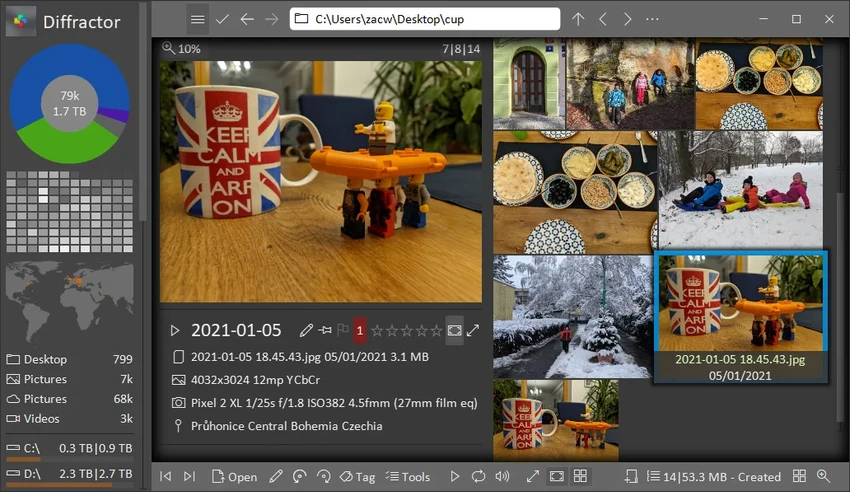
Diffractor offers a fast and efficient way to manage large media libraries without the complexity of heavy photo editing software. The interface is clean and focused, allowing users to quickly browse through thumbnails, view full-size images, and organize files using tags and ratings. One of its strongest features is metadata-based searching. Instead of manually sorting folders, users can locate images using attributes like date, location, or camera data, which is especially useful for photographers managing large archives.

Viewing media is smooth and responsive, with support for multiple formats including RAW images, which eliminates the need for external codecs or viewers. The ability to preview photos, videos, and audio files in one application adds to its convenience.

Basic editing tools are included for quick adjustments, such as cropping or resizing images, but the main strength of Diffractor lies in organization rather than advanced editing. The comparison feature is also helpful when sorting through similar images, making it easier to select the best shots and remove duplicates or low-quality files. Overall, Diffractor feels fast, lightweight, and purpose-built for managing large collections of media efficiently.

Who Should Use Diffractor?

  • Photographers managing large image libraries.
  • Users organizing videos and media archives.
  • People importing media from multiple devices.
  • Users who want fast media browsing without heavy software.
  • Anyone needing metadata-based search and organization.

Conclusion

Diffractor is a practical and lightweight media management tool that focuses on organization rather than editing. Its ability to handle large collections of photos and videos, combined with powerful metadata search and tagging features, makes it especially useful for photographers and digital content managers.

Pros & Cons

✓

Pros

  • Fast and lightweight media management tool.
  • Supports photos, videos, and audio in one app.
  • No extra codecs required.
  • Strong metadata search and filtering system.
  • Supports RAW image formats.
  • Easy tagging, rating, and organization tools.
  • Side-by-side media comparison feature.
  • Simple built-in editing tools.
  • Works well with large media libraries.
✕

Cons

  • Limited advanced photo editing features.
  • Interface is functional but not highly modern in design.
  • Best suited for organization rather than creative editing.

Frequently Asked Questions

What is Diffractor?

Diffractor is a media management tool for Windows that helps users organize, view, and manage photos, videos, and audio files.

Does Diffractor support RAW images?

Yes. Diffractor supports RAW image formats without requiring additional codecs.

Can I search files in Diffractor?

Yes. It supports advanced metadata search using EXIF, XMP, IPTC, ID3, and other standard metadata formats.

Does Diffractor include editing tools?

Yes, but only basic ones such as cropping, resizing, rotating, and simple color adjustments.

Can Diffractor handle large photo libraries?

Yes. It is designed to efficiently manage and browse large media collections with fast performance.

Does Diffractor support syncing files?

Yes. It can synchronize media collections with NAS or network drives, including two-way synchronization.

Recommended apps [Freeware]:
  • NirLauncher Package 1.30.24 NirLauncher Package logo a portable Windows utility suite with 180+ NirSoft tools for system, network, and recovery tasks
  • SSD Booster .NET 19.7 SSD Booster .NET logo a Windows tool designed to tweak system settings and optimize SSD performance with simple on/off controls
  • Dashlane 6.2626.1 Dashlane logo secure password manager that stores credentials, autofills forms, and enhances online security with encryption and alerts
  • ProgDVB 7.72.3 ProgDVB logo a multimedia player for watching digital TV, IPTV, satellite broadcasts, and online radio on Windows
  • Rufus 4.15 Rufus logo Create bootable USB drives quickly with Rufus, a lightweight Windows tool for installing OS, recovery, and firmware tasks
  • Cloudflare WARP 2026.6.850.0 Cloudflare WARP logo Browse faster and more securely with Cloudflare WARP, featuring encrypted connections, WireGuard technology, and Zero Trust support
Recommended apps [Shareware]:
  • VueScan 9.8.56 VueScan logo Enhance scanner functionality with advanced tools for scanning documents, photos, videos, and slides.
  • Start11 2.7.3 Start11 logo Windows customization tool that restores classic Start Menu styles and enhances taskbar functionality on Windows 10 and 11
  • GlassWire 3.9.1102 GlassWire logo monitors network activity, alerts you to suspicious internet behavior, tracks bandwidth usage, and helps protect your privacy and security
  • Beyond Compare 5.2.3.32296 Beyond Compare logo compare, merge, and sync files easily with Beyond Compare, a powerful cross-platform tool
  • Elcomsoft Forensic Disk Decryptor 2.21.1036 Elcomsoft Forensic Disk Decryptor logo Access and analyze encrypted BitLocker, FileVault, VeraCrypt, and TrueCrypt disks with forensic-grade decryption tools
  • QILING Disk Master Professional 8.8 QILING Disk Master Professional logo a backup and recovery tool for Windows offering system imaging, restore, and disk management