Xreveal logo

Xreveal 2.9.9

  • User Rating:
    ★★★★★
    ★★★★★
    0.0 ★ 0Votes
  • Requirements:
    Windows
  • Version: 2.9.9
  • Latest updated: 3 days ago
  • License: Freeware  
  • Publisher: Xreveal Project
  • Size: 3 MB
× app stores

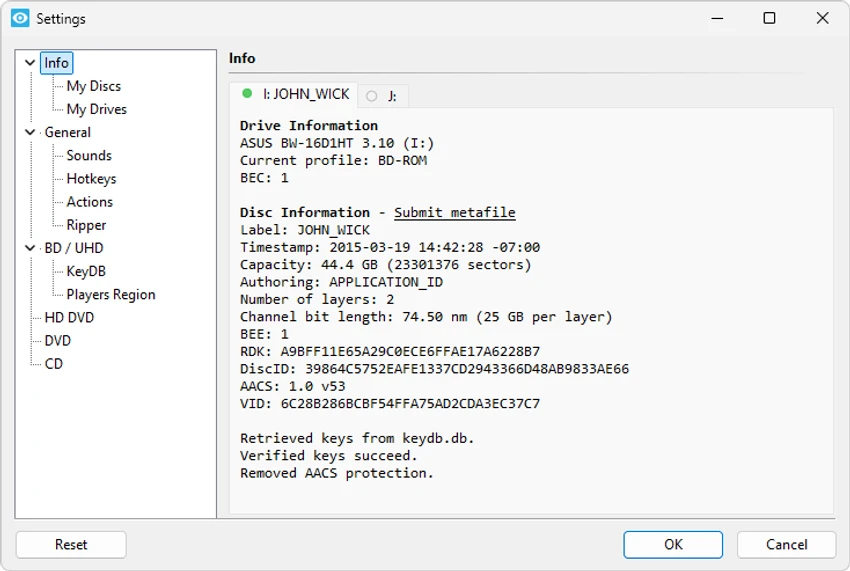
Xreveal is a lightweight optical disc decryption utility designed to work with supported Blu-ray, UHD Blu-ray, DVD, and CD media. Built as a research project focused on interoperability, it relies on the official public AACS specification and works in conjunction with an external decryption key database to access protected content. Unlike some commercial solutions, Xreveal does not include decryption keys or BD+ conversion tables. Instead, users must provide the required AACS decryption keys and BD+ FUT data separately for supported discs.

Once properly configured, Xreveal can remove supported disc protections through a straightforward interface, making it useful for users who need to access or back up media they are legally entitled to use.

Features of Xreveal

  • Removes Blu-ray AACS 1.0 protection
  • Removes Blu-ray AACS 2.0 (UHD) protection
  • Removes BD+ protection
  • Removes BDAV protection
  • Removes DVD CSS protection
  • Removes CPRM protection
  • Removes CPPM protection
  • Removes CD Digital Audio (CDDA) protection
  • Offline decryption after required keys are available
  • Lightweight interface
  • Based on the official public AACS specification
  • Requires external AACS decryption keys and BD+ FUT data

Interface and Usability

Xreveal focuses on simplicity rather than offering a large collection of configuration options. Once the required decryption keys and related data are available, the application provides a straightforward workflow for processing supported optical media. Because the software intentionally does not bundle the necessary key database, initial setup may require additional effort compared to commercial alternatives. Users should understand the application's requirements before expecting it to function with protected discs. Overall, the interface remains clean and lightweight, making day-to-day use relatively uncomplicated once properly configured.

Who Should Use Xreveal?

  • Advanced users
  • Optical media enthusiasts
  • IT professionals
  • Home media archivists
  • Users managing personal Blu-ray and DVD collections
  • Anyone needing interoperability with supported optical media in accordance with applicable laws

Conclusion

Xreveal offers a focused approach to optical disc decryption by supporting a variety of Blu-ray, UHD Blu-ray, DVD, and CD protection technologies while remaining lightweight and easy to operate after configuration. Its reliance on the official AACS specification and external key databases reflects its interoperability-oriented design rather than an all-in-one commercial solution.

Pros & Cons

✓

Pros

  • Lightweight application
  • Supports multiple optical disc protection formats
  • Offline decryption capability
  • Simple interface
  • Based on the official public AACS specification
  • Useful for legitimate disc access and archival workflows
✕

Cons

  • Does not include required decryption keys
  • Requires external AACS keys and BD+ data
  • Initial setup may be challenging for new users
  • Limited to supported protection schemes

Frequently Asked Questions

What is Xreveal used for?

Xreveal is an optical disc decryption utility that supports the removal of several protection technologies used on compatible Blu-ray, UHD Blu-ray, DVD, and CD media, enabling access to supported discs when properly configured.

Does Xreveal include decryption keys?

No. Xreveal does not include AACS decryption keys or BD+ conversion tables. Users must supply the required external key data for supported discs.

Which protection formats does Xreveal support?

Xreveal supports multiple protection technologies, including Blu-ray AACS 1.0, AACS 2.0 (UHD), BD+, BDAV, DVD CSS, CPRM, CPPM, and CD Digital Audio (CDDA) protection.

Does Xreveal require an internet connection?

No. Once the required decryption keys and related data are available, Xreveal can perform decryption without requiring a network connection.

Is Xreveal easy to use?

The application's interface is straightforward, but the initial setup may require additional configuration because users must provide the necessary decryption keys separately.

What can Xreveal be used for?

Xreveal can be used to access compatible optical media and facilitate legitimate interoperability or personal archival workflows, subject to the laws and regulations that apply in your jurisdiction.

Recommended apps [Freeware]:
  • iTop Easy Desktop 4.4.0.348 iTop Easy Desktop logo declutter, organize, and manage Windows desktop items efficiently and quickly
  • Edge Remover 2.7 Edge Remover logo a lightweight Windows tool designed to uninstall Microsoft Edge Chromium and UWP versions
  • Windows 11 Debloater 2.1.3 Windows 11 Debloater logo remove unwanted features, adjust privacy settings, and personalize Windows 11
  • Minimal Image Viewer 2.0.3 Minimal Image Viewer logo A lightweight Windows image viewer with fast startup, wide format support, GPU rendering, and portable privacy-focused design.
  • Intel Ethernet Adapter Complete Driver Pack 31.2.2 Intel Ethernet Adapter Complete Driver Pack logo Install and update Intel Ethernet drivers for supported network adapters with a complete collection for Windows, Linux, and FreeBSD.
  • cPicture LE 4.14 cPicture LE logo Manage, browse, crop, search, and process digital photos with a lightweight image workflow application supporting plugins and JPEG tools.
Recommended apps [Shareware]:
  • DiskBoss 17.0.14 DiskBoss logo powerful Windows file management tool for disk analysis, duplicate cleanup, file synchronization, and data migration
  • Ableton Live 12.4.2 Ableton Live logo a professional DAW for music production, MIDI editing, recording, and live performance
  • PDQ Deploy 20.0.20.0 PDQ Deploy logo Deploy software and Windows updates across multiple PCs with PDQ Deploy using automated scheduling and silent installations
  • Microsoft Office 2606 Build 20131.20112 Microsoft Office logo Create documents, spreadsheets, presentations, and emails with Microsoft Office, the industry-standard productivity suite
  • Cyber Privacy Suite 4.5.5 Cyber Privacy Suite logo protect privacy with VPN, tracking protection, encryption, and real-time security tools for Windows users
  • Apowersoft Video Download Capture 6.6.4.0 Apowersoft Video Download Capture logo Download, record, convert, and edit online videos with a versatile tool supporting multiple formats, resolutions, and streaming sources.