GiliSoft Movie DVD Creator logo

GiliSoft Movie DVD Creator 10.9

  • User Rating:
    ★★★★★
    ★★★★★
    0.0 ★ 0Votes
  • Requirements:
    Windows
  • Version: 10.9
  • Latest updated: 3 weeks ago
  • License: Free Trial  
  • Publisher: GiliSoft
  • Size: 253 MB
× app stores

GiliSoft Movie DVD Creator is a Windows-based DVD authoring tool designed for users who still rely on disc-based video delivery or archival formats. It allows you to convert common video files into playable DVD structures with menus, chapters, and navigation features. The software focuses on making DVDs, ISO images, or VIDEO_TS folders that can be played on standard DVD players or stored for later burning, making it useful for both personal and professional media projects.

Overview

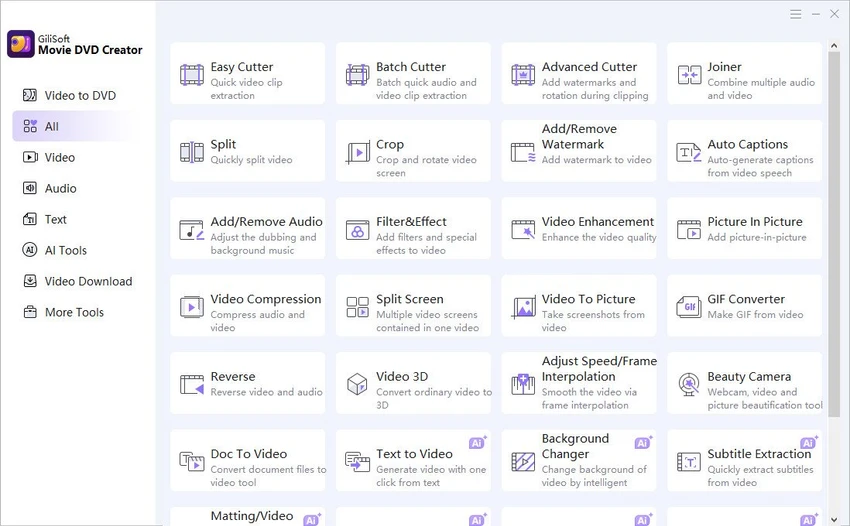
GiliSoft Movie DVD Creator combines DVD authoring and basic video preparation tools in one workflow. Instead of simply burning files to a disc, it builds a structured DVD project with menus, chapter navigation, subtitle support, and simple editing options like trimming and cropping. It supports a wide range of video formats and allows users to export their projects as physical DVDs, ISO files, or DVD folders. This flexibility makes it suitable for users who need both physical distribution and digital archiving.

Features of GiliSoft Movie DVD Creator

  • Supports common video formats including MP4, MOV, AVI, MKV, WMV, and more
  • DVD menu templates with customizable backgrounds, titles, and chapter buttons
  • Create DVD discs, ISO images, or VIDEO_TS folder outputs
  • Basic editing tools such as trim, crop, brightness, contrast, and saturation adjustments
  • Subtitle loading and simple text/title overlays
  • Watermark support for branding or identification
  • Chapter creation for structured DVD navigation
  • PAL and NTSC output standards for regional compatibility
  • Burn to multiple DVD formats including DVD-R, DVD+R, DVD-RW, and dual-layer discs
  • Combine videos, photos, and background music into a single DVD project
  • Preview function before final burning

User Experience

From a workflow perspective, the software is organized around a traditional DVD authoring process. Users typically start by importing media, then move into menu customization and chapter setup before exporting to disc, ISO, or folder format. The interface is functional and task-driven, focusing more on structured DVD creation than modern video editing timelines. Basic video adjustments like trimming and cropping are included, but the main strength lies in assembling playable DVD projects with navigation menus. For users familiar with DVD burning workflows, the process feels straightforward and predictable, especially when preparing content for standalone DVD players or archival storage.

Who Should Use GiliSoft Movie DVD Creator?

  • People creating family video discs or event collections
  • Schools or trainers preparing physical course materials
  • Businesses delivering offline video presentations
  • Users archiving videos in ISO or DVD folder formats
  • Anyone needing structured DVD menus and chapter navigation

Conclusion

GiliSoft Movie DVD Creator is a practical solution for users who still rely on DVDs for video distribution or archiving. With support for menus, chapters, subtitles, and multiple output formats, it covers the essential needs of DVD authoring without unnecessary complexity.

Pros & Cons

✓

Pros

  • Supports a wide range of video formats
  • Offers DVD menus and chapter navigation
  • Multiple output options (disc, ISO, folder)
  • Includes basic editing tools like trim and crop
  • Supports PAL and NTSC standards
✕

Cons

  • Focused on DVD workflows rather than modern digital formats
  • Editing tools are basic and not suitable for advanced video production
  • Requires physical disc knowledge for full use cases

Frequently Asked Questions

Can GiliSoft Movie DVD Creator burn videos directly to DVD?

Yes, it can burn video projects directly to DVD discs, as well as export ISO images or VIDEO_TS folders.

Does it support subtitle files?

Yes, the software allows users to load subtitles into DVD projects before burning.

Can I create DVD menus with this software?

Yes, it includes DVD menu templates and allows customization of backgrounds, titles, and chapter buttons.

What output formats are available?

You can export projects as DVD discs, ISO images, or VIDEO_TS folders.

Is it suitable for professional video editing?

It is mainly designed for DVD authoring, not advanced video editing or post-production work.

Recommended apps [Freeware]:
  • SoundSwitch 7.1.0 / 7.1.1 Beta 1 SoundSwitch logo a lightweight Windows tool that lets you switch audio devices instantly using customizable hotkeys
  • OcenAudio 3.20.0 OcenAudio logo a fast and easy-to-use audio editor with real-time effects, spectrogram analysis, and VST plugin support
  • Don't Sleep 10.22 Don't Sleep logo prevent sleep, restart, or hibernation with a lightweight Windows power control utility
  • Kali Linux 2026.2 Kali Linux logo a powerful penetration testing OS with tools for cybersecurity, digital forensics, and ethical hacking
  • FanControl v271 FanControl logo manages CPU and GPU fans with custom curves, temperature sensors, profiles, and advanced cooling controls
  • Telegram 7.0.2 Telegram logo Securely chat, share files, join large communities, and stay connected across devices with a feature-rich cloud messaging platform.
Recommended apps [Shareware]:
  • CloudMounter 3.7.2137 CloudMounter logo mounts cloud storage and remote servers like local drives for easy file access and management on Windows
  • Pdf995 26.1 Pdf995 logo Create high-quality PDF files from any application with Pdf995 Printer Driver using a lightweight virtual printer
  • WYSIWYG Web Builder 21.1.1 WYSIWYG Web Builder logo create responsive websites visually with drag-and-drop tools and automatic HTML generation
  • RecoveryTools zMigrator 26.6 RecoveryTools zMigrator logo Migrate Zimbra emails, contacts, and calendars to multiple formats
  • FTPie 2026.7.2 FTPie logo Manage FTP, cloud storage, and files easily with FTPie, featuring quick upload, sharing, and document editing tools
  • PerfectXL Compare 1.8.1 PerfectXL Compare logo analyzes Excel file differences, compares formulas, structures, and VBA changes for better version control