FileLegit Windows Utilities System Tools Quick Clipboard Editor
Quick Clipboard Editor logo

Quick Clipboard Editor 3.4.0.0

  • User Rating:
    ★★★★★
    ★★★★★
    0.0 0Votes
  • Requirements:
    Windows
  • Version: 3.4.0.0
  • Latest updated: 5 days ago
  • License: Freeware  
  • Publisher: Jean Lalonde
  • Size: 5 MB
× app stores

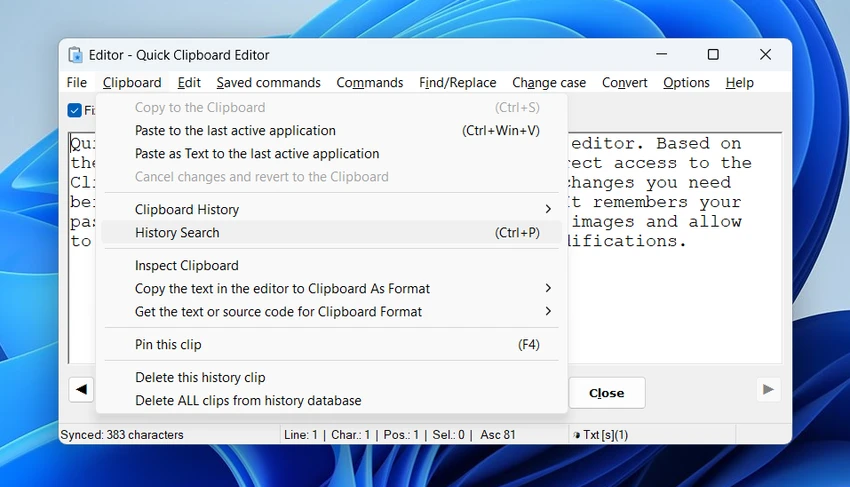
Quick Clipboard Editor (QCE) is a Windows utility designed to give users full control over clipboard content. Instead of simply copying and pasting text, QCE allows you to edit, transform, and manage clipboard data before it is inserted into another application.

It is especially useful for users who frequently work with text, code, or structured content and need quick editing tools without opening a full-featured text editor.

Key Features of Quick Clipboard Editor

  • Direct access to clipboard text for instant editing
  • Clipboard history access and retrieval of previous clips
  • Find and replace functionality for text editing
  • Insert or modify content on each line
  • Trim unwanted text sections
  • Keep or delete lines or characters based on rules
  • Sort text using different parameters
  • Change text case (uppercase, lowercase, and mixed formatting)
  • Convert text formats for HTML, XML, PHP, AHK, and other coding needs
  • Encode and decode Base64 text (including images)
  • Paste text as plain text or with original formatting
  • Paste content as keystrokes for form navigation
  • Distraction-free text editing window
  • Auto-indentation and coding-friendly editing tools
  • Pin frequently used clips for quick access via popup menu
  • Assign clipboard commands to hotkeys
  • Save and reuse clipboard transformation commands
  • Automate clipboard workflows via external applications
  • Save and load text files with encoding and line-ending options
  • Save or restore clipboard image data to disk
  • Backup and restore clipboard binary content

User Experience

During my experience with Quick Clipboard Editor, the most noticeable strength is how seamlessly it integrates with clipboard workflows. Instead of switching between multiple applications to clean up or adjust text, QCE allows direct editing of clipboard content before it is pasted anywhere else.

The clipboard history feature is particularly useful when working with multiple snippets at once. Being able to quickly retrieve previous clips saves time and reduces repetitive copying. Text transformation tools such as find-and-replace, case conversion, line filtering, and sorting make it easy to clean and structure content in seconds. These functions are especially helpful for writers, developers, and data-heavy workflows.

One of the more advanced capabilities is automation. Users can save clipboard transformation commands and trigger them using hotkeys or external tools, allowing repetitive tasks to be streamlined significantly. Support for encoding formats such as Base64, along with the ability to handle images and structured text formats, makes QCE more than just a basic clipboard viewer—it becomes a flexible text processing tool.

Who Should Use Quick Clipboard Editor?

  • Writers and editors working with frequent text revisions
  • Developers handling code snippets and structured data
  • Office users managing repetitive clipboard tasks
  • Power users who rely on clipboard history tools
  • Anyone needing advanced text transformation features

Conclusion

Quick Clipboard Editor enhances the standard clipboard experience by turning it into a fully functional text editing environment. With powerful transformation tools, clipboard history access, and automation support, it significantly improves productivity for users who work heavily with text.

Pros & Cons

Pros

  • Powerful clipboard editing capabilities
  • Supports clipboard history management
  • Wide range of text transformation tools
  • Useful automation and hotkey support
  • Handles text, code, and structured formats
  • Supports image and Base64 clipboard operations
  • Efficient workflow integration for productivity tasks
  • Reduces need for switching between applications

Cons

  • Feature-rich interface may feel complex for beginners
  • Primarily focused on text-heavy workflows
  • Windows-only utility

Frequently Asked Questions

What is Quick Clipboard Editor used for?

Quick Clipboard Editor is used to view, edit, and transform clipboard content before pasting it into applications.

Does it support clipboard history?

Yes. It allows users to access and reuse previous clipboard entries.

Can I format or modify text in the clipboard?

Yes. The tool includes features like find-and-replace, case conversion, sorting, trimming, and line editing.

Does it support automation?

Yes. Users can save clipboard transformation commands and trigger them using hotkeys or external applications.

Can it handle images in the clipboard?

Yes. It supports saving images from the clipboard and clipboard history, as well as encoding and decoding image data.

Is Quick Clipboard Editor suitable for developers?

Yes. It includes tools for code formatting, encoding, and structured text conversion, making it useful for development workflows.

What operating system does it support?

According to the provided information, Quick Clipboard Editor is designed for Windows systems.

Recommended apps [Freeware]:
  • Audacity 3.7.8 Audacity logo Free open-source audio editor and recorder with multi-track editing, effects, audio analysis, and format conversion
  • Automatic Email Processor 4.1.0 Automatic Email Processor logo Automatically save, archive, print, and process Outlook emails and attachments with customizable rules.
  • Cyberduck 9.5.0.45237 Cyberduck logo Manage FTP, SFTP, and cloud storage services like Google Drive, Dropbox, and Amazon S3 with Cyberduck for Windows
  • NanaZip 6.5.1750.0 NanaZip logo a modern file compression and extraction tool based on 7-Zip, offering strong encryption and wide format support
  • Digital Clock 5.2.2 Digital Clock logo customizable desktop clock app with skins, alarms, opacity control, and system tray support
  • Recuva 1.55.133 Recuva logo recover deleted files from PCs, USB drives, memory cards, and damaged or formatted disks
Recommended apps [Shareware]:
  • Topaz Photo 1.6.1 Topaz Photo logo advanced AI to sharpen photos, remove noise, and enhance image quality with ease
  • COAA PlanePlotter 6.7.6.3 COAA PlanePlotter logo a Windows tool that decodes live aircraft data like ADS-B and ACARS and displays real-time radar-style tracking
  • Send Anywhere 24.6.0 Send Anywhere logo free cross-platform file-sharing tool that transfers files of any size without registration.
  • Sequence Generator Pro 4.5.0.1649 Sequence Generator Pro logo a Windows astrophotography capture suite for automating imaging, focus, and sequencing.
  • ViewCompanion Pro 17.03.0.1203 ViewCompanion Pro logo View, convert, annotate, and compare PDF, DWF, CAD, and technical drawing files with powerful batch tools
  • XL-Connector 3.7.14.0 XL-Connector logo Excel plugin for Salesforce data export, import, bulk updates, and metadata management.