


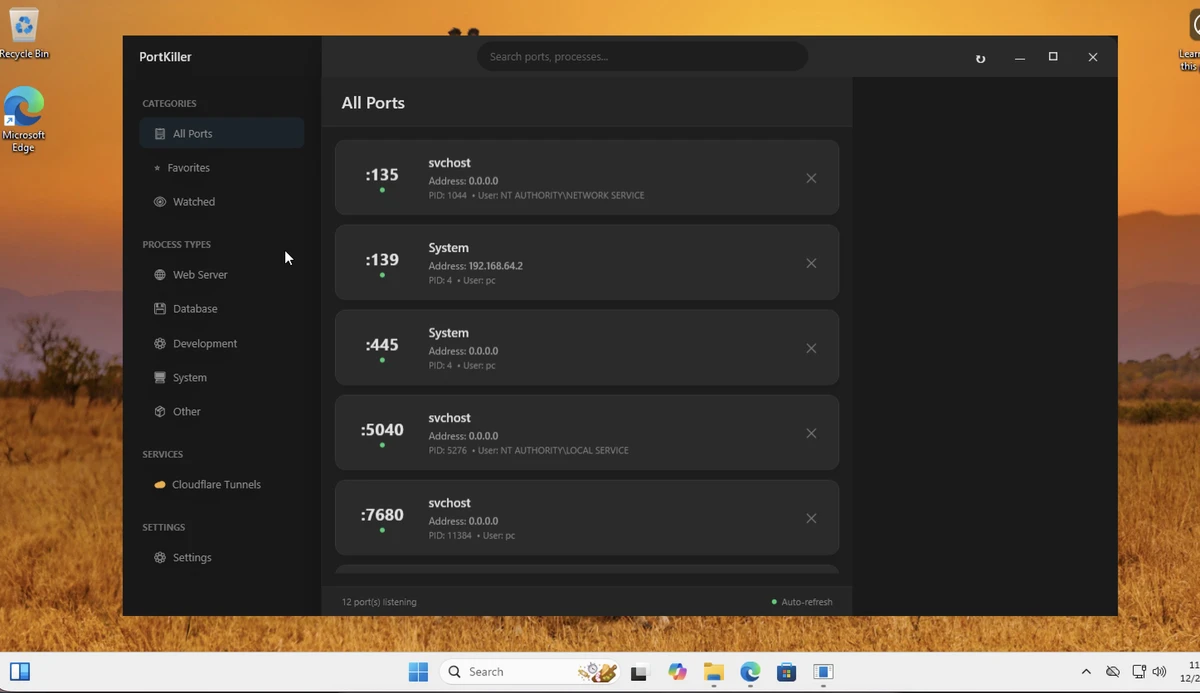

PortKiller is a network utility designed to monitor TCP ports, inspect active connections, and manage running processes in real time. It is aimed primarily at developers and network administrators who need visibility into system-level network activity and port usage. The tool goes beyond basic port tracking by offering process management features and integrations for modern development workflows such as Kubernetes port forwarding and Cloudflare Tunnel handling.
PortKiller provides a unified view of all TCP port activity on a system. Once launched, it immediately scans active connections and lists processes associated with each port, allowing users to quickly identify what is running and where. It is designed as a lightweight, no-install utility that can be executed directly. The interface focuses on clarity, grouping processes into categories such as web services, databases, development tools, and system processes. This makes it easier to filter and analyze network activity without being overwhelmed by raw data. In addition to local monitoring, it supports modern cloud and container workflows, making it useful in hybrid development environments.
System Requirements: Windows 11, Windows 10
Features of PortKiller
- Real-time TCP port monitoring across the system
- Process inspection and management (including ability to terminate processes)
- No-installation execution (portable usage via executable)
- Favorites and watched lists for tracking specific ports
- Filtering and categorization of processes (web, database, development, system, etc.)
- Kubernetes kubectl port-forward session support
- Cloudflare Tunnel monitoring and management (requires Cloudflared)
- Ability to view tunnel status and open connections in a browser
- Process sorting and simplified filtering for easier analysis
- Open-source availability
User Experience
Using PortKiller feels lightweight and direct. The application launches quickly and immediately begins listing active TCP connections without requiring setup or installation. The categorization system helps reduce complexity when multiple services are running, especially in development environments where ports can become difficult to track manually. Features like “Favorites” and “Watched” lists are particularly helpful for monitoring critical services over time.
Conclusion
PortKiller is a practical utility for users who need real-time insight into TCP port activity and process management. Its combination of lightweight design, process filtering, and modern DevOps integrations makes it especially valuable for technical users.


