


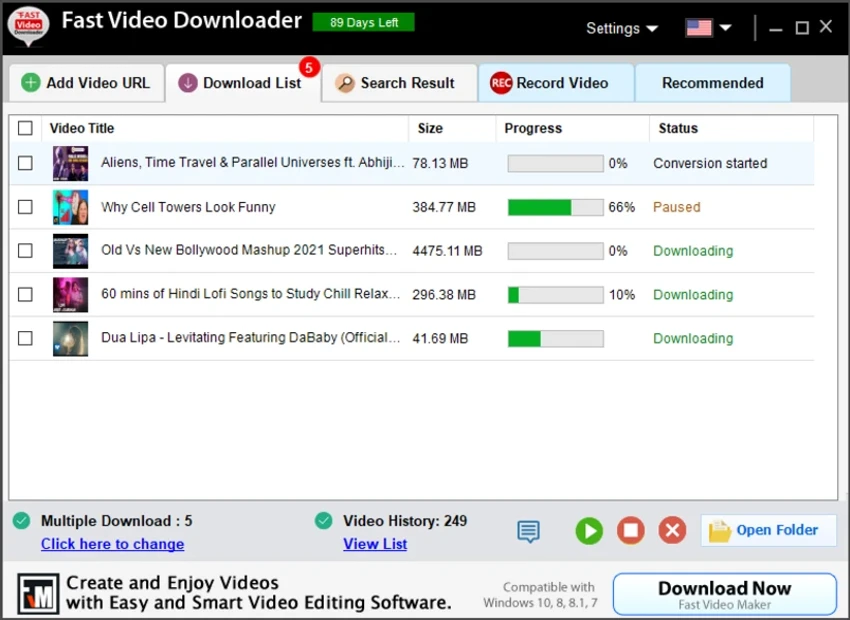

Fast Video Downloader is a Windows-based software designed to help users download online videos from popular platforms such as YouTube, Dailymotion, Vimeo, Metacafe, Facebook, and Bing. In addition to downloading, it also includes built-in tools for converting videos into device-compatible formats like iPhone, iPad, Android, and PSP.
What makes this tool more than just a downloader is its combination of features, including batch downloading, video conversion, scheduling downloads, and even screen recording. It aims to serve users who want an all-in-one media downloading and conversion solution.
Features of Fast Video Downloader
- Download videos from platforms like YouTube, Vimeo, Facebook, Dailymotion, Metacafe, and Bing
- Support for multiple simultaneous downloads
- High-resolution video downloads including HD (720p), Full HD (1080p), 4K, and 8K (where available)
- Built-in download scheduler for automated downloading tasks
- Smart video search feature for quick access and downloading
- One-click URL paste detection for fast download setup
- Video conversion to formats compatible with iPhone, iPad, Android, PSP, 3GP, and AVI
- Automatic conversion after download completion
- Ability to change video resolution without altering format
- No download speed restrictions imposed by the software
- Proxy configuration support for restricted networks
- Screen recording feature for capturing any area of the screen
- System audio and microphone recording support
- Auto-stop screen recording based on time settings
- Feedback submission feature for reporting issues or video URL errors
Interface and Usability
Fast Video Downloader offers a functional and utility-focused interface. The workflow is straightforward: users paste a video URL or search directly within the app, choose resolution or format, and begin downloading.
The layout prioritizes efficiency rather than visual design, making it suitable for users who prefer practical tools over modern, minimalistic interfaces. Features like automatic URL detection and batch downloading help reduce manual steps. Screen recording and conversion tools are integrated into the same environment, which may feel slightly dense for first-time users, but it improves productivity once familiar.
Who Should Use Fast Video Downloader?
- Users who frequently download online videos for offline viewing
- Content creators who need quick access to video conversion tools
- Students or professionals saving educational video content
- Users who want a combined downloader and screen recording tool
- Anyone needing batch downloads and scheduled video fetching
Conclusion
Fast Video Downloader is a versatile Windows tool that combines video downloading, format conversion, and screen recording in one application. While its interface is more functional than modern, its feature set makes it a practical choice for users who need more than just a basic video downloader.


