XnView MP logo

XnView MP 1.11.5

  • User Rating:
    ★★★★★
    ★★★★★
    0.0 0Votes
  • Requirements:
    Windows
  • Version: 1.11.5
  • Latest updated: 10 hours ago
  • License: Free Trial  
  • Publisher: XnSoft
  • Size: 57 MB
× app stores

XnView MP is a powerful image viewing, management, and conversion application designed for users who work with large image collections. As the advanced version of XnView, it offers improved performance, faster loading times, and better caching while preserving the familiar interface and core functionality that many users appreciate.

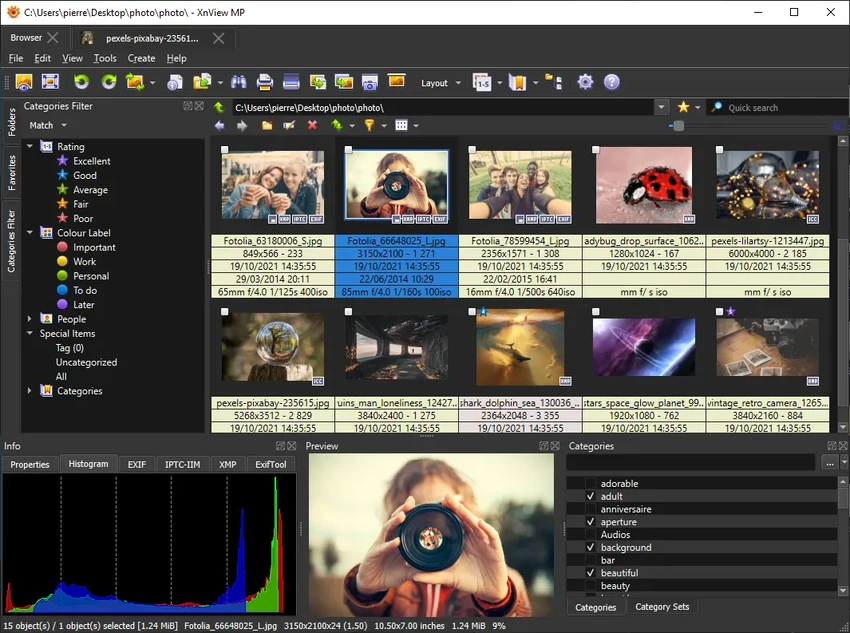
The software combines image browsing, cataloging, editing, and batch conversion into a single application. Whether you need to organize thousands of photos, quickly edit an image, or convert multiple files at once, XnView MP provides a practical workflow without feeling overly complicated.

Features of XnView MP

  • Supports more than 500 image formats for viewing.
  • Exports images to approximately 70 different file formats.
  • Built-in image browser with customizable thumbnail sizes.
  • Flexible workspace with dockable and rearrangeable panels.
  • Image comparison tools.
  • Basic image editing features including:
    • Crop
    • Resize
    • Histogram analysis
    • Image enhancement filters
  • Batch image conversion for single or multiple files.
  • Converts images to popular formats including:
    • JPEG
    • GIF
    • PNG
    • TIFF
    • BMP
    • PCX
    • TGA
  • Optimized loading speed and caching compared to the original XnView.
  • Designed to efficiently manage large image libraries.

User Experience

After using XnView MP, I found its interface clean and easy to navigate. The central browser makes it simple to browse folders, while the dockable panels allow me to arrange the workspace according to my preferences. This flexibility helps speed up everyday tasks, especially when working with extensive photo collections. Opening images is quick, and double-clicking a file immediately launches the built-in editor. Although the editing tools are not intended to replace professional image editing software, they cover many everyday adjustments such as cropping, resizing, checking histograms, and applying enhancement filters.

One of the most useful features is the batch conversion module. Instead of converting images individually, I could process multiple files simultaneously, making repetitive tasks much faster. Performance is another strong point. The improved caching and faster loading make navigating large folders noticeably smoother than older versions of XnView.

Who Should Use XnView MP?

  • Photographers managing large photo collections.
  • Designers who need to preview images in multiple formats.
  • Users who frequently convert image files in batches.
  • Anyone looking for an efficient image viewer with basic editing tools.
  • Windows users who want an all-in-one image management application.

Conclusion

XnView MP is more than just an image viewer. It combines image organization, basic editing, and powerful batch conversion into a single application while maintaining excellent performance with large image libraries. Its extensive support for image formats and customizable workspace make it a practical solution for both casual users and professionals.

Pros & Cons

Pros

  • Supports over 500 image formats.
  • Exports to around 70 file formats.
  • Fast performance with improved caching.
  • Flexible and customizable interface.
  • Useful batch conversion tools.
  • Built-in image editing features.
  • Suitable for managing large image collections.

Cons

  • Editing tools are limited to basic image adjustments.
  • Advanced editing capabilities are not the primary focus.

Frequently Asked Questions

What is XnView MP used for?

XnView MP is used to view, organize, edit, and convert image files. It also provides batch conversion tools for processing multiple images simultaneously.

How many image formats does XnView MP support?

The software supports viewing more than 500 image formats and exporting to approximately 70 file formats.

Does XnView MP include image editing tools?

Yes. It includes basic editing features such as cropping, resizing, histogram analysis, and image enhancement filters.

Can XnView MP convert multiple images at once?

Yes. The built-in batch conversion module allows users to convert multiple image files in a single operation.

What operating systems does XnView MP support?

According to the provided information, XnView MP supports Windows 11, Windows 10, Windows 8, and Windows 7.

Recommended apps [Freeware]:
  • Easy Gamer Utility 1.3.107 Easy Gamer Utility logo a Windows tool that optimizes gaming performance, clears cache, and fixes common game issues.
  • BleachBit 6.0.0 BleachBit logo a free Windows cleaner that removes junk files, protects privacy, and frees disk space with secure wiping.
  • Vivaldi Browser 8.0.4033.54 Vivaldi Browser logo a Chromium-based browser with built-in mail, calendar, notes, ad blocker, and deep customization features.
  • DAEMON Tools Lite 12.6.0.2458 DAEMON Tools Lite logo Create, mount, and manage ISO, MDF, and other disc images with virtual CD/DVD/Blu-ray drives
  • WifiInfoView 3.00 WifiInfoView logo scans nearby Wi-Fi networks and displays detailed technical information in real time
  • XnConvert 1.112.0.0 XnConvert logo batch image converter supporting 500 formats with 80+ editing actions and cross-platform compatibility
Recommended apps [Shareware]:
  • VueScan 9.8.56 VueScan logo Enhance scanner functionality with advanced tools for scanning documents, photos, videos, and slides.
  • GiliSoft USB Lock 11.2 GiliSoft USB Lock logo restricts USB, disk, program, and website access to prevent data leaks and misuse
  • EF Mailbox Manager 26.05 EF Mailbox Manager logo Manage multiple POP3 email accounts, remove spam on the server, and download messages securely
  • VideoPad Video Editor 18.38 VideoPad Video Editor logo a Windows movie maker for editing videos, adding effects, transitions, audio, and exporting to social platforms
  • SyncBackPro 12.0.17 SyncBackPro logo advanced backup, restore, synchronization, encryption, FTP support, and automation tools
  • CoolUtils PDF Combine 8.1.0.76/13 CoolUtils PDF Combine logo Windows tool for merging multiple PDF files into one, with bookmarks, encryption, and batch processing