MailStore Home logo

MailStore Home 26.3.0.24111

  • User Rating:
    ★★★★★
    ★★★★★
    0.0 ★ 0Votes
  • Requirements:
    Windows
  • Version: 26.3.0.24111
  • Latest updated: 2 weeks ago
  • License: Freeware  
  • Publisher: deepinvent Software
  • Size: 24 MB
× app stores

MailStore Home is a free email archiving and backup application designed to help users store, manage, and search their private emails from multiple sources. The software creates a centralized email archive, allowing users to keep messages from different accounts, email programs, and mailboxes in one secure location. The application supports email sources including internet mail services such as Gmail and Yahoo! Mail, POP3 and IMAP accounts, Microsoft Outlook, Windows Mail, Windows Live Mail, Microsoft Exchange mailboxes, Microsoft Office 365, Mozilla Thunderbird, SeaMonkey, and local email files such as PST and EML formats.

MailStore Home helps users protect important email information by creating local backups that can be stored on a computer or used as a portable archive on a USB drive. This makes it easier to preserve messages that may contain important documents, attachments, or personal records. The software also provides powerful search capabilities, allowing users to quickly find archived emails using keywords and advanced search criteria. Searches can include email content, dates, and attachment information, helping users locate specific messages from large archives.

In addition to storing and searching emails, MailStore Home allows users to open archived messages, reply to them, or forward them through their standard email application. With support for multiple email platforms and flexible backup options, it provides a practical solution for personal email organization and long-term storage.

Features of MailStore Home

  • Archive emails from multiple accounts and applications
  • Support for Gmail, Yahoo! Mail, POP3, and IMAP mailboxes
  • Import emails from Microsoft Outlook and Outlook files
  • Support for Microsoft Exchange and Office 365 mailboxes
  • Compatible with Mozilla Thunderbird and SeaMonkey
  • Store emails locally on a computer or USB drive
  • Search archived emails using keywords and advanced criteria
  • Find messages by date, content, and attachments
  • Export archived emails to other applications
  • Backup archives to CD, DVD, hard drives, or USB devices
  • Search attachment contents
  • Portable installation option

Interface and Usability

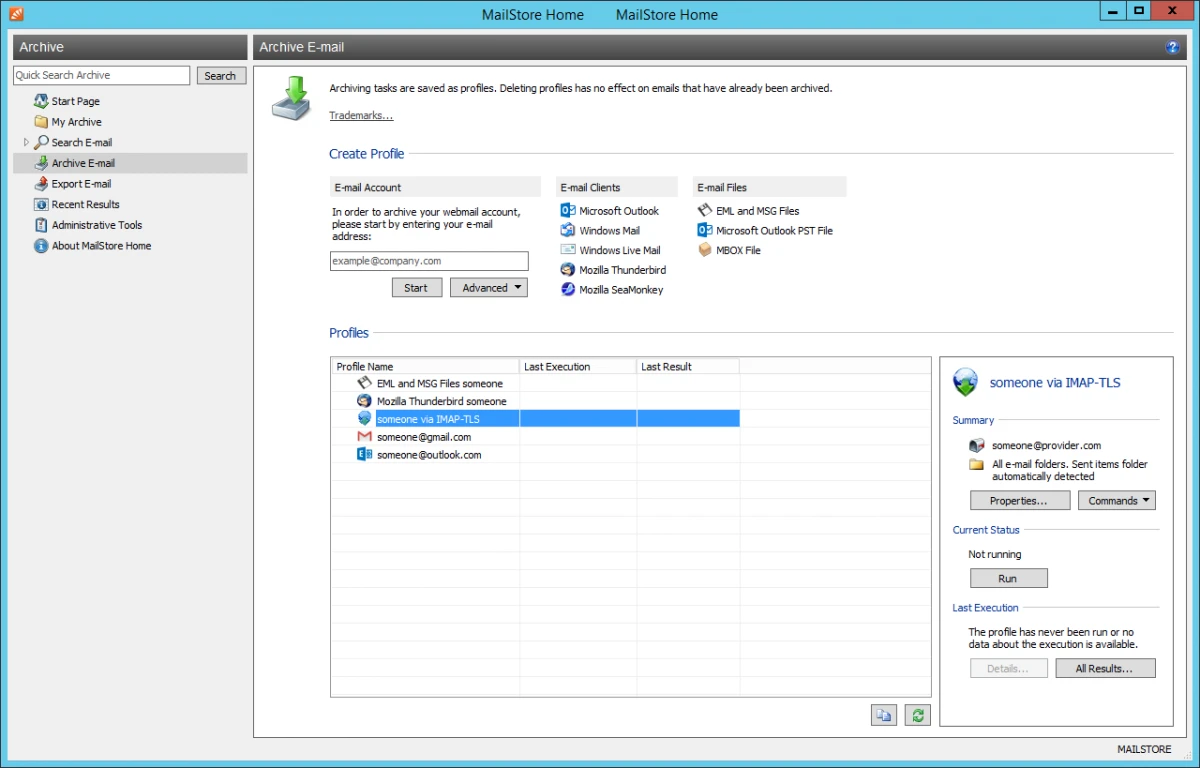
MailStore Home provides a structured interface that focuses on email archiving, searching, and management tasks. The setup process guides users through creating an email archive, after which the main interface provides access to the application’s core functions. The workflow is straightforward: users select an email source, create an archive, and then search or manage stored messages when needed. The search tools make it easier to navigate large email collections by providing detailed filtering options.

The ability to store emails from different programs and services in a single archive improves organization, especially for users who manage multiple accounts. The portable option also adds flexibility for users who want to keep their email archive on a USB drive. Overall, MailStore Home is designed to make email backup and retrieval simple while providing advanced search capabilities for larger collections.

Who Should Use MailStore Home?

  • Users backing up personal Gmail or email accounts
  • People managing multiple email applications
  • Users who need long-term email storage
  • Anyone wanting faster access to archived messages
  • Users preserving important email attachments and records

Conclusion

MailStore Home is a practical email archiving solution for users who want to protect and organize their important messages. Its ability to collect emails from multiple services and applications into one searchable archive makes managing large email collections much easier.

Pros & Cons

✓

Pros

  • Supports many email services and applications
  • Creates a centralized email archive
  • Provides powerful email search features
  • Supports local and portable backups
  • Allows exporting and restoring archived emails
✕

Cons

  • Designed mainly for personal email archiving rather than team collaboration

Frequently Asked Questions

What is MailStore Home used for?

MailStore Home is used to archive, back up, and search personal emails. It stores messages from different email accounts and applications in a centralized archive.

Which email services does MailStore Home support?

MailStore Home supports internet mailboxes such as Gmail and Yahoo! Mail, as well as POP3, IMAP, Microsoft Outlook, Microsoft Exchange, Office 365, Thunderbird, SeaMonkey, and local email files.

Can MailStore Home search archived emails?

Yes. MailStore Home includes search tools that allow users to find archived emails using keywords, dates, message content, and attachment information.

Can I store my MailStore Home archive on a USB drive?

Yes. MailStore Home supports a portable option that allows users to store and use the archive from a USB drive or another portable location.

Can MailStore Home restore or export emails?

Yes. MailStore Home allows users to export archived emails and open messages through standard email applications for replying or forwarding.

Does MailStore Home back up email attachments?

Yes. MailStore Home stores emails with their related information, including attachments, and provides options for searching attachment contents.

Recommended apps [Freeware]:
  • AIMP 5.40.2722 AIMP logo a lightweight audio player with high-quality sound, playlist tools, equalizer, and audio conversion features
  • Google Chrome 150.0.7871.125 Google Chrome logo fast, secure, and stable web browser with sandboxing, tab isolation, and a minimal interface for modern web applications
  • Mozilla Thunderbird 152.0.1 Mozilla Thunderbird logo secure email client with spam filtering, RSS support, and advanced tools for managing multiple accounts
  • Kdenlive 26.04.3 Kdenlive logo Powerful open-source video editing solution with multi-track editing, advanced effects, broad format support, and flexible workflows.
  • Doro PDF Writer 2.27 Doro PDF Writer logo Create PDF files from any printable Windows application with encryption, customization options, and a simple virtual printer.
  • WordPress 7.0.2 WordPress logo Create websites, blogs, and online platforms easily with a flexible publishing system offering themes, plugins, and content tools.
Recommended apps [Shareware]:
  • Adobe Illustrator 2026 Adobe Illustrator logo professional vector graphic editor for creating logos, illustrations, and scalable designs.
  • Sequence Generator Pro 4.5.0.1649 Sequence Generator Pro logo a Windows astrophotography capture suite for automating imaging, focus, and sequencing.
  • FastStone Image Viewer 8.5 FastStone Image Viewer logo a fast and user-friendly tool for viewing, editing, converting, and managing images on Windows
  • WinCatalog 2026.2.0.629 WinCatalog logo a disk and file cataloging tool for Windows that indexes files for fast search and organization
  • AD FastReporter 26.7.1 AD FastReporter logo Active Directory reporting tool that simplifies generating, scheduling, and sharing AD reports efficiently.
  • PRTG - Free Network Monitor 26.2.120.1477 PRTG - Free Network Monitor logo Monitor network performance, track traffic usage, and detect system issues with a free network monitoring solution for businesses.