FileLegit Windows Multimedia Image Editors Gilisoft Image Editor
Gilisoft Image Editor logo

Gilisoft Image Editor 8.7.0

  • User Rating:
    ★★★★★
    ★★★★★
    0.0 ★ 0Votes
  • Requirements:
    Windows
  • Version: 8.7.0
  • Latest updated: 3 weeks ago
  • License: Free Trial  
  • Publisher: Gilisoft
  • Size: 633 MB
× app stores

Gilisoft Image Editor is a Windows-based photo editing tool designed to enhance, modify, and transform images using a wide set of editing features. It provides both basic and advanced tools for improving photos, ranging from simple adjustments like cropping and resizing to more complex operations such as object removal and portrait retouching. The software is built to support a wide range of users, from beginners who need quick edits to more experienced users who want detailed control over image adjustments. It includes tools for color correction, filters, effects, and composition work, making it suitable for both everyday photo editing and creative design tasks.

In addition to standard editing functions, Gilisoft Image Editor also includes productivity-focused features such as batch processing and multi-format saving, which help streamline workflows when working with large sets of images.

Features of Gilisoft Image Editor

  • Crop images with preset aspect ratios or custom dimensions
  • Resize images with quality-preserving scaling
  • Rotate and flip images horizontally or vertically
  • Adjust brightness, contrast, hue, and saturation
  • Apply color correction and enhancement tools
  • Use filters and artistic effects for creative styling
  • Remove unwanted objects from images
  • Retouch portraits (skin smoothing, whitening teeth, etc.)
  • Create collages using templates and layouts
  • Add and customize text with fonts, colors, and effects
  • Work with layers and blending modes for advanced editing
  • Batch process multiple images at once
  • Analyze images using histogram tools
  • Zoom and pan for precise editing control
  • Undo and redo unlimited editing steps
  • Save images in formats such as JPEG, PNG, TIFF, and others
  • Built-in user-friendly interface designed for quick navigation

Interface and Usability

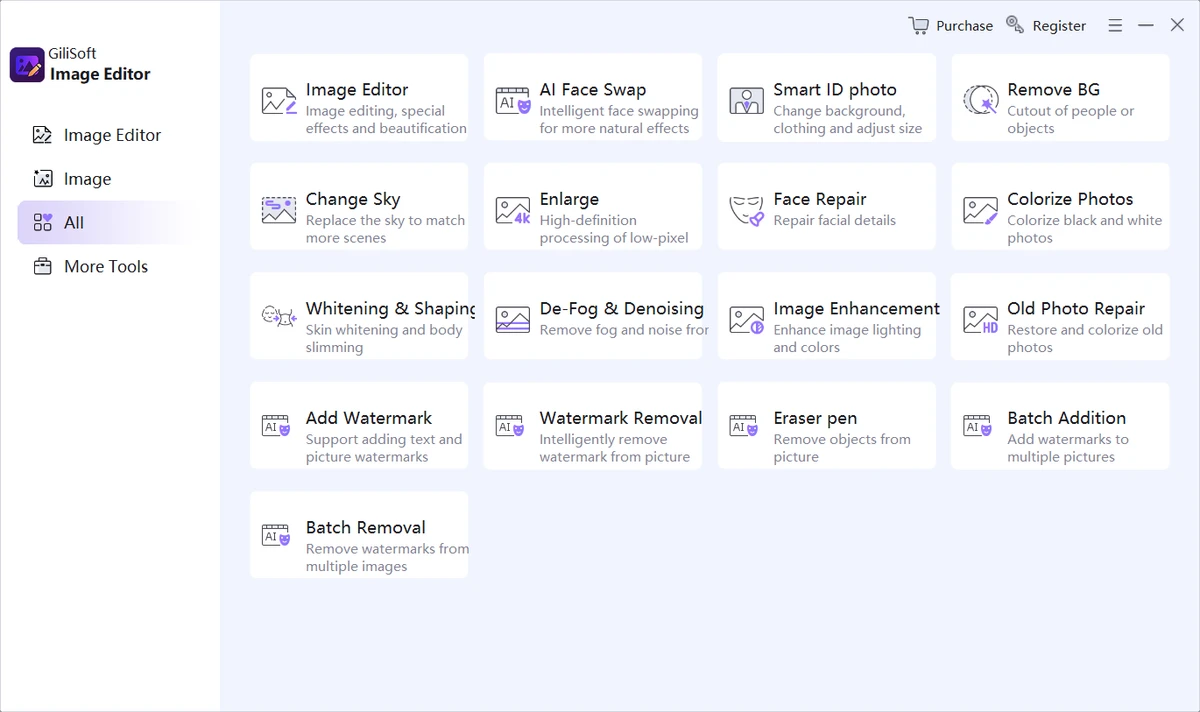
Gilisoft Image Editor uses a structured interface designed to keep editing tools accessible and organized. Most core functions such as cropping, color adjustments, and filters are available through clearly labeled menus, allowing users to start editing without a steep learning curve.

The layout supports both quick edits and more detailed work. Tools like zooming, layering, and histogram analysis help users refine images at a higher level of precision, while simpler features remain easy to access for everyday tasks. Batch processing and format export options are integrated into the workflow, making it practical for users who need to edit multiple images efficiently.

Who Should Use Gilisoft Image Editor?

  • Casual users editing personal photos
  • Photographers performing quick adjustments and retouching
  • Designers needing basic to intermediate editing tools
  • Users who want batch image processing capabilities
  • Anyone looking for an easy-to-use Windows image editor

Conclusion

Gilisoft Image Editor provides a broad set of photo editing tools in a single application, covering everything from basic adjustments to more advanced editing techniques. Its combination of simplicity and feature depth makes it suitable for both casual and semi-professional image editing workflows.

Pros & Cons

✓

Pros

  • Wide range of editing tools in one package
  • Supports both basic and advanced image editing
  • Batch processing improves productivity
  • Includes object removal and portrait retouching
  • User-friendly interface suitable for beginners
✕

Cons

  • No official update/change log provided
  • Advanced design features are limited compared to professional-grade tools

Frequently Asked Questions

What is Gilisoft Image Editor used for?

Gilisoft Image Editor is used to edit, enhance, and transform images. It supports tasks such as cropping, resizing, color correction, filters, and object removal.

Can I remove unwanted objects from photos?

Yes. The software includes an object removal tool that helps erase unwanted elements from images while maintaining a clean background.

Does Gilisoft Image Editor support batch processing?

Yes. It allows users to apply the same edits to multiple images at once, which is useful for large photo collections or repetitive editing tasks.

Can I create collages with this software?

Yes. The tool includes a collage creation feature with templates, layouts, and customization options for arranging multiple images.

What file formats does it support?

It supports saving images in multiple formats, including JPEG, PNG, TIFF, and other common image file types.

Is Gilisoft Image Editor suitable for beginners?

Yes. The interface is designed to be user-friendly, making it easy for beginners to perform basic edits while still offering advanced tools for experienced users.

Recommended apps [Freeware]:
  • Easy System Utility 1.1.67 Easy System Utility logo clean junk files, repair tools, passwords and system optimization.
  • FlowHeater 4.5.6 FlowHeater logo data integration tool connecting files and databases like Excel, Access, SQL Server and MySQL
  • NxFilter 4.7.5.3 NxFilter logo freeware enterprise web filtering tool that blocks malware, controls internet access, and enforces DNS-based security policies
  • MEmu Android Emulator 9.5.5.1 MEmu Android Emulator logo Play Android games and run mobile apps on Windows with MEmu Android Emulator, featuring customizable controls and multi-instance support
  • Clipboard Remote 2.0.1 Clipboard Remote logo Transfer text, URLs, and images securely across your devices over LAN or Wi-Fi with fast clipboard synchronization.
  • UEFITool A75 UEFITool logo Analyze, extract, and modify UEFI firmware images with support for multiple BIOS formats and detailed firmware structure viewing.
Recommended apps [Shareware]:
  • JProfiler 16.1.1 JProfiler logo a powerful Java profiler for analyzing performance, memory usage, and database activity
  • SysTools SQL Backup Recovery 12.0.0 SysTools SQL Backup Recovery logo Repair and recover corrupt SQL Server BAK files, restore database objects, and export recovered data with ease.
  • Modern CSV 2.4.3 Modern CSV logo high-performance CSV editor for Windows with fast large-file handling, multi-cell editing, filtering, and sorting tools
  • Aeon Timeline 3.5.107 Aeon Timeline logo create detailed timelines for writing, projects, legal cases, research and education
  • Actual Transparent Window 8.15.4 Actual Transparent Window logo adjust per-window transparency, improve multitasking, and organize desktop space efficiently on Windows
  • FoneLab Android Data Recovery 3.1.56 FoneLab Android Data Recovery logo Recover deleted Android contacts, messages, photos, videos, documents, and more from phones, SD cards, and SIM cards.