


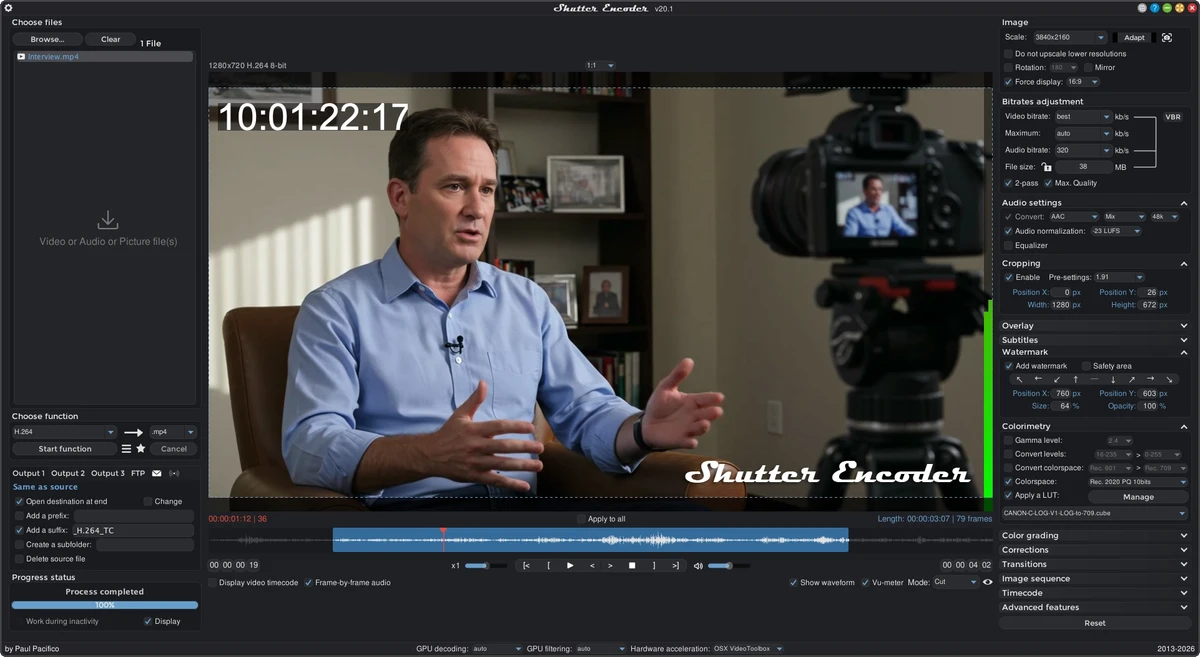

Shutter Encoder is a free and open-source multimedia processing tool designed to handle a wide range of video, audio, and image tasks. Built on powerful open-source technologies such as FFmpeg, it provides users with an extensive set of features for converting, editing, compressing, and analyzing media files. While its interface appears simple at first glance, Shutter Encoder is a highly capable professional-grade tool that supports advanced workflows including batch processing, codec conversion, subtitle creation, and detailed media analysis.
Features of Shutter Encoder
- Free and open-source multimedia processing tool
- Supports video, audio, and image workflows
- Advanced batch processing capabilities
- Intuitive interface with structured workflows
- Wide codec support for input and output formats
Video Features
- Trim and cut videos without re-encoding
- Rewrap, conform, and replace audio tracks
- Add subtitles and video inserts
- Encode to formats such as:
- H.264
- H.265
- VP9
- AV1
- Xvid
- WMV
- MPEG
- Professional editing codecs:
- DNxHD
- DNxHR
- Apple ProRes
- Uncompressed YUV
- DVD and Blu-ray creation and ripping support
Audio Features
- Convert between multiple audio formats:
- WAV
- AIFF
- FLAC
- MP3
- AAC
- AC3
- OPUS
- OGG
- Audio normalization and loudness analysis
- True peak and waveform analysis
Image Features
- JPEG and image extraction tools
- Image creation and processing support
Advanced Tools
- Cut detection and black frame detection
- File renaming and batch automation
- Media metadata analysis using MediaInfo
- Integration with FFmpeg-based processing pipeline
User Experience
Shutter Encoder offers a balanced experience between simplicity and professional-grade functionality. The interface is structured in a way that guides users through typical workflows—selecting input files, choosing an operation, adjusting settings, and exporting results.
Despite its minimalistic appearance, the application exposes a wide range of advanced options. Users can perform simple tasks like converting video formats or more complex operations such as encoding in professional-grade codecs or analyzing audio loudness levels. One of its strongest advantages is batch processing, which allows users to handle large sets of media files efficiently. This makes it particularly useful for content creators, editors, and professionals working with high volumes of video or audio data.
Because it is built on well-known open-source tools like FFmpeg and MediaInfo, Shutter Encoder benefits from strong codec support and reliable performance across different media formats. While beginners can easily perform basic conversions, advanced features may require some learning, especially for users unfamiliar with video encoding concepts.
Who Should Use Shutter Encoder?
- Video editors and content creators
- Audio engineers and podcasters
- Users converting large media libraries
- Professionals needing batch encoding workflows
- Users working with multiple video/audio formats
- Anyone needing a free alternative to commercial encoders
Conclusion
Shutter Encoder stands out as a highly capable multimedia processing tool that bridges the gap between simple converters and professional editing software. With its extensive codec support, batch processing capabilities, and deep integration of open-source technologies, it offers exceptional flexibility for handling virtually any media workflow.


