OpenCode logo

OpenCode 1.17.20

  • User Rating:
    ★★★★★
    ★★★★★
    0.0 ★ 0Votes
  • Requirements:
    Windows
  • Version: 1.17.20
  • Latest updated: 2 weeks ago
  • License: Open Source  
  • Publisher: Anomaly
  • Size: 128 MB
× app stores

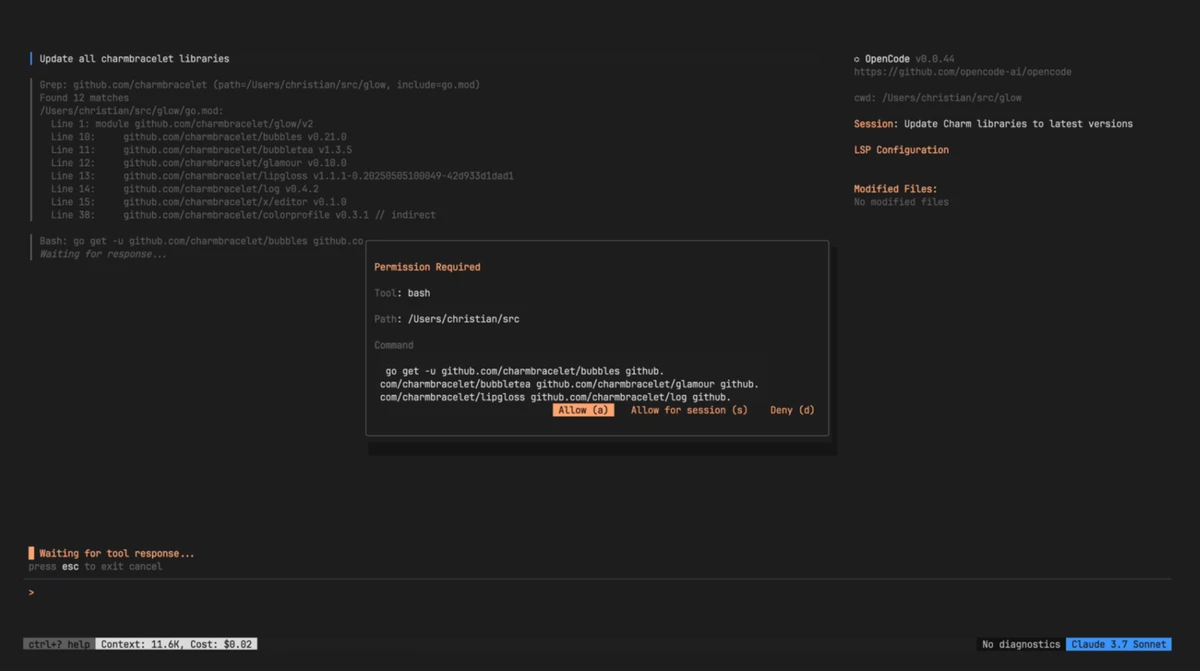
OpenCode is an open source AI coding assistant designed to help developers write code, troubleshoot problems, and understand existing projects directly from their computer. The tool works through a command-line interface and allows users to interact with AI models using natural language instructions.

Unlike traditional code editors, OpenCode focuses on assisting developers within their existing workflow. It can read project files, answer questions about code, help explain concepts, and assist with tasks such as writing scripts, debugging, and generating code. The software is designed to work with many programming languages, making it suitable for developers working across different technology stacks.

OpenCode runs locally as a lightweight application without requiring a dedicated graphical interface. This makes it fast to launch and convenient for users who already work with terminals, IDEs, or development environments. Instead of providing its own built-in AI model, OpenCode connects with selected language models through supported providers or user-provided API keys.

The flexibility of OpenCode allows developers to choose different AI models and workflows. It supports connections with various LLM providers, including cloud-based models and local models through compatible tools. This gives users more control over where their data is processed and which AI system powers their coding assistance. With its open source approach, lightweight design, and customizable model support, OpenCode is aimed at developers who want an AI assistant without being locked into a single platform or ecosystem.

Features of OpenCode

  • Open source AI coding assistant
  • Runs from the command line
  • Helps write code and fix programming issues
  • Reads and understands project files
  • Supports multiple programming languages
  • Works with different AI models and providers
  • Compatible with various IDE workflows
  • Supports local files without requiring cloud project syncing
  • Lightweight application design
  • Supports local AI models through compatible tools
  • Uses user-selected API keys for supported providers

Interface and Usability

OpenCode uses a command-line interface instead of a traditional graphical application window. This design keeps the software lightweight and allows it to launch quickly, which fits naturally into workflows built around terminals, scripts, and development tools.

For developers comfortable with command-line environments, the experience is straightforward. Users can navigate to a project folder, run OpenCode, and interact with the assistant using text commands and questions.

The lack of a graphical interface may feel limiting for users who prefer visual development environments, but it also keeps the application focused on speed and flexibility. Developers can integrate OpenCode into their existing workflow rather than adapting to a completely new interface.

Setting up AI providers requires some technical steps, including configuring API access or connecting compatible local models. Once configured, users gain more control over their preferred AI tools and models.

Who Should Use OpenCode?

  • Software developers writing and reviewing code
  • Programmers who prefer terminal-based tools
  • Developers working with multiple programming languages
  • Users who want more control over AI model selection
  • Teams that prefer open source development tools
  • Developers interested in using local AI models

Conclusion

OpenCode is a focused AI coding assistant that gives developers more control over how they use AI during programming tasks. Its open source design, support for multiple models, and lightweight command-line workflow make it an appealing option for experienced developers who prefer flexibility over a packaged ecosystem.

Pros & Cons

✓

Pros

  • Open source and flexible
  • Works with multiple AI models
  • Lightweight and fast command-line design
  • Supports local project file access
  • Allows users to choose their preferred development workflow
✕

Cons

  • No graphical interface for users who prefer visual tools
  • Requires configuration of AI providers or API keys
  • Depends on external AI models rather than including its own model

Frequently Asked Questions

What is OpenCode used for?

OpenCode is used as an AI assistant for programming tasks. It can help developers write code, fix bugs, understand project files, and answer technical questions.

Does OpenCode include its own AI model?

No. OpenCode does not include its own built-in language model. Instead, it connects to selected AI models through supported providers or user-configured API access.

Can OpenCode work with local AI models?

Yes. OpenCode can work with local models through compatible tools such as local AI model servers, allowing users to keep processing on their own system.

Does OpenCode support different programming languages?

Yes. OpenCode is designed to work with various programming languages and can assist with different types of development projects.

Does OpenCode require an internet connection?

OpenCode depends on the AI models it connects to. When using online AI providers, an internet connection is required. Local model setups may allow more local processing.

Is OpenCode suitable for beginners?

OpenCode is mainly designed for developers who are comfortable with command-line tools and programming workflows. Users new to development tools may need additional time to understand the setup process.

Recommended apps [Freeware]:
  • Far Manager 3.0 Build 6699 Far Manager logo Manage files efficiently with Far Manager's fast text-based interface, plugins, and archive support
  • HomeBank 5.10.2 HomeBank logo Track expenses, manage budgets, and analyze personal finances with HomeBank's powerful reporting tools
  • MSI Center 2.0.71.0 MSI Center logo a system utility for MSI devices that manages performance, gaming modes, monitoring, RGB, and hardware optimization tools
  • Intel Wireless Bluetooth Driver 24.50.0 Intel Wireless Bluetooth Driver logo Intel Wireless Bluetooth Driver for Windows 10/11 delivers stable Bluetooth connectivity for supported Intel adapters
  • MACAddressView 1.55 MACAddressView logo Find company details from MAC addresses with a lightweight Windows utility that works offline using an internal database.
  • Mumble 1.5.901 Mumble logo A low-latency encrypted voice communication app with positional audio, noise suppression, and gaming-focused features.
Recommended apps [Shareware]:
  • App Builder 2026.18 App Builder logo a visual development environment for creating HTML5, mobile, desktop, and PWA applications
  • WavePad 24.38 WavePad logo audio editor for Windows, macOS, and mobile devices, offering effects, restoration tools, and batch processing
  • MediaHuman YouTube Downloader 3.9.22 MediaHuman YouTube Downloader logo download videos, playlists, and channels in HD, 4K, and 8K with audio support and MP3 extraction
  • Image for Windows 4.12 Image for Windows logo disk imaging tool for full system backup, restore, and recovery with encryption, compression, and bootable rescue medi
  • CorelDRAW Technical Suite 2026 v27.1.0.129 CorelDRAW Technical Suite logo Create detailed technical illustrations, documentation, and graphics with professional vector design, 3D, and publishing tools.
  • Muziza YouTube Downloader Converter 9.5.7 Muziza YouTube Downloader Converter logo Download online videos, convert media files, extract audio, manage playlists, and optimize videos for multiple devices.