FileLegit Windows Multimedia Video Editors Catalyst Production Suite
Catalyst Production Suite logo

Catalyst Production Suite 2026.1.1

  • User Rating:
    ★★★★★
    ★★★★★
    0.0 0Votes
  • Requirements:
    Windows
  • Version: 2026.1.1
  • Latest updated: 3 weeks ago
  • License: Commercial  
  • Publisher: SONY CREATIVE
  • Size: 637 MB
× app stores

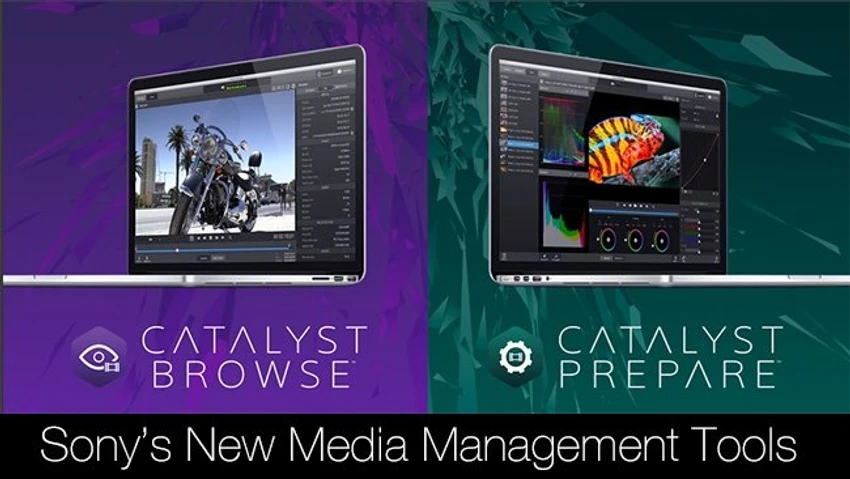
Catalyst Production Suite is a professional media workflow solution developed for handling Sony Pro video formats. It is designed to support the entire process from ingesting camera footage to preparing content for post-production. The suite includes two main components: Catalyst Browse and Catalyst Prepare. Together, they allow users to view, organize, back up, and process video footage directly from cameras, cards, or external storage devices. It is particularly focused on efficiency in handling high-quality production media while maintaining accuracy and data integrity.

Features of Catalyst Production Suite

Catalyst Prepare

  • View media directly from camera, deck, or card reader
  • Full-volume backup with checksum verification
  • Organize clips into bins
  • Batch copy and batch transcode clips
  • Apply color adjustments and visual looks
  • Set in and out points for clips
  • Assign multichannel audio configurations
  • Upload clips to Sony Ci Media Cloud Services
  • Create rough cuts using Storyboard feature

Catalyst Browse

  • Browse Sony Pro format media with thumbnail or detailed views
  • View and edit clip metadata
  • Playback with source color space accuracy
  • Apply color correction and color grading looks
  • Create, ingest, and export Sony Professional Disc clip lists
  • Copy selected clips or portions to local drives or NAS
  • Transcode media into multiple formats
  • Upload directly to Sony Ci Media Cloud Services

Shared Features

  • Cross-platform media browsing and logging
  • Support for Sony S-Log and RAW color workflows
  • ASC-CDL color data import/export compatibility
  • Clip selection and in/out marking tools
  • Media organization using structured workflows

Interface and Usability

Catalyst Production Suite is structured around two dedicated tools, each focusing on a different stage of media handling. Catalyst Browse is designed for quick viewing and logging, while Catalyst Prepare focuses on deeper media organization and preparation tasks.

Navigation is based on visual clip browsing, metadata panels, and structured bins. Users can review footage, apply corrections, and manage large media sets using list or thumbnail views. The workflow is designed to support professional production environments where speed and accuracy are essential.

Who Should Use Catalyst Production Suite?

  • Video editors and post-production professionals
  • Film and broadcast production teams
  • Users working with Sony Pro cameras and formats
  • Studios requiring reliable media backup and verification workflows
  • Teams managing large-scale video ingestion and transcoding tasks

Conclusion

Catalyst Production Suite provides a structured workflow for managing Sony Pro video content from capture to post-production. With tools for browsing, backup verification, transcoding, and cloud integration, it supports efficient handling of professional video media.

Pros & Cons

Pros

  • Strong support for Sony Pro video formats
  • Integrated workflow from ingest to post-production
  • Reliable checksum-based backup verification
  • Built-in color correction and metadata tools
  • Cloud upload integration with Sony Ci services

Cons

  • Focused mainly on Sony ecosystem formats
  • Requires relatively high system resources for 4K workflows
  • Not designed for general consumer video editing

Frequently Asked Questions

What is Catalyst Production Suite used for?

It is used for managing, reviewing, and preparing professional video footage, especially Sony Pro formats, from capture through post-production workflows.

What is the difference between Catalyst Browse and Catalyst Prepare?

Catalyst Browse focuses on viewing, logging, and basic media management, while Catalyst Prepare handles more advanced tasks like backup, transcoding, and media organization.

Does Catalyst Production Suite support 4K media?

Yes, but 4K workflows require stronger hardware, including a multi-core processor, SSD storage, and sufficient RAM.

Can I back up video files using Catalyst Prepare?

Yes. It supports full-volume backups with checksum verification to ensure data integrity.

Does it support color correction tools?

Yes. Users can apply color adjustments, looks, and work with Sony’s S-Log and RAW color workflows.

Can media be uploaded to the cloud?

Yes. The suite supports uploading clips to Sony Ci Media Cloud Services for collaboration and review.

Recommended apps [Freeware]:
  • MusicBee 3.6.9668 MusicBee logo a free music player and library manager with tagging, podcast support, album art lookup, and playlists
  • TreeSheets 3223 TreeSheets logo combines spreadsheets, outlines, notes, and mind mapping into a lightweight data organization tool
  • AVG Clear 26.6.11050 AVG Clear logo completely removes AVG antivirus products, files, settings, and registry entries from Windows systems
  • StarDesk 1.4.1 StarDesk logo remote desktop solution offering low-latency connections, file transfer, remote assistance, Quick Launch, and remote device management.
  • Wagnardsoft Tools 1.0.8.2 Wagnardsoft Tools logo Clean temporary files, repair Windows system files, and maintain your PC with Wagnardsoft Tools (WTools)
  • MiniTool Partition Wizard 13.9 MiniTool Partition Wizard logo manages disk partitions with resizing, cloning, recovery, OS migration, and storage tools
Recommended apps [Shareware]:
  • VovSoft Audio to Lyrics Converter 1.2 VovSoft Audio to Lyrics Converter logo offline AI tool to transcribe audio into LRC, SRT, VTT, and text files.
  • ExamDiff Pro 17.0.1.5 ExamDiff Pro logo a Windows file comparison tool for code review, folder sync, and document diffing with merge support.
  • Royal TS 7.4.50622 Royal TS logo centralizes remote connections, credential management, automation, and secure team collaboration.
  • Rons WebLynx 2026.07.03.1618 Rons WebLynx logo offline Windows bookmark manager with tagging, automation, RSS support, and link checking
  • FTPie 2026.7.2 FTPie logo Manage FTP, cloud storage, and files easily with FTPie, featuring quick upload, sharing, and document editing tools
  • ESET Internet Security 19.2.7.0 ESET Internet Security logo Protect your PC with ESET Internet Security, offering antivirus, firewall, anti-phishing, and online security tools