


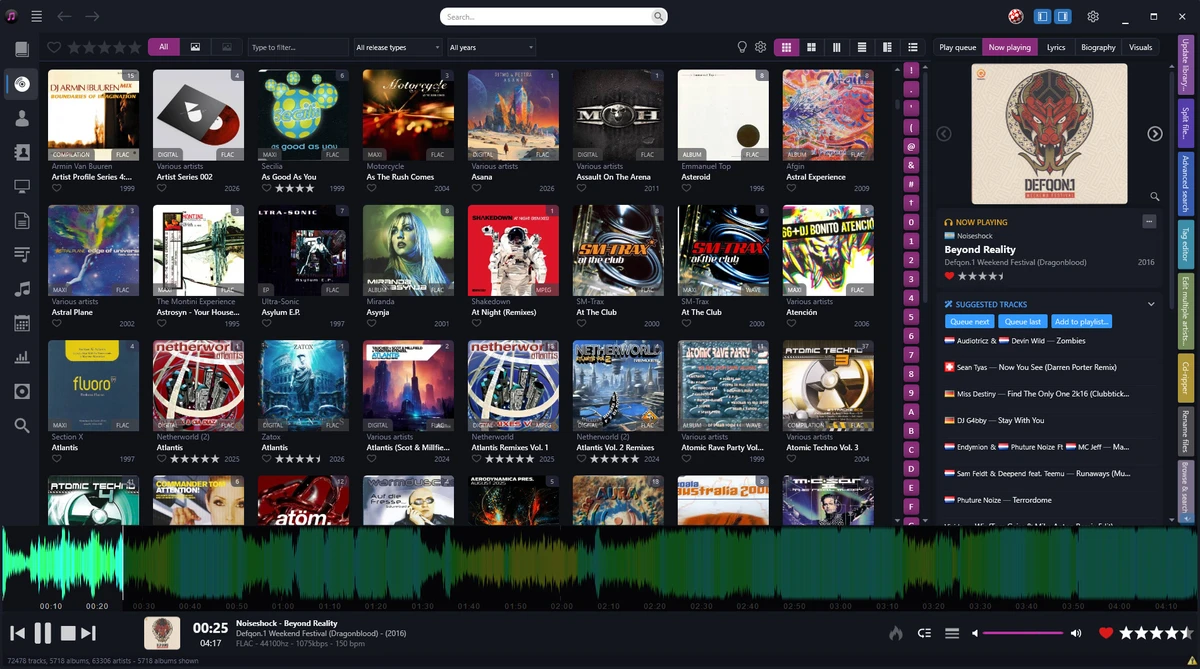

Helium Music Manager is a comprehensive music management application designed for users who want complete control over their music collections. Instead of juggling multiple tools for tagging, playback, cataloging, and synchronization, Helium combines these functions into a single platform. Whether your music is stored on hard drives, CDs, vinyl recordings, or portable devices, Helium Music Manager provides an organized environment for browsing, editing, and enjoying your collection. It supports a wide range of popular audio formats and includes powerful tools for metadata management, album artwork retrieval, playlist creation, and device synchronization.
Features of Helium Music Manager
- Supports MP3, MP4, FLAC, OGG, WMA, M4A, APE, MPC, and Audio CDs
- Import music from CDs, vinyl records, tapes, and digital libraries
- Advanced music tagging and metadata editing tools
- Batch tag editing and file renaming capabilities
- Automatic folder structure creation based on custom rules
- Download album artwork, artist photos, biographies, and discographies
- Search music by artist, title, genre, rating, and more
- Built-in music playback functionality
- Playlist management and report generation
- Synchronization support for iPod, Creative Zen, mobile devices, and other portable players
- Audio and data CD burning
- Last.fm scrobbling support
- Shoutcast streaming support
- Microsoft SQL Server and MySQL support for large music collections
- Music Information Browser with web-style navigation
- Quality analysis and repair tools for broken MP3 files
- Export playlists for external use
User Experience
After using Helium Music Manager, it becomes clear that the software is designed with music enthusiasts and collectors in mind. The application goes far beyond simple playback by providing extensive organization and library management tools. One of the standout aspects is its ability to catalog large collections efficiently. Users with thousands of tracks can quickly sort, search, and filter content using detailed metadata. The built-in tagging tools help clean up inconsistent music libraries, while batch operations significantly reduce the time needed to organize files.
The Music Information Browser offers an intuitive way to explore collections, displaying album covers, artist images, and detailed music information. Browsing feels visual and engaging rather than relying solely on traditional file structures.
System Requirements
- Operating System: Windows 11, Windows 10, or Windows 8
- Processor: Intel or AMD multi-core processor
- RAM: 4 GB minimum (8 GB recommended for large libraries)
- Storage: 500 MB free disk space
- Sound Card: Required for audio playback
Conclusion
Helium Music Manager stands out as a powerful all-in-one music management solution for Windows. Its combination of cataloging, tagging, playback, synchronization, and artwork management tools makes it particularly valuable for users with growing music collections.


