


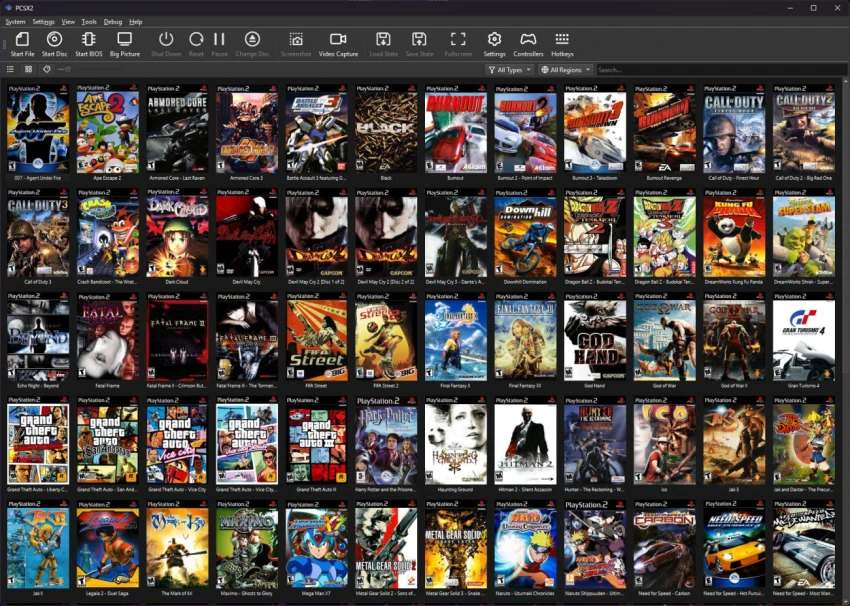

PCSX2 is a PlayStation 2 emulator that lets you experience classic PS2 games on your PC. Designed for users who want to revisit their favorite console titles, the software recreates the PS2 environment using your computer's hardware. While it offers extensive configuration options and can deliver an excellent gaming experience, it also requires some initial setup and a basic understanding of emulation. Unlike plug-and-play applications, PCSX2 asks users to provide their own PlayStation 2 system files and game ROMs extracted from legally owned game discs. Once configured, it offers a flexible environment where graphics and performance settings can be adjusted to match different hardware capabilities.
Features of PCSX2
- Emulates the PlayStation 2 console on a PC.
- Supports ROM images extracted from your own PS2 game collection.
- Requires original PlayStation 2 system software files (BIOS).
- Offers detailed emulator configuration options.
- Includes adjustable graphics settings such as renderer selection and resolution.
- Supports graphics enhancements including FXAA, Shade Boost, and texture filtering.
- Provides advanced options like Speedhacks, INTC Spin Detection, Wait Loop, and mVU Flag Hack.
- Includes a debug terminal for troubleshooting and advanced configuration.
- Allows users to choose between native PS2 resolution or higher rendering resolutions depending on hardware performance.
User Experience
Using PCSX2 feels rewarding once everything is configured correctly, but the initial setup can take some time. Before launching a game, I had to prepare the required PlayStation 2 system files and game images, then spend time reviewing the available configuration options. The software does a good job of explaining many of its settings, making it easier to understand what each option controls. However, some advanced settings—such as Speedhacks and various hardware tweaks—are clearly intended for users who already have some experience with emulators.
Graphics customization is one of PCSX2's strongest points. I was able to select my preferred graphics renderer, adjust the rendering resolution, and experiment with options like FXAA and texture filtering to find the right balance between image quality and performance. Performance depends heavily on both the game and the hardware. While many games can run smoothly, more demanding titles may require a powerful PC and additional tweaking before they become fully playable.
Overall, PCSX2 sits comfortably between beginner-friendly software and an advanced emulator. Casual users may find the learning curve challenging, while experienced users will appreciate the depth of customization available.
Who Should Use PCSX2?
PCSX2 is best suited for players who want to revisit their PlayStation 2 game library on a modern PC. It is especially suitable for users who are comfortable configuring software and adjusting performance settings to achieve the best results.
Conclusion
PCSX2 successfully brings the PlayStation 2 experience to modern PCs while offering a wide range of configuration options to improve graphics and performance. Although getting started requires preparation and some technical understanding, the emulator rewards users with a flexible and highly customizable experience.


