Wondershare UniConverter logo

Wondershare UniConverter 17.4.4.617

  • User Rating:
    ★★★★★
    ★★★★★
    0.0 0Votes
  • Requirements:
    Windows
  • Version: 17.4.4.617
  • Latest updated: 3 weeks ago
  • License: Free Trial  
  • Publisher: Wondershare
  • Size: 2 MB
× app stores

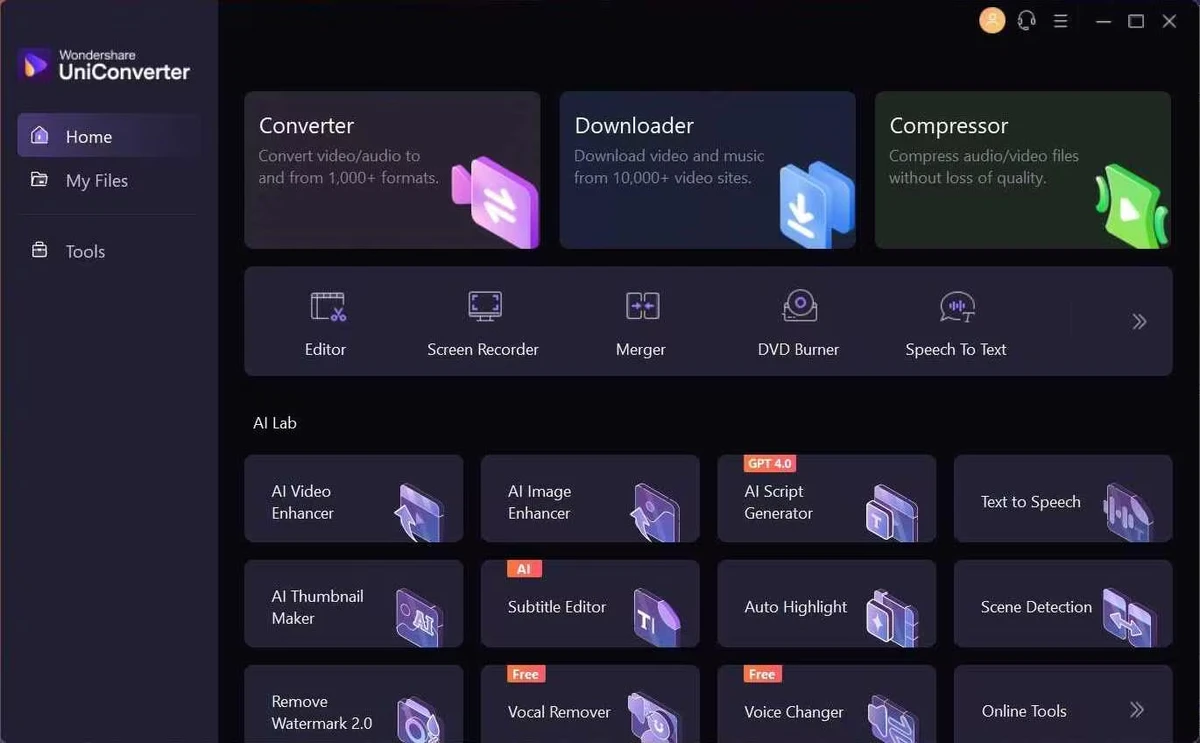
Wondershare UniConverter is an all-in-one video processing tool designed to help users convert, edit, compress, download, and manage video files. Originally known as Wondershare Video Converter Ultimate, the software supports video conversion tasks across a wide range of formats while maintaining quality and processing speed. Beyond conversion, UniConverter includes tools for video editing, screen recording, DVD and Blu-ray creation, file compression, GIF creation, metadata fixing, and media transfers to compatible devices. With support for Windows 11, Windows 10, Windows 8, Windows 7, and Windows Vista, it provides a complete set of multimedia utilities for users who need a versatile solution for handling video content.

Features of Wondershare UniConverter

  • Video conversion: Convert videos into different formats while maintaining quality and compatibility with various devices.
  • Video editing tools: Customize videos with built-in editing features to create more polished results.
  • Online video downloading: Download videos from more than 10,000 sites, including options for downloading playlists and converting online videos to MP3.
  • Screen recording: Capture desktop activities with audio using the built-in screen recorder.
  • Video compression: Reduce video file sizes while aiming to maintain video quality.
  • DVD and Blu-ray toolkit: Burn videos to DVD and Blu-ray discs, convert formats to DVD, use templates, and edit DVD files.
  • Device transfer: Transfer media files to Apple devices, Android devices, USB drives, and external hard drives with format conversion support.
  • Additional video tools: Includes metadata fixing, GIF creation, and VR conversion for Windows users.

Interface and Usability

Wondershare UniConverter is designed as a centralized video toolbox, bringing multiple multimedia functions into one application. The software organizes features around common video tasks such as converting files, editing clips, compressing videos, downloading online content, and transferring media.

The wide range of available tools makes UniConverter suitable for users who regularly work with different types of video files. Instead of using separate programs for conversion, compression, recording, and disc creation, users can access these functions within the same application. The workflow is focused on making video management more convenient, especially for users who need to prepare videos for different devices or platforms.

Who Should Use Wondershare UniConverter?

Wondershare UniConverter is suitable for users who frequently work with video files and need more than a basic converter. It can be useful for content creators, home video editors, and users who need to convert videos for smartphones, TVs, external drives, or other devices. It is also a practical choice for users looking for additional video tools such as compression, recording, DVD creation, and media transfer in a single application.

Conclusion

Wondershare UniConverter is a comprehensive video management solution that combines conversion, editing, compression, downloading, recording, and disc-related tools in one package. Its wide selection of features makes it a flexible option for users who regularly handle different video formats and need a reliable multimedia workspace.

Pros & Cons

Pros

  • Supports video conversion across many formats
  • Includes editing, compression, and recording tools
  • Offers DVD and Blu-ray creation features
  • Provides video downloading capabilities from online sources
  • Supports media transfer to various devices
  • Includes additional tools such as GIF creation and metadata fixing

Cons

  • No official information about recent version changes is available
  • Some features may be more than needed for users looking for only a simple converter

Frequently Asked Questions

What is Wondershare UniConverter?

Wondershare UniConverter is a video conversion and multimedia toolkit that allows users to convert, edit, compress, download, record, and manage video files.

What formats can Wondershare UniConverter convert?

Wondershare UniConverter is designed to convert videos into different formats for compatibility with various devices and playback platforms. The available information states that it supports conversion tasks across 1000 formats.

Can Wondershare UniConverter download online videos?

Yes. Wondershare UniConverter includes video downloading features that allow users to download videos from more than 10,000 sites, including playlist downloads and online video-to-MP3 conversion options.

Does Wondershare UniConverter include a video editor?

Yes. The software includes built-in video editing features that allow users to customize videos and create more polished results.

Can Wondershare UniConverter compress videos?

Yes. Wondershare UniConverter includes a video compressor that reduces file size while aiming to maintain video quality.

What operating systems does Wondershare UniConverter support?

According to the available system requirements, Wondershare UniConverter supports Windows 11, Windows 10, Windows 8, Windows 7, and Windows Vista.

Recommended apps [Freeware]:
  • CS Easy Unlocker 1.1.6.0 CS Easy Unlocker logo unlock restricted folders and fix “Access Denied” errors with a simple one-click tool.
  • Directory Opus 13.24 Directory Opus logo a powerful Windows file manager with dual-pane navigation, FTP support, file tagging, and Explorer replacement
  • PointerStick 7.17 PointerStick logo a virtual pointer to Windows desktops, helping presenters highlight mouse movements on large screens
  • Norton 360 Remover 26.6.11050.2580 Norton 360 Remover logo a utility that completely uninstalls Norton 360 security software, removing leftover files and settings
  • Google Drive 127.0.1 Google Drive logo secure cloud storage, file syncing, collaboration tools, and 15GB of free storage
  • Image Sort 2.14.7 Image Sort logo a free, open-source photo organizer that helps you quickly sort, move, rename, and delete images
Recommended apps [Shareware]:
  • Araxis Merge 2026.0 Araxis Merge logo a powerful file comparison and merging tool for developers, legal teams, and professionals handling version control
  • VovSoft Domain Checker 10.4 VovSoft Domain Checker logo check domain availability, perform WHOIS lookups, and analyze multiple domains in batch mode
  • ON1 Resize AI 2026.4 ON1 Resize AI logo advanced AI upscaling technology to enlarge photos up to 10x while preserving detail, sharpness, and print quality
  • CoolUtils PDF Combine 8.1.0.76/13 CoolUtils PDF Combine logo Windows tool for merging multiple PDF files into one, with bookmarks, encryption, and batch processing
  • Ideal Remote 26.8 Ideal Remote logo Manage Windows, macOS, and Linux systems remotely with IDEAL REMOTE, featuring secure remote access and built-in administration tools
  • WinCam 4.0 WinCam logo Record screens, applications, audio, and tutorials with a lightweight Windows recorder featuring real-time capture and editing tools.