FileLegit Windows Internet & Network Download Managers Muziza YouTube Downloader Converter
Muziza YouTube Downloader Converter logo

Muziza YouTube Downloader Converter 9.5.7

  • User Rating:
    ★★★★★
    ★★★★★
    0.0 ★ 0Votes
  • Requirements:
    Windows
  • Version: 9.5.7
  • Latest updated: 2 weeks ago
  • License: Free Trial  
  • Publisher: Muziza
  • Size: 164 MB
× app stores

Muziza YouTube Downloader Converter is a Windows application that combines online video downloading, media conversion, audio extraction, and playback features in a single package. The software is designed to help users download videos from supported websites, convert media into different formats, and prepare content for playback on various devices.

The application supports downloading videos from YouTube as well as other supported platforms, including Facebook, Instagram, and Dailymotion. It can download high-resolution videos up to 8K where available and also provides the option to download only the audio stream from YouTube and save it as an MP3 file.

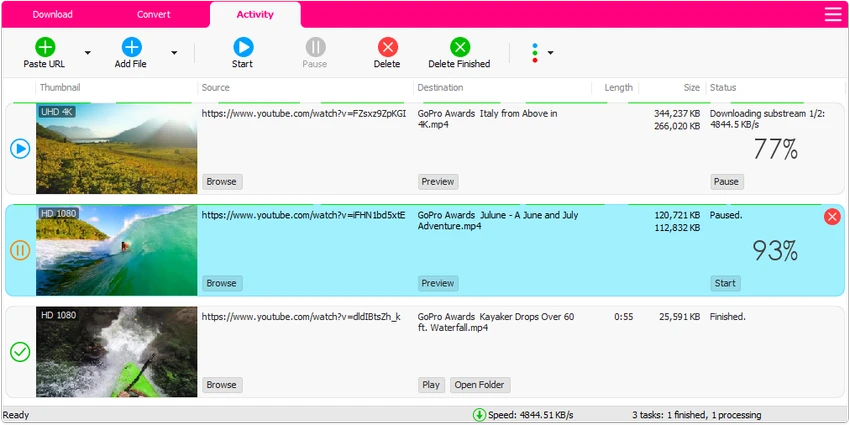
Beyond downloading individual videos, the software includes playlist downloading, simultaneous downloads, pause and resume functionality, and a multi-threaded download engine designed to improve download performance. Users can also drag and drop supported video links directly into the application to begin downloads.

Muziza YouTube Downloader Converter also functions as a media converter, allowing users to convert video and audio files between multiple formats. Additional features include extracting audio from video files, optimizing videos for mobile devices, customizable output presets, optional iTunes integration, and a built-in media player for playing supported files.

Features of Muziza YouTube Downloader Converter

  • Downloads videos from supported online video websites
  • Supports YouTube, Facebook, Instagram, Dailymotion, and other supported platforms
  • Downloads videos up to 8K resolution where available
  • Downloads audio streams from YouTube as MP3
  • Downloads complete or partial playlists
  • Multi-threaded download acceleration
  • Supports simultaneous downloads
  • Pause and resume downloads
  • Drag-and-drop URL support
  • Preview media while downloading
  • Converts video and audio files between multiple formats
  • Extracts audio from video files
  • Supports output formats including MP4, FLV, AVI, WMV, MOV, MP3, AAC, WAV, and AC3
  • Optimizes videos for mobile devices
  • Includes customizable conversion presets
  • Optional iTunes library integration
  • Built-in media player

Interface and Usability

Muziza YouTube Downloader Converter is designed to simplify the process of downloading and converting online media. Users can start downloads by copying and pasting supported URLs or by dragging links directly into the application window.

The software organizes downloading, conversion, and playback tools within a single interface, reducing the need for separate applications. Features such as simultaneous downloads, playlist support, and preview during downloads improve convenience for users managing multiple media files. The inclusion of ready-made conversion presets also simplifies exporting media for different devices without requiring manual configuration.

Who Should Use Muziza YouTube Downloader Converter?

  • Users who download online videos for offline viewing
  • People who convert video and audio into different formats
  • Users who extract audio from videos
  • Anyone managing video playlists from supported platforms
  • Users preparing media for mobile devices
  • People looking for an integrated downloader and converter

Conclusion

Muziza YouTube Downloader Converter brings together video downloading, media conversion, audio extraction, and playback tools into a single Windows application. Its support for high-resolution downloads, playlist management, and multiple output formats makes it a practical option for users who regularly work with online media.

Pros & Cons

✓

Pros

  • Combines downloading, conversion, and playback features
  • Supports multiple online video platforms
  • Downloads high-resolution videos where available
  • Includes playlist downloading
  • Supports multiple output formats
  • Provides download management features such as pause and resume
✕

Cons

  • No update information is available for the current version
  • Some features depend on supported websites and available media formats
  • Available only for 64-bit Windows systems

Frequently Asked Questions

What is Muziza YouTube Downloader Converter used for?

Muziza YouTube Downloader Converter is used to download videos from supported online platforms, convert media files, extract audio, and manage offline video collections.

Which websites does Muziza YouTube Downloader Converter support?

According to the provided information, it supports YouTube, Facebook, Instagram, Dailymotion, and thousands of other supported video websites.

Can I download only the audio from YouTube videos?

Yes. The software allows users to download the audio stream from supported YouTube videos and save it as an MP3 file.

Does Muziza YouTube Downloader Converter support playlist downloads?

Yes. The software can download an entire playlist or selected videos from a playlist.

Can I convert downloaded videos into other formats?

Yes. The application supports converting video and audio files into multiple formats, including MP4, AVI, WMV, MOV, MP3, AAC, WAV, and AC3.

What operating systems does Muziza YouTube Downloader Converter support?

According to the provided system requirements, Muziza YouTube Downloader Converter supports 64-bit versions of Windows 7, Windows 8, Windows 10, and Windows 11.

Recommended apps [Freeware]:
  • QuadSpinner Gaea 2.3.0.1 QuadSpinner Gaea logo a procedural terrain design tool for creating realistic landscapes with advanced erosion tools.
  • MSI Center 2.0.71.0 MSI Center logo a system utility for MSI devices that manages performance, gaming modes, monitoring, RGB, and hardware optimization tools
  • CreateInstall 8.11.2 CreateInstall logo Build customizable Windows installers with CreateInstall, featuring scripting, flexible compression, and full install control
  • Wireshark 4.6.7 Wireshark logo Analyze network traffic, inspect packets, and troubleshoot connections with a powerful protocol analysis tool for professionals.
  • Revo Uninstaller Free 2.7.0 Revo Uninstaller Free logo Remove unwanted programs, clean leftover files, and manage Windows apps with a free uninstall utility designed for easier system maintenance.
  • DuckDuckGo 0.164.1 DuckDuckGo logo Browse privately with tracker blocking, ad protection, private search, cookie controls, and secure browsing tools built in.
Recommended apps [Shareware]:
  • ViewCompanion Pro 17.10.0.1204 ViewCompanion Pro logo View, convert, annotate, and compare PDF, DWF, CAD, and technical drawing files with powerful batch tools
  • LumaBooth 8.2.1.0 LumaBooth logo professional photo booth software for photos, GIFs, videos, 360 booths, and event customization
  • eM Client 10.4.5606.0 eM Client logo a modern Windows email client with support for Gmail, Exchange, calendars, tasks, contacts, and chat in one app
  • Beyond Compare 5.2.3.32296 Beyond Compare logo compare, merge, and sync files easily with Beyond Compare, a powerful cross-platform tool
  • FinePrint 12.31 FinePrint logo optimizes printing by removing pages, combining jobs, adding watermarks, and saving paper and toner on Windows
  • Gammadyne Mailer 74.0 Gammadyne Mailer logo Automate email campaigns, manage mailing lists, track engagement, and process messages with advanced marketing tools.