


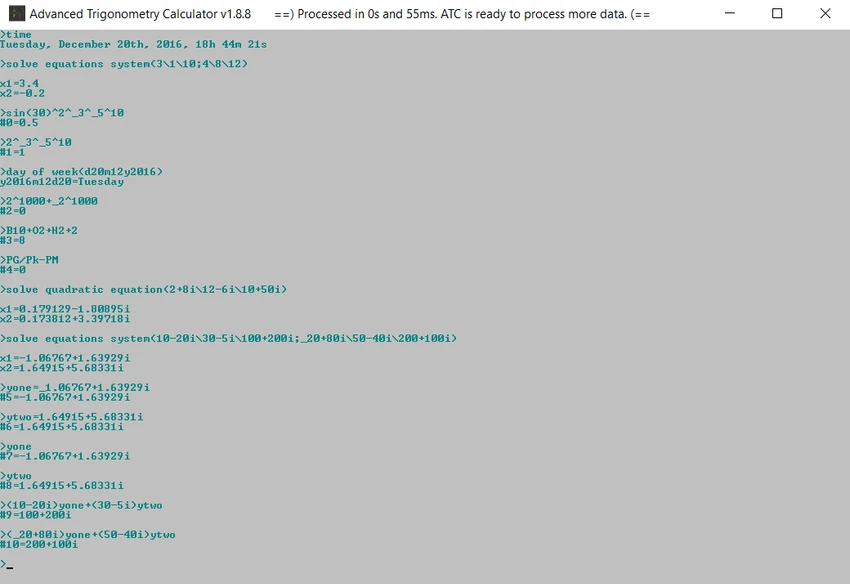

Advanced Trigonometry Calculator is a command-line scientific calculator for Windows that focuses on solving advanced mathematical expressions, trigonometric calculations, and complex number operations. Beyond basic arithmetic, it supports scientific notation, multiple numerical systems, variables, equation solving, and text-based batch calculations.
The application is designed for users who frequently work with mathematical formulas and technical calculations. It can evaluate multiple expressions, process text files containing calculations, and display results in decimal, binary, octal, hexadecimal, or scientific notation. In addition to its mathematical capabilities, it includes several utility features such as a stopwatch, timer, calendar, clock, and history management. Although it operates through a command prompt interface, it provides a broad collection of functions for users who prefer keyboard-driven workflows.
Features of Advanced Trigonometry Calculator
- Advanced trigonometric calculations.
- Scientific notation support.
- Complex number calculations.
- Solve systems of equations with complex numbers.
- Process multiple mathematical expressions.
- Batch processing of text (.txt) files.
- Support for:
- Decimal
- Binary
- Octal
- Hexadecimal
- Mix different numerical systems within the same expression.
- User-defined variables.
- SI measurement prefix support.
- Built-in mathematical constants (π and e).
- Parentheses and expression validation.
- Configurable trigonometric calculation modes.
- History of previous calculations.
- Reuse previous results in new expressions.
- Stopwatch.
- Timer.
- Clock and calendar.
- Determine the day of the week from a given date.
- User configuration options.
- Open user guide and application resources directly from commands.
- Commands for restarting the application and resetting settings.
Interface and Usability
Advanced Trigonometry Calculator uses a command prompt interface instead of a traditional graphical window. Users enter mathematical expressions directly through text commands, making it well suited for those comfortable working in a keyboard-driven environment.
Despite its minimal appearance, the application includes numerous convenience features such as command history, variables, configurable output formats, and text file processing for batch calculations. While beginners may need some time to learn the available commands, experienced users can perform complex calculations efficiently once familiar with the workflow.
Who Should Use Advanced Trigonometry Calculator?
- Students studying advanced mathematics.
- Engineering students.
- Scientists and researchers.
- Users working with trigonometry.
- Users performing complex number calculations.
- Anyone who prefers command-line mathematical tools.
- Users processing multiple mathematical expressions from text files.
Conclusion
Advanced Trigonometry Calculator offers a comprehensive set of mathematical tools for users who require more than a basic calculator. Its support for complex numbers, multiple numeral systems, scientific notation, variables, and batch processing makes it particularly useful for technical and educational applications.


