


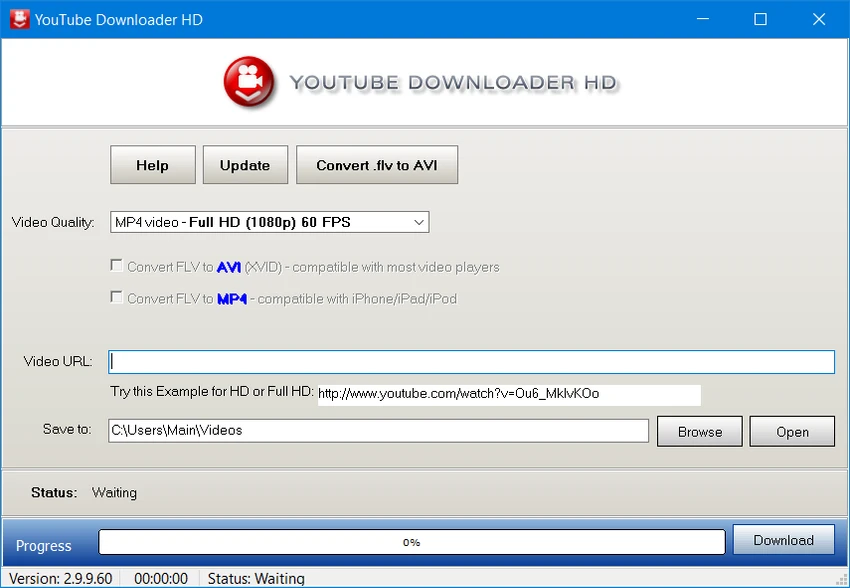

Downloading online videos for offline viewing can be useful when you want to watch content without an internet connection. YouTube Downloader HD provides a simple solution for saving YouTube videos locally and converting them into common video formats. Designed with simplicity in mind, the application focuses on the essential tasks users expect from a video downloader: entering a video URL, selecting an output location, choosing a format, and starting the download process. Its straightforward interface makes it accessible even for users with little experience using video download tools.
Overview
YouTube Downloader HD is a Windows application that allows users to download YouTube videos in high-definition quality and convert them into different formats. The software supports several output options, including FLV and MP4 formats with different quality levels. In addition to downloading videos, the program can convert FLV files into AVI (XviD) for broader compatibility with video players, or convert them into MP4 for use with devices and applications that support the format. The application uses minimal system resources and is designed to complete download and conversion tasks without significantly affecting other running programs.
Features of YouTube Downloader HD
- Download videos from YouTube
- Support for HD video downloads
- Simple three-step workflow:
- Enter video URL
- Select output folder
- Choose output format
- Supports FLV output:
- 240p
- HQ 360p
- HQ 720p
- Supports MP4 output:
- Medium quality
- HD 720p
- Full HD 1080p
- Convert FLV videos to AVI (XviD)
- Convert videos to MP4 format
- Compatible with iPod and QuickTime-supported MP4 playback
- Lightweight application with low CPU and memory usage
- Simple interface suitable for beginners
User Experience
YouTube Downloader HD keeps the user experience focused and uncomplicated. After installation, the main window presents a clean layout with clearly defined fields for entering a video URL, selecting a destination folder, and choosing the preferred output format.
The lack of unnecessary options makes the software approachable for beginners. Users who have never worked with video download tools should be able to understand the basic workflow quickly. The format selection provides useful flexibility. Users can choose between FLV and MP4 outputs depending on their playback needs, while the available quality options allow a balance between file size and video quality.
Performance is another positive aspect. The application is lightweight and does not require significant system resources during operation. Based on the provided information, download and conversion tasks complete quickly while maintaining good image and audio quality. Overall, YouTube Downloader HD is designed for users who want a straightforward downloading and conversion tool rather than a feature-heavy multimedia application.
Who Should Use YouTube Downloader HD?
- Users who want a simple video downloader
- Beginners looking for an easy workflow
- People who need offline access to downloaded videos
- Users converting FLV videos to common formats
- Anyone looking for a lightweight Windows download tool
Conclusion
YouTube Downloader HD delivers a simple and efficient way to download and convert YouTube videos. Its clean interface, support for HD formats, and low system requirements make it accessible for users who want a straightforward solution without complicated settings.


