DiskBoss logo

DiskBoss 16.9.18

  • User Rating:
    ★★★★★
    ★★★★★
    0.0 0Votes
  • Requirements:
    Windows
  • Version: 16.9.18
  • Latest updated: 3 days ago
  • License: Free Trial  
  • Publisher: Flexense Ltd
  • Size: 18 MB
× app stores

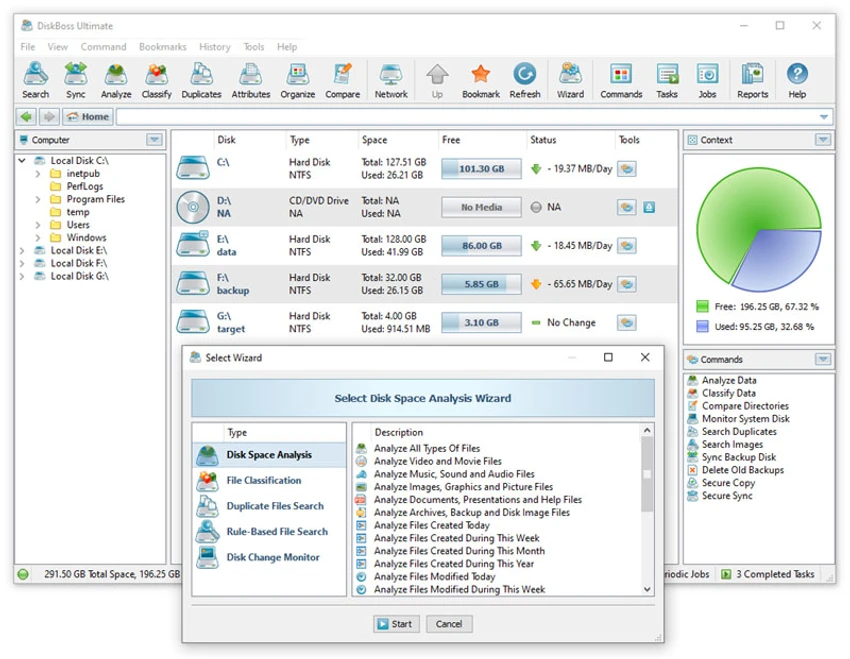
DiskBoss is an automated, rule-based file management and disk analysis tool designed for Windows systems and servers. It helps users analyze disk usage, classify files, detect duplicates, and perform secure file operations such as deletion, synchronization, and data migration. The software is built for efficiency and automation, allowing users to define policies that manage files automatically based on predefined rules. This makes it especially useful for IT administrators and users handling large amounts of data.

Features of DiskBoss

  • Disk space analysis with detailed usage breakdowns.
  • File classification and organization tools.
  • Duplicate file search and cleanup functionality.
  • Bulk file deletion and secure data wiping.
  • High-speed file synchronization.
  • Secure file copy operations.
  • Fault-tolerant data migration between storage devices.
  • Real-time disk change monitoring.
  • File integrity monitoring.
  • Automated, rule-based file management policies.

User Experience

DiskBoss focuses heavily on automation and control. The interface is structured around tasks and policies, allowing users to define how files should be analyzed, moved, or deleted. While it may feel technical at first, it becomes a powerful asset once configured properly. Disk space analysis is straightforward, providing clear insights into how storage is being used. Duplicate file detection is particularly useful for freeing up space, especially on systems with large media or document collections.

Advanced users benefit from synchronization and migration features, which allow secure and efficient data transfer between drives or systems. Real-time monitoring adds an additional layer of control for tracking file system changes.

Who Should Use DiskBoss?

  • IT administrators managing large storage systems.
  • Users who need to analyze and optimize disk usage.
  • Professionals handling large file collections.
  • Anyone needing duplicate file cleanup tools.
  • Users requiring automated file management workflows.

Conclusion

DiskBoss is a powerful and flexible disk management solution that goes beyond basic file browsing. With advanced analysis, automation, and secure file operations, it provides everything needed to manage storage efficiently on Windows systems.

Pros & Cons

Pros

  • Powerful disk space analysis tools.
  • Effective duplicate file detection and cleanup.
  • High-speed file synchronization.
  • Secure file copy and deletion options.
  • Real-time monitoring of file system changes.
  • Strong automation through rule-based policies.
  • Supports a wide range of Windows and server versions.

Cons

  • Interface may feel complex for beginners.
  • Requires configuration to unlock full potential.
  • Primarily focused on advanced users and IT environments.

Frequently Asked Questions

What is DiskBoss used for?

DiskBoss is used for disk space analysis, file management, duplicate cleanup, and data synchronization.

Can DiskBoss find duplicate files?

Yes. It includes a built-in duplicate file search and cleanup feature.

Does DiskBoss support automation?

Yes. It allows rule-based and policy-driven automated file management.

Is DiskBoss suitable for servers?

Yes. It supports multiple Windows Server versions including Server 2025.

Can it securely delete files?

Yes. It includes secure file deletion and data wiping features.

Recommended apps [Freeware]:
  • Automatic Email Processor 4.1.0 Automatic Email Processor logo Automatically save, archive, print, and process Outlook emails and attachments with customizable rules.
  • Smart Defrag 11.4.0.508 Smart Defrag logo a fast Windows disk defragmenter that optimizes hard drives, improves speed, and system stability.
  • FlowHeater 4.5.5 FlowHeater logo data integration tool connecting files and databases like Excel, Access, SQL Server and MySQL
  • Directory Opus 13.24 Directory Opus logo a powerful Windows file manager with dual-pane navigation, FTP support, file tagging, and Explorer replacement
  • BitComet 2.21 BitComet logo BitTorrent download manager supporting torrents, HTTP, and FTP with advanced speed and disk optimization tools
  • Photo Pos Pro 4.21 Build 51 Photo Pos Pro logo a feature-rich photo editor for Windows with layers, filters, RAW support, and advanced image design tools
Recommended apps [Shareware]:
  • Foxit PDF Editor 2026.1.1.36485 Foxit PDF Editor logo complete PDF solution for businesses, offering advanced editing, collaboration, and document security features.
  • MobiKin Assistant for Android 5.1.47 MobiKin Assistant for Android logo back up, restore, and manage Android data, contacts, apps, and files from a PC
  • Centurion Setup 51.0 Centurion Setup logo Windows installer builder that creates compressed, self-contained executables with multilingual support
  • Pano2VR 8.0.4 Pano2VR logo powerful software for building interactive panoramic images and virtual tours for desktop and mobile platforms
  • Coolutils PDF Splitter Pro 6.1.0.85/57 Coolutils PDF Splitter Pro logo Split large PDF files by keywords, page breaks, or document patterns with Coolutils PDF Splitter Pro for Windows.
  • HTTP Debugger Pro 10.3 HTTP Debugger Pro logo captures and analyzes HTTP and HTTPS traffic from browsers and apps, helping developers debug web requests in real time