NetworkTrafficView logo

NetworkTrafficView 2.52

  • User Rating:
    ★★★★★
    ★★★★★
    0.0 0Votes
  • Requirements:
    Windows
  • Version: 2.52
  • Latest updated: 2 weeks ago
  • License: Freeware  
  • Publisher: NirSoft
  • Size: 0.2 MB
× app stores

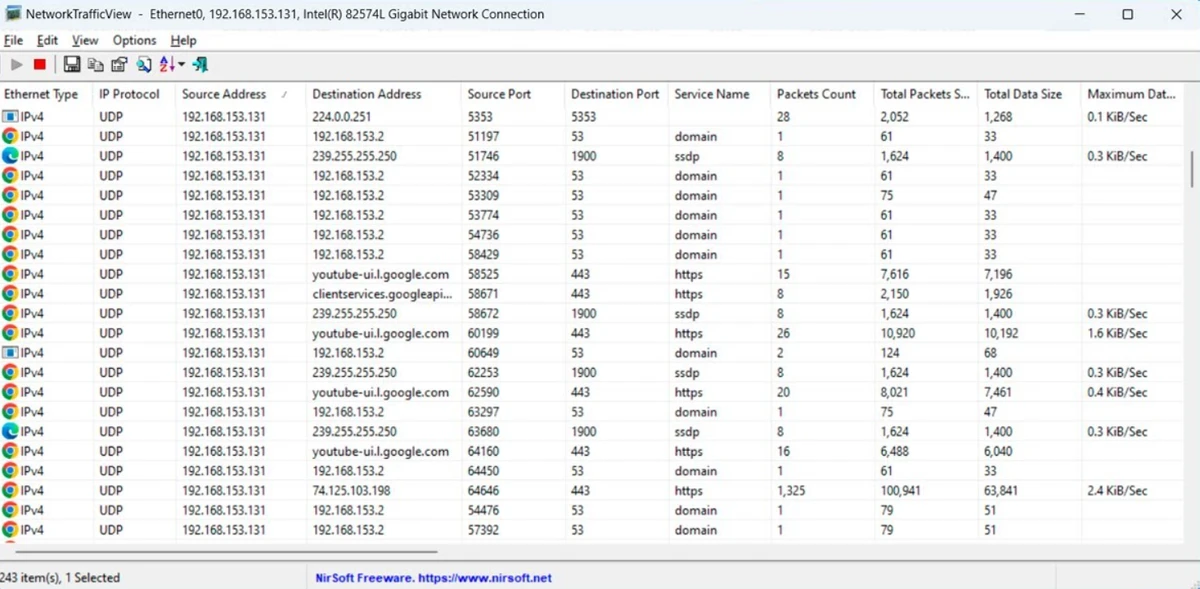
NetworkTrafficView is a lightweight Windows network monitoring utility designed to capture and analyze packets passing through a computer’s network adapter. The software provides a simple way to view network activity by organizing traffic statistics based on Ethernet type, IP protocol, source and destination addresses, and network ports. During my experience with NetworkTrafficView, I found it useful for quickly checking network behavior without the complexity of larger network analysis platforms. It displays detailed information about connections, including packet counts, transfer sizes, speeds, timing information, and TCP process details. Its compact design makes it suitable for users who need a straightforward overview of network traffic and connection activity.

Features of NetworkTrafficView

  • Captures packets passing through a network adapter.
  • Displays general network traffic statistics.
  • Groups traffic information by:
    • Ethernet Type
    • IP Protocol
    • Source Address
    • Destination Address
    • Source Port
    • Destination Port
  • Shows detailed network information, including:
    • Ethernet Type (IPv4, IPv6, ARP)
    • IP Protocol (TCP, UDP, ICMP)
    • Source Address
    • Destination Address
    • Source Port
    • Destination Port
    • Service Name (such as HTTP and FTP)
    • Packet Count
    • Total Packet Size
    • Total Data Size
    • Data Speed
    • Maximum Data Speed
    • Average Packet Size
    • First and Last Packet Time
    • Connection Duration
  • Displays process ID and process name for TCP connections.

Interface and Usability

NetworkTrafficView focuses on presenting network information in a clear and practical format. The interface is designed around data tables, allowing users to view traffic details without navigating through complicated menus. The grouped statistics view makes it easier to identify communication patterns by showing related packet information together. Users can examine addresses, protocols, ports, transfer speeds, and timing details from a single interface.

Because the tool concentrates on monitoring and displaying traffic information, it is most suitable for users who already understand basic networking concepts or need a quick overview of active network activity.

Who Should Use NetworkTrafficView?

  • Users who need a lightweight network monitoring tool.
  • IT professionals checking network activity.
  • Administrators analyzing basic traffic statistics.
  • Users troubleshooting network connections.
  • Anyone interested in viewing packet-level network information.
  • Users who prefer compact utilities over large monitoring suites.

Conclusion

NetworkTrafficView is a practical network monitoring utility for users who need a compact way to inspect traffic passing through their network adapter. Its detailed packet statistics, connection information, and process identification features make it useful for troubleshooting and understanding network activity.

Pros & Cons

Pros

  • Lightweight and easy to use.
  • Captures network packets in real time.
  • Provides detailed traffic statistics.
  • Displays TCP process information.
  • Shows bandwidth and speed-related data.
  • Supports IPv4, IPv6, and ARP traffic information.
  • Useful for quick network analysis.

Cons

  • Requires basic networking knowledge to interpret some information.
  • Focused on monitoring rather than advanced network management.

Frequently Asked Questions

What is NetworkTrafficView used for?

NetworkTrafficView is used to monitor network traffic by capturing packets that pass through a computer’s network adapter and displaying detailed statistics.

What network protocols does NetworkTrafficView display?

The software displays IP protocols including TCP, UDP, and ICMP, along with Ethernet types such as IPv4, IPv6, and ARP.

Does NetworkTrafficView show which programs are using network connections?

Yes. For TCP connections, the program displays the related process ID and process name.

What information does NetworkTrafficView show about network traffic?

It displays details such as source and destination addresses, ports, service names, packet counts, data sizes, transfer speeds, packet sizes, and connection timing information.

Is NetworkTrafficView suitable for beginners?

The program is lightweight and simple to operate, but understanding the displayed network information requires some basic knowledge of networking concepts.

Can NetworkTrafficView analyze all network activity?

NetworkTrafficView captures packets passing through the selected network adapter and displays available traffic statistics based on the captured data.

Recommended apps [Freeware]:
  • EarthView 7.17.0 EarthView logo dynamic wallpapers and screensavers with day, night, and weather effects
  • FreeFileSync 14.10 FreeFileSync logo open-source tool for folder synchronization, file comparison, and efficient backups
  • AlienFx Tools 9.6.1.1 AlienFx Tools logo a lightweight suite for managing Alienware lighting, fan control, power profiles, and system monitoring
  • NoMachine 9.8.2 NoMachine logo Access and control remote computers securely with a fast desktop sharing tool for working, accessing files, and remote management.
  • Inno Setup Unpacker 2.2.10 Inno Setup Unpacker logo Extract files from Inno Setup installers quickly with a lightweight command-line utility supporting advanced unpacking options.
  • Sandboxie 5.73.0 Sandboxie logo Protect your system by running applications in an isolated environment that prevents unwanted changes while keeping full functionality.
Recommended apps [Shareware]:
  • Sync Breeze 18.2.32 Sync Breeze logo fast and reliable file synchronization tool for local drives, NAS devices, and enterprise storage systems.
  • Topaz Photo 1.6.1 Topaz Photo logo advanced AI to sharpen photos, remove noise, and enhance image quality with ease
  • VovSoft Audio to Lyrics Converter 1.2 VovSoft Audio to Lyrics Converter logo offline AI tool to transcribe audio into LRC, SRT, VTT, and text files.
  • EmEditor 26.2.0 EmEditor logo a fast Windows code editor with large file support, syntax highlighting, regex search, and powerful editing tools
  • Sparkbooth 7.2.79 Sparkbooth logo Create a professional photo booth with Sparkbooth, featuring customizable layouts, green screen effects, instant sharing, and printing
  • WinCatalog 2026.2.0.629 WinCatalog logo a disk and file cataloging tool for Windows that indexes files for fast search and organization