FileLegit Windows Utilities System Tools Revo Registry Cleaner
Revo Registry Cleaner logo

Revo Registry Cleaner 2.2.1

  • User Rating:
    ★★★★★
    ★★★★★
    0.0 0Votes
  • Requirements:
    Windows
  • Version: 2.2.1
  • Latest updated: 6 days ago
  • License: Freeware  
  • Publisher: VS Revo Group
  • Size: 94.2 MB
× app stores

Revo Registry Cleaner is a dedicated Windows registry maintenance utility available in both Free and Pro editions. Designed to help users identify and remove invalid or unnecessary registry entries, the software combines registry cleaning, monitoring, backup, and tuning capabilities into a single solution. Beyond basic cleanup, Revo Registry Cleaner provides real-time registry monitoring, automated maintenance features, backup options, and a collection of registry tweaks aimed at helping users customize and optimize their Windows experience.

Features of Revo Registry Cleaner

  • Registry cleaning with more than 15 scanning categories
  • Detects and removes invalid and redundant registry entries
  • Four registry scan depth modes
  • Custom registry key inclusion and exclusion options
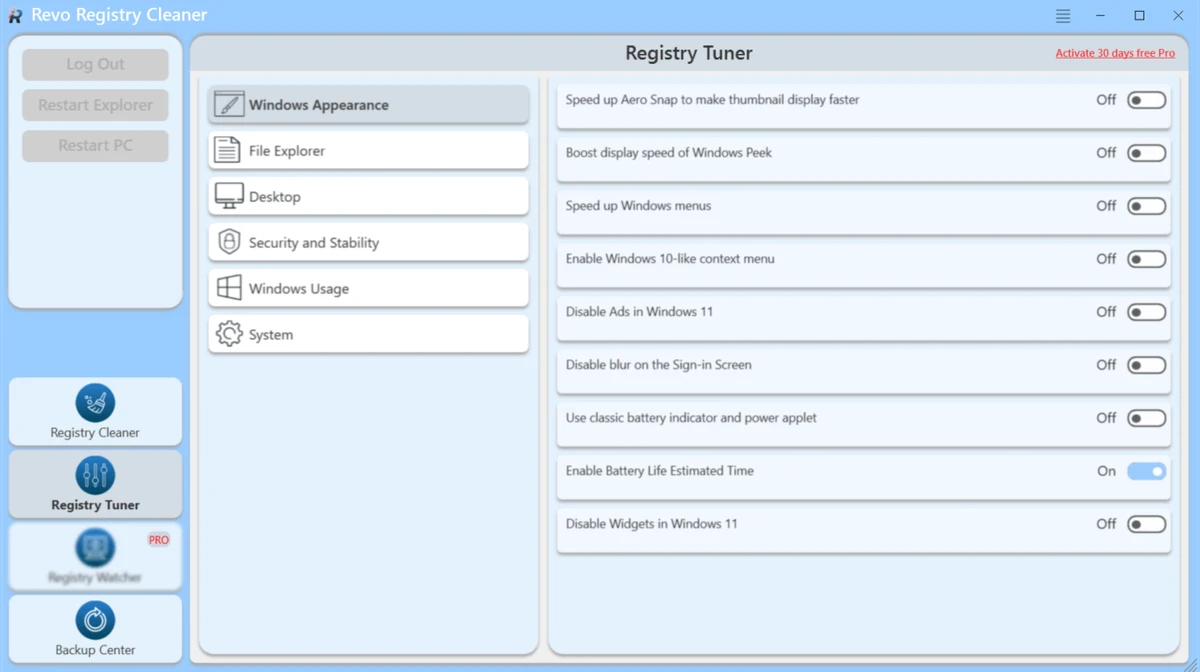
  • Registry Tuner with 50 registry tweaks
  • Real-time Registry Watcher monitoring
  • Tracks registry key and value changes
  • Identifies processes responsible for registry modifications
  • Filter registry events by operation type or data content
  • Create backups for specific registry keys
  • Full registry backup functionality
  • Scheduled automatic registry backups
  • Scheduled automatic cleaning
  • Daily, weekly, and monthly automation options
  • Automatic background updates
  • Scan all user accounts or a single user account
  • Dark Mode interface support
  • Export registry modification logs

User Experience

After using Revo Registry Cleaner, it becomes apparent that the software is designed for users who want more control over Windows registry maintenance than basic cleanup utilities typically provide. The cleaning component offers flexibility through multiple scan categories and four scan depth levels. This allows users to choose between quick maintenance scans and more comprehensive registry inspections depending on their needs.

One of the more useful aspects is the ability to customize scans through key inclusion and exclusion settings. This provides greater control for advanced users who want to avoid modifying specific registry areas. The Registry Watcher feature adds another layer of functionality by monitoring registry activity in real time. Being able to track changes and identify the processes responsible for modifications can be particularly useful for troubleshooting system behavior or software installations.

Backup options are also well integrated into the workflow. Users can create backups of individual registry keys or the entire registry and automate the process through scheduled tasks. This helps reduce risk when making registry changes or applying tweaks. The included Registry Tuner expands the software beyond maintenance by offering a collection of registry-based customization options. Combined with automation tools and background updates, the software provides a comprehensive registry management environment rather than simply a cleanup tool.

Who Should Use Revo Registry Cleaner?

  • Windows power users
  • System administrators
  • IT professionals
  • PC maintenance enthusiasts
  • Users troubleshooting registry-related issues
  • Users seeking automated registry maintenance
  • Individuals who regularly optimize and customize Windows settings

Conclusion

Revo Registry Cleaner offers a powerful collection of tools for maintaining and monitoring the Windows Registry. With advanced scanning options, real-time tracking, backup protection, scheduling capabilities, and registry tuning features, it provides a level of control that goes beyond traditional registry cleaners.

Pros & Cons

Pros

  • More than 15 registry scanning categories
  • Multiple scan depth options
  • Registry inclusion and exclusion customization
  • Real-time registry monitoring
  • Registry tweak and optimization tools
  • Full and partial registry backup support
  • Scheduled cleaning and backup automation
  • Tracks registry modifications and related processes
  • Supports exporting registry activity logs
  • User-friendly interface with Dark Mode support

Cons

  • Focused exclusively on Windows registry management
  • Advanced features may be unnecessary for casual users
  • Registry modifications require careful use and understanding

Frequently Asked Questions

What is Revo Registry Cleaner used for?

Revo Registry Cleaner is used to clean, monitor, back up, and optimize the Windows Registry by removing invalid entries and managing registry changes.

How many scanning categories does the software provide?

The software includes more than 15 scanning categories designed to identify different types of invalid or unnecessary registry entries.

Does Revo Registry Cleaner support registry backups?

Yes. Users can create backups of specific registry keys or perform full registry backups. Automated scheduled backups are also supported.

What is Registry Watcher?

Registry Watcher is a real-time monitoring feature that tracks registry changes, records modifications, and identifies the processes responsible for those changes.

Can the software automate registry maintenance?

Yes. Scheduled Auto Clean and Auto Backup features allow users to automate registry maintenance tasks on daily, weekly, or monthly schedules.

What is Registry Tuner?

Registry Tuner provides approximately 50 registry tweaks that allow users to customize and optimize various Windows settings.

Which operating systems are supported?

Revo Registry Cleaner supports Windows 7, Windows 8, Windows 8.1, Windows 10, and Windows 11 (64-bit versions only).

Recommended apps [Freeware]:
  • BleachBit 6.0.0 BleachBit logo a free Windows cleaner that removes junk files, protects privacy, and frees disk space with secure wiping.
  • CrossFTP 2.00.1 CrossFTP logo a multi-protocol FTP client for Windows supporting SFTP, WebDAV, S3, Azure, and secure file transfers
  • Video Repair Tool 5.0.2.3 Video Repair Tool logo repair corrupted, broken, or unplayable video files on Windows and Mac with simple recovery workflows.
  • PDFgear 2.1.16 PDFgear logo a free PDF editor for Windows that supports editing, conversion, OCR, merging, signing, and AI-assisted PDF workflows
  • K-Lite Codec Pack Mega 19.8.2 K-Lite Codec Pack Mega logo Play all audio and video formats on Windows with K-Lite Codec Pack Mega, a full multimedia codec and filter package
  • SoftPerfect RAM Disk 26.6 SoftPerfect RAM Disk logo creates high-speed virtual drives in memory to boost performance and reduce disk wear
Recommended apps [Shareware]:
  • VueScan 9.8.56 VueScan logo Enhance scanner functionality with advanced tools for scanning documents, photos, videos, and slides.
  • Sequence Generator Pro 4.5.0.1649 Sequence Generator Pro logo a Windows astrophotography capture suite for automating imaging, focus, and sequencing.
  • Roboform 9.9.4.6 Roboform logo a secure password manager using AES-256 encryption, autofill, and cross-device sync for safer login management
  • Mountain Duck 5.3.0.29446 Mountain Duck logo mounts cloud storage and servers as local drives with smart sync, offline access, and seamless file integration
  • JProfiler 16.1.1 JProfiler logo a powerful Java profiler for analyzing performance, memory usage, and database activity
  • EF File Catalog 26.05 EF File Catalog logo Catalog disks, folders, archives, and media for fast offline browsing, searching, and file organization