


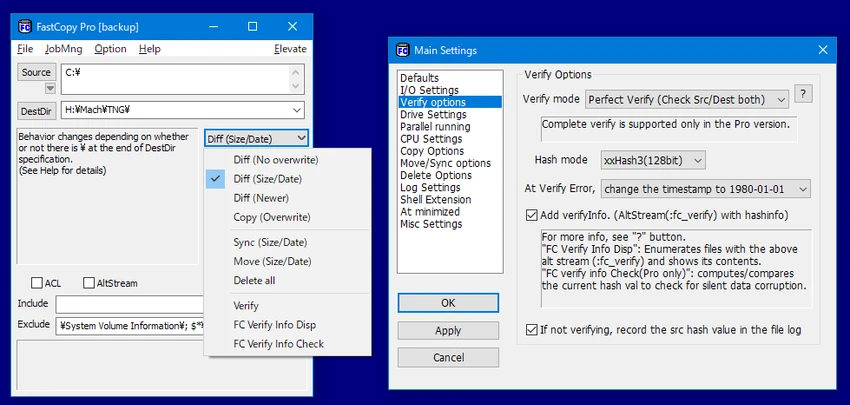

FastCopy is a lightweight Windows utility designed to significantly improve file copying speed compared to the default Windows file transfer system. It focuses on performance, stability, and simplicity, allowing users to transfer large volumes of data quickly while reducing interruptions caused by file errors. Positioned as a replacement for standard copy-and-paste operations, FastCopy is especially useful for users who regularly move or synchronize large datasets.
Overview
FastCopy operates as a dedicated file transfer tool that bypasses some of the limitations of Windows Explorer copying. It provides a simple interface where users select source and destination paths, then execute high-speed file operations. Beyond basic copying, it also supports synchronization modes and selective file handling based on attributes such as size or modification date. The tool is designed to continue operations even when encountering problematic files, improving reliability during large transfers.
Features of FastCopy
- High-speed file copying for large data transfers
- Optimized performance compared to standard Windows copy function
- Error-resilient copying (skips problematic files and continues process)
- File synchronization mode for mirroring data between locations
- Selective copy options based on file size or date
- Real-time display of transfer speed and remaining time
- Lightweight application with small installation size (~4 MB)
- Integration with Windows context (right-click menu support)
- Simple interface designed for quick operation
User Experience
FastCopy offers a minimal and functional interface that prioritizes speed over visual complexity. Users are presented with a compact control window where they can quickly define source and destination paths and start the transfer process. Despite its simplicity, the tool includes advanced options for more precise file operations, such as filtering files by size or date. During transfers, it provides real-time feedback on speed and progress, helping users monitor large copy tasks effectively.
The software is particularly useful in scenarios where Windows File Explorer struggles with large or complex transfers. However, its interface may feel basic compared to modern file management tools.
Who Should Use FastCopy?
FastCopy is best suited for users who frequently handle file transfers and need better performance than default system tools, such as:
- IT technicians managing large data backups or migrations
- Office users transferring large files regularly
- Power users working with media, projects, or datasets
- System administrators performing quick file synchronization tasks
- Users looking for a faster alternative to Windows Explorer copy function
Conclusion
FastCopy is a practical and efficient file transfer utility for Windows users who need speed and reliability. While it does not offer a complex interface or advanced file management ecosystem, it excels at its core purpose: fast, stable, and efficient data copying.


