Adobe Acrobat Pro DC logo

Adobe Acrobat Pro DC 2026

  • User Rating:
    ★★★★★
    ★★★★★
    0.0 0Votes
  • Requirements:
    Windows
  • Version: 2026
  • Latest updated: 1 week ago
  • License: Free Trial  
  • Publisher: Adobe
  • Size: 1.6 GB
×

Adobe Acrobat Pro DC is a professional PDF management solution designed to create, edit, and secure PDF documents. With its cloud connectivity, advanced editing tools, and robust security features, it streamlines document workflows for both personal and professional use.

Overview

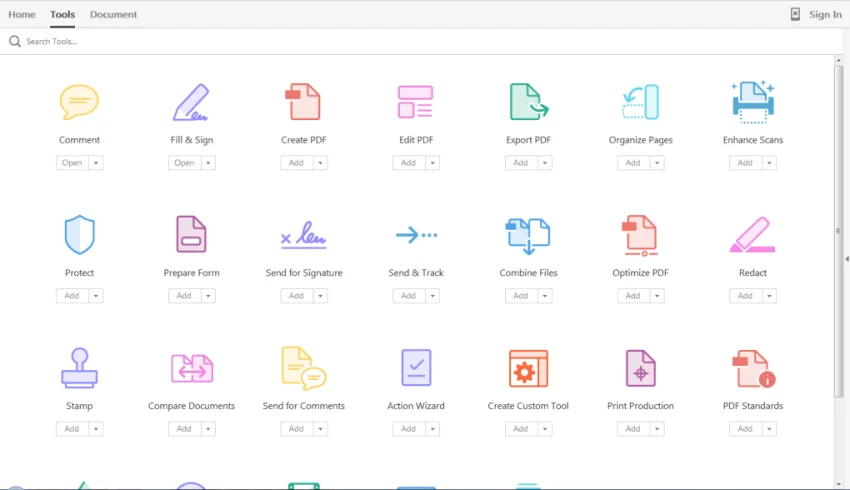
Adobe Acrobat Pro DC 2026 is the latest version of Adobe’s flagship PDF software. It allows users to create, edit, and export PDF files in multiple formats. The updated interface features a sleek Ribbon-style design, making navigation intuitive and efficient. One standout feature is its cloud integration, enabling users to access and manage PDF files across devices. Beyond basic PDF editing, Acrobat Pro DC supports annotations, digital signatures, and robust security options to safeguard documents. Whether you need to split, merge, or scan PDFs, this software provides a professional-grade environment for handling all your PDF tasks.

Features of Adobe Acrobat Pro DC

  • Create and edit PDF documents seamlessly
  • Annotate, comment, and provide feedback on PDFs
  • Digitally sign and secure PDF files
  • Split, merge, and organize PDFs efficiently
  • Export PDFs to multiple formats
  • Scan physical documents into PDF format
  • Cloud connectivity for accessing PDFs across devices
  • Comprehensive search tool for locating elements in PDFs
  • Protected Mode and advanced security to prevent malware
  • Customizable options for annotations, multimedia, and page layout

User Experience

Using Adobe Acrobat Pro DC feels professional and polished. The interface is modern and easy to navigate, with a dedicated sidebar for comments that doesn’t interfere with the reading space. PDF creation from multiple formats is fast, and editing tools are straightforward enough to handle text, images, and annotations without needing additional software. The cloud integration is particularly useful for users who work across multiple devices, ensuring recent files are always accessible. Security features, including Protected Mode, provide peace of mind when handling sensitive documents. While most functions are intuitive, accessing the help guide requires an internet connection, which may be a limitation for offline users.

Conclusion & Recommendation

Adobe Acrobat Pro DC 2026 is a top-tier PDF solution, combining powerful editing, secure document management, and cloud accessibility. Whether for personal or professional use, it streamlines PDF workflows and maintains high standards for document security. If you work regularly with PDFs, Adobe Acrobat Pro DC is a reliable choice. Explore the software today to experience professional PDF management at its finest.

Pros & Cons

Pros

    • Comprehensive PDF creation and editing tools
    • Cloud integration for multi-device access
    • Advanced security and digital signature support
    • Modern, intuitive interface
    • Efficient document management features (split, merge, scan)

Cons

    • Requires internet access for full help guide
    • Large file size (1.6 GB)
    • Advanced features may have a learning curve for beginners

Frequently Asked Questions

What platforms is Adobe Acrobat Pro DC available on?

Adobe Acrobat Pro DC is available on Windows and macOS, supporting multilingual usage.

Can I edit scanned PDF documents?

Yes, Acrobat Pro DC can convert scanned documents into editable PDFs using OCR technology.

Does it support cloud storage?

Yes, the software allows you to access and manage PDFs across devices via cloud connectivity.

Is Adobe Acrobat Pro DC secure?

The software includes Protected Mode and advanced security features to safeguard against malware and unauthorized access.

How large is the software?

The installation size is approximately 1.6 GB.

Recommended apps [Freeware]:
  • Trillian 6.6 Build 15 Trillian logo all-in-one chat software designed to simplify online communication
  • DirPrintOK 7.61 DirPrintOK logo fast and portable tool to print or export directory contents in XLS, HTML, CSV, or TXT formats.
  • StaxRip 2.52.4 StaxRip logo powerful Windows GUI for video/audio encoding using FFmpeg, x265, AviSynth+, VapourSynth, and more.
  • UltraSearch 4.9.2.1208 UltraSearch logo locates files and folders on local NTFS drives in seconds without building an index. Fast, precise, and lightweight.
  • Stretchly 1.21.0 Stretchly logo reminds you to take breaks while working on your computer, promoting better health and productivity.
  • iTop Easy Desktop 4.3.0.342 iTop Easy Desktop logo declutter, organize, and manage Windows desktop items efficiently and quickly
Recommended apps [Shareware]:
  • Amazing Laptop Cooling Wizard 1.1.5.8 Amazing Laptop Cooling Wizard logo Reduce laptop overheating by optimizing CPU and fan cooling performance on Windows.
  • SketchUp Pro 2026 SketchUp Pro logo powerful 3D modeling software for architects, designers, and engineers with intuitive tools.
  • Adobe Illustrator 2026 Adobe Illustrator logo professional vector graphic editor for creating logos, illustrations, and scalable designs.
  • Wondershare Filmora 15.3.20.18660 Wondershare Filmora logo a powerful, user-friendly video editor with effects, transitions, and 4K support.
  • Adobe After Effects 2026 Adobe After Effects logo advanced motion graphics, visual effects, compositing, and animation tools for creators.
  • Wondershare AllMyTube 7.4.9.2 Wondershare AllMyTube logo download and convert videos from YouTube and 100+ sites into multiple formats for offline viewing.