FileLegit Windows Multimedia Audio Editors VovSoft Audio to Lyrics Converter
VovSoft Audio to Lyrics Converter logo

VovSoft Audio to Lyrics Converter 1.0

  • User Rating:
    ★★★★★
    ★★★★★
    0.0 0Votes
  • Requirements:
    Windows
  • Version: 1.0
  • Latest updated: 2 days ago
  • License: Free Trial  
  • Publisher: VovSoft
  • Size: 133 MB
×

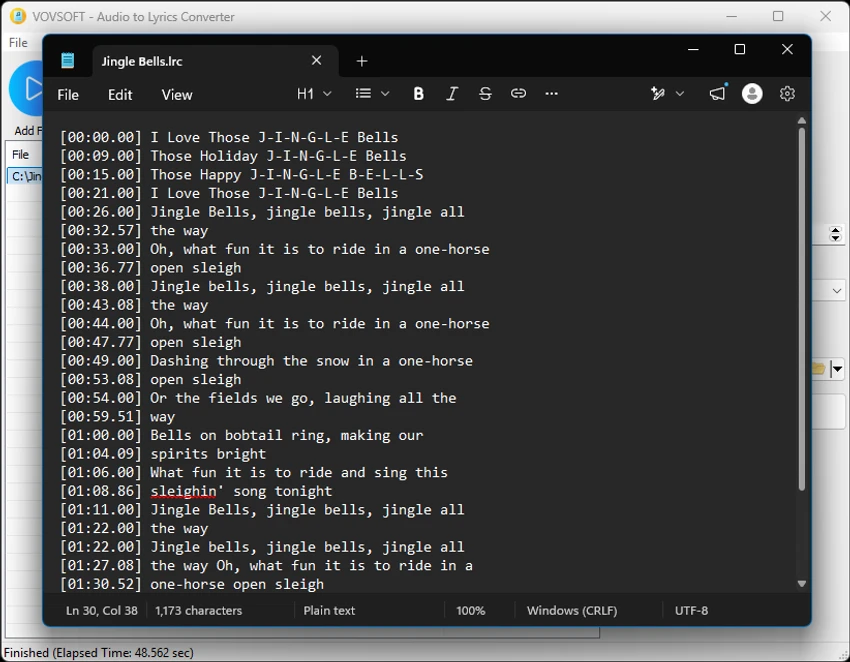
Vovsoft Audio to Lyrics Converter is a Windows utility designed to automatically convert audio files into text-based outputs such as lyrics and subtitles. Using offline AI speech recognition models, it processes audio locally on your computer and generates synchronized transcripts with timestamps for music, videos, podcasts, and other spoken content.

Vovsoft Audio to Lyrics Converter uses offline AI models based on OpenAI Whisper technology to transcribe audio files into structured text formats. It supports common audio inputs such as MP3, WAV, OGG, and FLAC, and produces outputs like LRC lyrics files, SRT/VTT subtitles, and plain text transcripts. One of its core strengths is that all processing happens locally, meaning no internet connection or cloud API is required. This improves privacy and makes it suitable for users who prefer offline workflows or need to process sensitive audio content securely.

Key Features of Audio to Lyrics Converter

  • Wide Format Support: Works with popular audio formats, including MP3, WAV, OGG, and FLAC.
  • Multiple Output Formats: Export your transcriptions as standard LRC files for music players, SRT or VTT files for video subtitles, or plain TXT files for easy reading.
  • Offline AI Processing: Utilizes OpenAI Whisper models to process audio securely on your PC without an internet connection. Select from different local models (Base, Small, Medium, Large) and leverage multi-thread CPU support to perfectly balance fast conversion speeds with high transcription accuracy.
  • Batch Processing: Easily queue up individual tracks or add entire folders to convert multiple audio files in one seamless operation.
  • Synchronized Timestamps: Automatically generates precise timestamp tags (e.g., [00:26.00]) so your lyrics match the exact pacing of the song or audio track.
  • Customizable Line Lengths: Set a maximum character count per line to ensure your subtitles and lyrics display perfectly on any screen size or media player.
  • Drag and Drop Support: Quickly load your audio tracks by simply dragging and dropping files or folders directly into the software interface.

Perfect For

  • Musicians creating LRC lyric files for songs
  • Video creators generating subtitles (SRT/VTT)
  • Podcasters and journalists transcribing interviews
  • Users who need offline, private transcription tools
  • Content creators working with multilingual audio

Conclusion

Vovsoft Audio to Lyrics Converter is a practical offline transcription tool that transforms audio into structured lyrics and subtitles with strong accuracy and privacy-focused processing. Its use of local AI models makes it especially appealing for users who prefer not to rely on cloud services.

Pros & Cons

Pros

    • Fully offline AI processing for privacy
    • Supports multiple transcription formats (LRC, SRT, VTT, TXT)
    • High-quality transcription using Whisper models
    • Batch processing for efficiency
    • Flexible model selection for speed vs accuracy
    • Simple drag-and-drop workflow

Cons

    • Performance depends on CPU hardware
    • No cloud acceleration option
    • Larger AI models can be slow on weaker systems
    • No official rating or changelog provided

Frequently Asked Questions

What is Vovsoft Audio to Lyrics Converter used for?

Vovsoft Audio to Lyrics Converter is used to convert audio files into lyrics, subtitles, and text transcripts using offline AI.

Does it require an internet connection?

No, it works fully offline using local AI models.

What audio formats are supported?

It supports MP3, WAV, OGG, and FLAC files.

Can it create subtitles?

Yes, it can generate SRT and VTT subtitle files with timestamps.

Is it suitable for professional use?

Yes, it is suitable for content creators, podcasters, and musicians who need accurate offline transcription.

Recommended apps [Freeware]:
  • EarthView 7.16.4 EarthView logo dynamic wallpapers and screensavers with day, night, and weather effects
  • WinScan2PDF 9.77 WinScan2PDF logo scan documents and save them as PDFs or JPEGs with minimal setup and low CPU usage.
  • UltraSearch 4.9.2.1208 UltraSearch logo locates files and folders on local NTFS drives in seconds without building an index. Fast, precise, and lightweight.
  • iTop Easy Desktop 4.3.0.342 iTop Easy Desktop logo declutter, organize, and manage Windows desktop items efficiently and quickly
  • Android Studio 2026.1.1.9 Android Studio logo Google’s official IDE for Android, offering intelligent coding, fast emulators, and cloud integration.
  • Garmin Express 7.29.0.0 Garmin Express logo manage Garmin GPS devices with map updates, backups, software updates, and device registration
Recommended apps [Shareware]:
  • Quick Heal AntiVirus Pro 26.1.0.2 Quick Heal AntiVirus Pro logo real-time malware protection, ransomware defense, and email security
  • Typing Instructor Platinum 21.1 Typing Instructor Platinum logo improve typing speed and accuracy through interactive lessons, games, and 10-finger typing practice.
  • Adobe Illustrator 2026 Adobe Illustrator logo professional vector graphic editor for creating logos, illustrations, and scalable designs.
  • Sync Breeze 18.2.32 Sync Breeze logo fast and reliable file synchronization tool for local drives, NAS devices, and enterprise storage systems.
  • Charles 5.2.0 Charles logo HTTP proxy tool for web debugging, allowing developers to inspect, modify, and analyze network traffic in real time
  • Teorex FolderIco 9.2.2 Teorex FolderIco logo Change folder colors or icons in one click and organize your files visually, so you can find everything instantly