


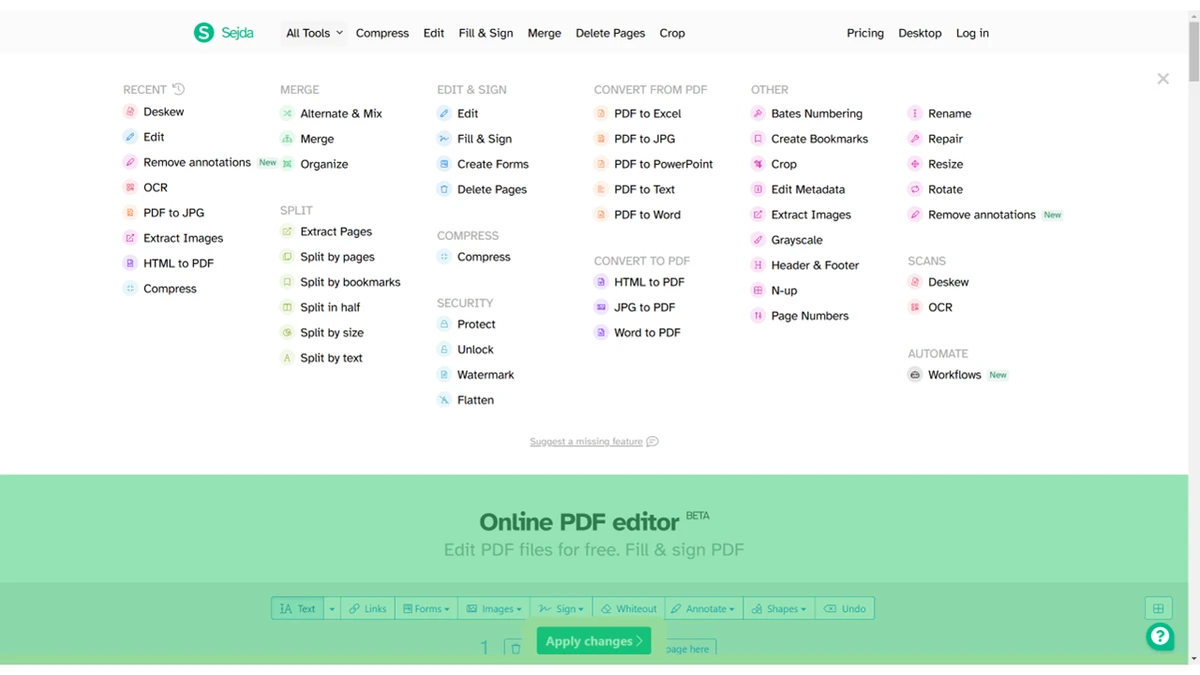

Sejda PDF Desktop is a versatile PDF management tool designed to simplify everyday document editing tasks without the complexity of enterprise-grade software. It provides an accessible alternative to heavyweight solutions like Adobe Acrobat, focusing on ease of use, speed, and essential PDF workflows. The software is suitable for students, office users, and professionals who regularly work with PDF documents and need a straightforward way to edit, organize, and secure files.
Features of Sejda PDF Desktop
- Merge multiple PDFs into a single document.
- Split PDFs into separate files or extract pages.
- Compress PDFs while maintaining readability and quality.
- Edit PDF text directly without conversion.
- Add or remove text, images, links, and annotations.
- Convert PDFs to formats such as:
- Word
- Excel
- Images
- Add or remove watermarks.
- Fill and sign PDF forms.
- Password protect PDFs or remove restrictions.
- OCR functionality for converting scanned documents into editable text.
- Cross-platform support:
- Windows
- macOS
- Linux
User Experience
Sejda PDF Desktop is designed with simplicity in mind. The interface is clean and intuitive, allowing users to quickly access common PDF tools without a steep learning curve. Daily tasks such as merging receipts, compressing large documents for email, or editing text in resumes are handled efficiently. The ability to edit PDFs directly is especially useful for users who frequently need quick corrections without converting file formats. The application performs well in most common scenarios, offering fast processing and consistent output quality. However, more advanced workflows may require a paid plan due to free usage limits.
Free Version Limitations
- Up to 3 tasks per day.
- Maximum file size of 50MB or 200 pages.
- Batch processing is not available in the free version.
- Advanced workflows require a paid subscription.
Who Should Use Sejda PDF Desktop?
- Students managing study materials and notes.
- Office workers handling reports and forms.
- Users needing quick PDF edits and conversions.
- People looking for an alternative to Adobe Acrobat.
- Cross-platform users (Windows, macOS, Linux).
Conclusion
Sejda PDF Desktop delivers a smooth and accessible PDF editing experience with all the essential tools most users need. While its free version has limitations, it remains a strong choice for everyday document management tasks.


