O&O ShutUp10++ logo

O&O ShutUp10++ 3.1.1104

  • User Rating:
    ★★★★★
    ★★★★★
    0.0 0Votes
  • Requirements:
    Windows
  • Version: 3.1.1104
  • Latest updated: 1 week ago
  • License: Freeware  
  • Publisher: O&O Software
  • Size: 76 MB
× app stores

O&O ShutUp10++ is a lightweight privacy management tool for Windows that allows users to disable or control various system features related to data collection, telemetry, updates, and location services. It is designed for users who want a centralized and simple way to adjust Windows privacy settings without navigating complex system menus.

Overview

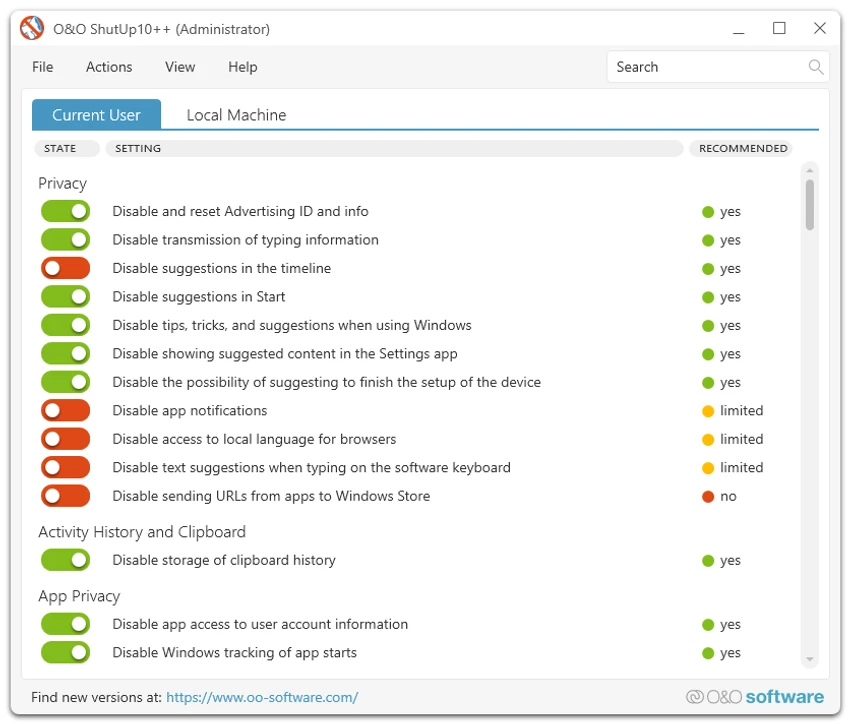
O&O ShutUp10++ is developed by O&O Software and focuses on giving users more control over how Windows handles personal data and system-level communication. Instead of manually changing multiple system settings across different Windows menus, this tool consolidates privacy-related options into a single interface. Users can quickly review and toggle settings related to diagnostics, location tracking, updates, and other background services. The software is portable, meaning it can be run without installation, and is designed to work primarily with Windows 10 and Windows 11.

Features of O&O ShutUp10++

  • Centralized control of Windows privacy settings
  • Disable or manage telemetry and data collection features
  • Control location services and background tracking
  • Manage Windows Update behavior
  • Adjust security and system comfort settings
  • Portable application (no installation required)
  • Simple interface suitable for non-technical users
  • Quick access to grouped privacy recommendations
  • Ability to apply or revert changes easily

User Experience

O&O ShutUp10++ is designed to be straightforward and accessible, even for users without technical experience. The interface organizes privacy settings into categories, making it easier to understand what each option affects. Instead of requiring manual registry edits or deep system navigation, users can toggle settings directly from the application. This reduces complexity and lowers the risk of misconfiguration compared to manual tweaking.

Who Should Use O&O ShutUp10++?

O&O ShutUp10++ is best suited for users who want more control over Windows privacy and data sharing without dealing with advanced system settings. It is particularly useful for privacy-conscious users, home users who want to reduce telemetry, and IT administrators configuring multiple systems.

Conclusion

O&O ShutUp10++ is a practical and user-friendly privacy control tool for Windows. It simplifies access to system settings that are otherwise scattered and difficult to manage.

Pros & Cons

Pros

  • Easy-to-use privacy control interface
  • Portable (no installation required)
  • Centralized Windows privacy settings
  • Helps reduce telemetry and background data sharing
  • Suitable for non-technical users

Cons

  • Requires user understanding to avoid disabling important features
  • Limited to Windows privacy-related settings
  • No advanced system optimization tools

Frequently Asked Questions

What is O&O ShutUp10++ used for?

It is used to manage and disable Windows privacy, telemetry, and data-sharing features.

Does O&O ShutUp10++ require installation?

No, it is a portable tool and can run directly without installation.

Is O&O ShutUp10++ safe to use?

Yes, but users should carefully review each setting before applying changes.

Does it work on Windows 11?

Yes, it supports both Windows 10 and Windows 11.

Recommended apps [Freeware]:
  • CalendarTask 3.30.290.9088 CalendarTask logo lightweight desktop calendar with note-taking, cloud sync, reminders, and desktop scheduling tools
  • FluentTweaker 26.06.02 FluentTweaker logo a Windows utility for safe, reversible system tweaks focused on UI, privacy, and performance control.
  • Blank And Secure 8.41 Blank And Secure logo a portable Windows tool that securely deletes files by overwriting data to prevent recovery.
  • Viber for Windows 28.2.0 Viber for Windows logo make free calls, send messages, and sync chats across devices via WiFi or 3G
  • Quick CPU 6.6.0 Quick CPU logo Monitor core parking, turbo boost, frequency scaling, and system power in real time
  • Hasleo Backup Suite 5.8.2.2 Hasleo Backup Suite logo Windows backup software for system restore, disk imaging, and cloning with emergency recovery support
Recommended apps [Shareware]:
  • VovSoft Audio to Lyrics Converter 1.0 VovSoft Audio to Lyrics Converter logo offline AI tool to transcribe audio into LRC, SRT, VTT, and text files.
  • MacDrive 12.0.1.23 MacDrive logo Access, read, and write Mac-formatted APFS and HFS+ drives on Windows with full support for encrypted volumes and RAID
  • DP Animation Maker 3.5.51 DP Animation Maker logo a simple Windows tool for creating animated images, GIFs, and videos with effects, objects, and music.
  • Drive SnapShot 1.51.0.1811 Drive SnapShot logo creates complete disk image backups while Windows runs, allowing fast system recovery and file restoration
  • XYplorer 28.30.1300 XYplorer logo a fast, portable Windows file manager with tabbed browsing, dual-pane support, scripting, and advanced file management tools
  • Softros LAN Messenger 12.6.3.0 Softros LAN Messenger logo secure encrypted LAN messaging, group chat, and file sharing for office communication