


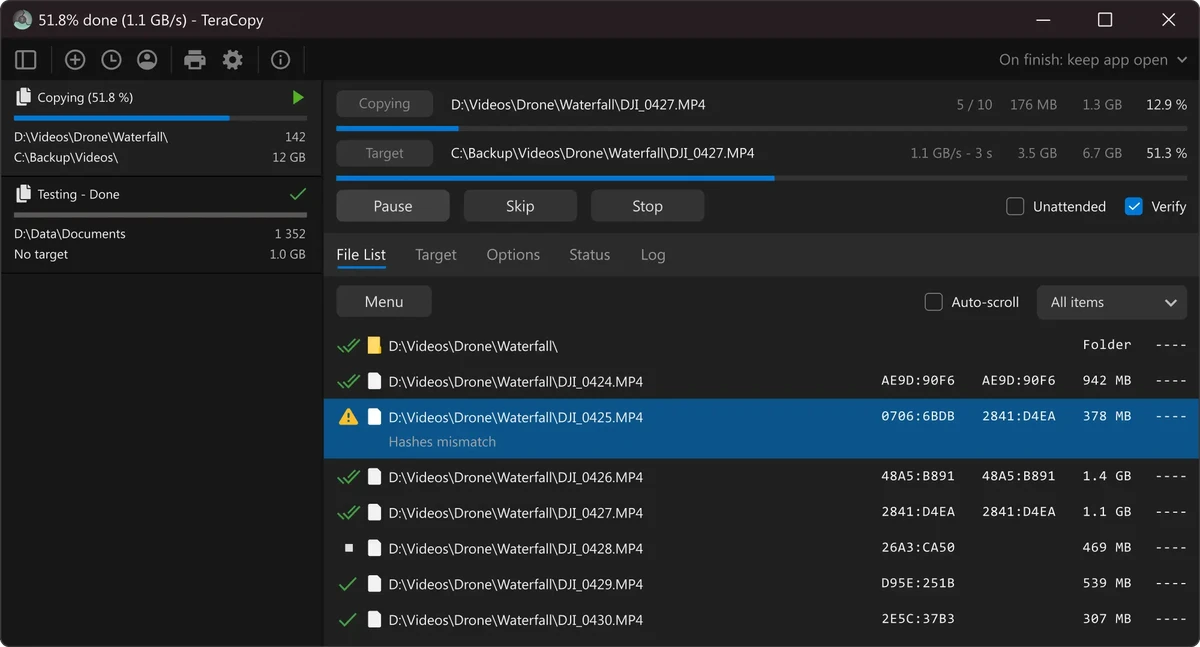

TeraCopy is a file transfer utility designed to improve the speed, reliability, and control of copying and moving files on Windows systems. It replaces the default Windows Explorer copy function with a more efficient engine that supports pause, resume, error recovery, and checksum verification.
Overview
TeraCopy focuses on optimizing file transfer performance while reducing interruptions caused by system errors or problematic files. It uses dynamic buffer adjustment and asynchronous copying to improve speed, especially when transferring data between physical drives. One of its key strengths is reliability. Instead of stopping an entire transfer when an error occurs, TeraCopy skips problematic files and continues the process, later showing a detailed report of skipped items.
It integrates seamlessly with Windows Explorer, allowing users to copy or move files as they normally would, but with improved control and performance in the background.
Features of TeraCopy
- Faster file copying and moving operations
- Dynamic buffer optimization for improved transfer speed
- Pause and resume file transfers anytime
- Ability to retry or skip problematic files
- Detailed transfer error reporting
- Copy locked files using Shadow Copy
- Full Unicode support for file names
- Seamless Windows Explorer integration
- Interactive file transfer queue management
- Select files by extension or folder
- Remove selected files from transfer queue
- Asynchronous file copying for better performance
- Checksum verification for file integrity comparison
- Support for multiple simultaneous copy operations
- Quick access to favorite destination folders
User Experience
Using TeraCopy feels like a direct upgrade over the default Windows file transfer system. Transfers are more stable, especially when handling large batches of files or moving data across different drives. The pause and resume functionality is particularly useful when dealing with large transfers, allowing users to temporarily stop operations without losing progress. The interface also provides clear visibility into transfer status, including skipped files and errors.
Checksum verification adds confidence when copying important data, ensuring that source and destination files match correctly. Integration with Windows Explorer makes it easy to adopt without changing existing workflows.
Who Should Use TeraCopy?
- Users transferring large files regularly
- IT professionals managing data migrations
- Photographers and video editors handling large media libraries
- Anyone frustrated with slow or unstable Windows file copying
- Users needing pause/resume and error recovery features
Conclusion
TeraCopy is a dependable upgrade for Windows file management, offering faster transfers, better error handling, and improved user control. Its ability to pause, resume, and recover from errors makes it a valuable tool for both everyday users and professionals.


