FileLegit Windows Utilities System Tools NTFS Permissions Auditor
NTFS Permissions Auditor logo

NTFS Permissions Auditor 26.6.27

  • User Rating:
    ★★★★★
    ★★★★★
    0.0 0Votes
  • Requirements:
    Windows
  • Version: 26.6.27
  • Latest updated: 2 days ago
  • License: Freemium  
  • Publisher: AlbusBit
  • Size: 14 MB
× app stores

NTFS Permissions Auditor is a Windows utility designed to analyze and report on file and folder permissions within NTFS file systems. It helps administrators and IT teams quickly understand who has access to specific directories, how permissions are structured, and whether any inconsistencies or risks exist in the access control setup.

Overview

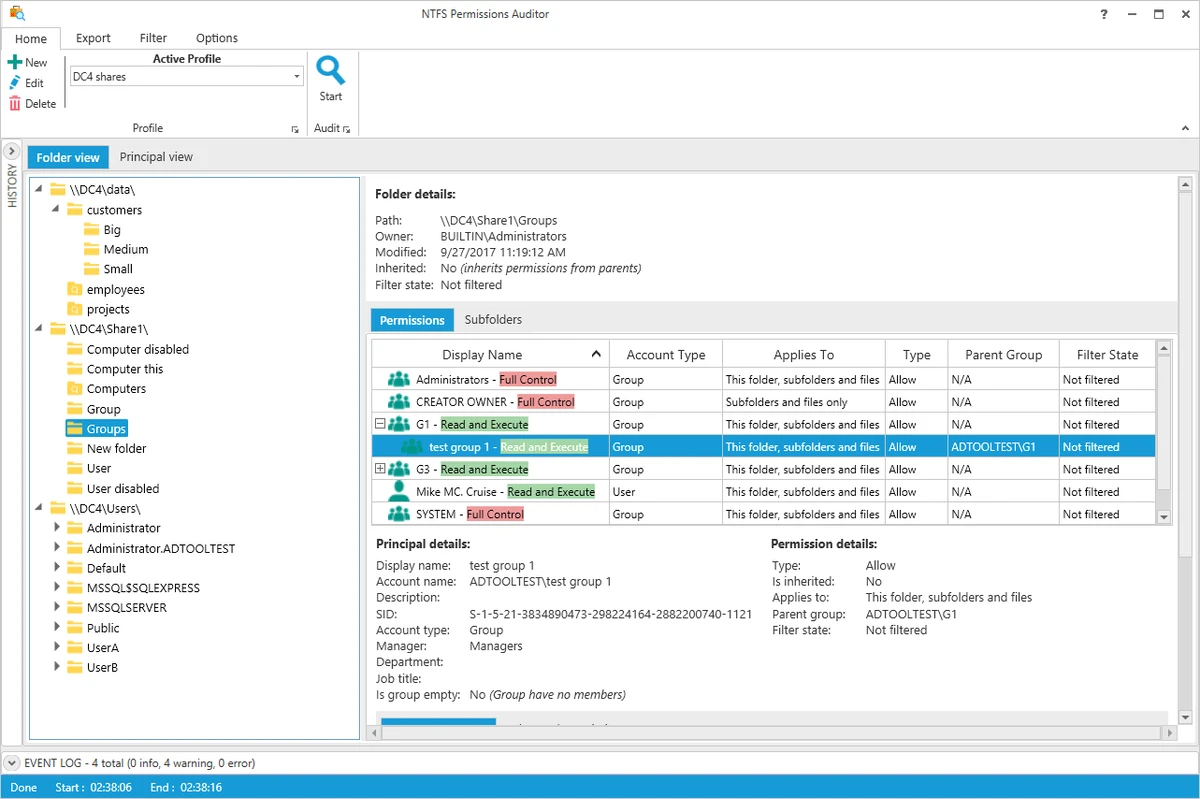
NTFS Permissions Auditor focuses on permission auditing and access visibility across Windows systems. It scans directories and accounts to produce structured reports that show how permissions are assigned and inherited. The tool is especially useful in environments where multiple users, groups, and domain accounts interact with shared file systems. It provides both folder-based and account-based perspectives, making it easier to understand access relationships and detect permission issues. A free version is available with detailed audit capabilities, while a Pro version expands filtering and export options.

Features of NTFS Permissions Auditor

  • Analyze NTFS folder and file permissions across Windows systems
  • Fast scanning of directory structures with caching for improved performance
  • Folder tree view showing paths, ownership, and permissions
  • Account-based view showing user/group access across directories
  • Support for advanced filtering (AND/OR conditions and multi-criteria rules)
  • Filter by permission type (Allow/Deny), inheritance, account status, and more
  • Detect unresolved SIDs and orphaned accounts
  • Export reports to Excel (XLSX), CSV, XML, HTML, and PDF
  • Compare audit results to track permission changes over time
  • Exclude specific directories, system folders, or accounts from scans
  • Local database storage for historical audit data
  • Optimized resource usage to avoid system overload during scans

User Experience

NTFS Permissions Auditor is designed for IT administrators who need detailed visibility into file system permissions without manually checking Windows settings. The interface is structured around two main views: folder-based and account-based analysis. This dual perspective makes it easier to identify both where permissions are applied and who has access across the system.

Filtering tools are particularly strong, allowing users to refine audit results during or after scanning. This reduces the need to rerun full audits when narrowing down results. Export options also make it practical for reporting and compliance documentation. Performance is generally optimized for large file systems, with caching mechanisms helping reduce repeated system queries during scans.

Who Should Use NTFS Permissions Auditor?

  • IT administrators managing Windows file servers
  • Security teams auditing access control policies
  • Organizations requiring compliance reporting for file permissions
  • System engineers reviewing shared drive access structures
  • Businesses managing large multi-user file environments

Conclusion

NTFS Permissions Auditor is a practical and focused tool for Windows administrators who need detailed insight into file system permissions. Its combination of folder and account-level views, strong filtering options, and reporting capabilities makes it useful for both security audits and compliance tracking.

Pros & Cons

Pros

  • Detailed NTFS permission visibility across folders and accounts
  • Powerful filtering system for precise audits
  • Multiple export formats for reporting and compliance
  • Change tracking between audit sessions
  • Local data storage for historical analysis
  • Efficient scanning with caching optimization

Cons

  • Focused specifically on NTFS environments (limited use outside Windows file systems)
  • Can be complex for non-technical users

Frequently Asked Questions

What is NTFS Permissions Auditor used for?

It is used to analyze and report on folder and file permissions in Windows NTFS systems.

Can it detect permission changes over time?

Yes, it can compare audit results and generate change reports showing modifications in permissions.

Does it support exporting reports?

Yes, it supports exporting to Excel, CSV, XML, HTML, and PDF formats.

Who should use this tool?

It is designed for IT administrators, security teams, and organizations managing shared Windows file systems.

Does it require advanced technical knowledge?

Basic use is straightforward, but interpreting permission structures and filters may require IT experience.

Recommended apps [Freeware]:
  • DirPrintOK 7.61 DirPrintOK logo fast and portable tool to print or export directory contents in XLS, HTML, CSV, or TXT formats.
  • AnyTXT Searcher 1.3.3173 AnyTXT Searcher logo fast desktop search tool that indexes and searches full-text content across documents, PDFs, emails, and more
  • ATTO Disk Benchmark 5.00.3 ATTO Disk Benchmark logo Measure SSD, HDD, RAID, and storage controller performance with ATTO Disk Benchmark on Windows systems
  • Wondershare Recoverit 14.0.29.10 Wondershare Recoverit logo Recover deleted, lost, formatted, or corrupted files from PCs, USB drives, SD cards, and more with Wondershare Recoverit
  • ExpanDrive 2026.06.11 ExpanDrive logo mounts cloud storage and remote servers as local drives for seamless file access in Windows Explorer
  • Tixati 3.43 Tixati logo a fast, ad-free BitTorrent client offering advanced peer control, bandwidth management, and detailed swarm analysis
Recommended apps [Shareware]:
  • Audio Transcoder 2.12.24 Audio Transcoder logo all-in-one audio converter and CD ripper supporting MP3, FLAC, AAC, WMA, and more
  • Foxit PDF Editor 2026.1.1.36485 Foxit PDF Editor logo complete PDF solution for businesses, offering advanced editing, collaboration, and document security features.
  • Wipe Professional 2026.07 Wipe Professional logo a Windows cleanup tool that removes junk files, cache, cookies, and browsing traces to improve privacy and performance
  • IntraWEB 16.2.2 IntraWEB logo web development framework for creating interactive web applications using a Windows application-style approach
  • TubeMate 6.4.6 TubeMate logo downloads online videos, converts media formats, extracts audio, and manages high-quality video downloads
  • XL-Connector 3.7.14.0 XL-Connector logo Excel plugin for Salesforce data export, import, bulk updates, and metadata management.