Mumble logo

Mumble 1.5.901

  • User Rating:
    ★★★★★
    ★★★★★
    0.0 ★ 0Votes
  • Requirements:
    Windows
  • Version: 1.5.901
  • Latest updated: 2 weeks ago
  • License: Open Source  
  • Publisher: Mumble
  • Size: 47 MB
× app stores

Mumble is an open-source voice communication application designed for users who need fast, reliable, and secure audio communication. Originally popular among gaming communities, Mumble focuses on low-latency voice chat, making it suitable for situations where quick communication is important. The application uses encryption for voice communication and provides features designed to improve audio clarity while reducing distractions.

One of Mumble’s standout features is positional audio support, which allows users in supported games to hear other players based on their in-game location. This creates a more immersive communication experience by making voices feel closer or farther away depending on player positions. The built-in overlay also allows users to access voice chat information while remaining inside supported games.

Mumble includes several audio enhancement tools to improve communication quality. Noise suppression helps reduce background distractions, while echo removal improves clarity during conversations. The application also automatically adjusts microphone levels to help maintain consistent volume between users, preventing situations where one person is too quiet or excessively loud.

Designed with efficiency in mind, Mumble uses low bandwidth and provides a portable version for users who prefer flexible installation options. With access control features, text-to-speech status updates, and strong encryption, Mumble remains a practical voice communication solution for gaming groups and communities that value performance and privacy.

Features of Mumble

  • Low-latency voice communication
  • Low bandwidth usage
  • Always encrypted communication
  • Open-source software
  • High-quality voice processing
  • Noise suppression for reducing background sounds
  • Echo removal
  • Automatic microphone volume adjustment
  • Positional audio support in compatible games
  • In-game overlay
  • Access control lists (ACL) for user management
  • Text-to-speech status updates
  • Portable version available

Interface and Usability

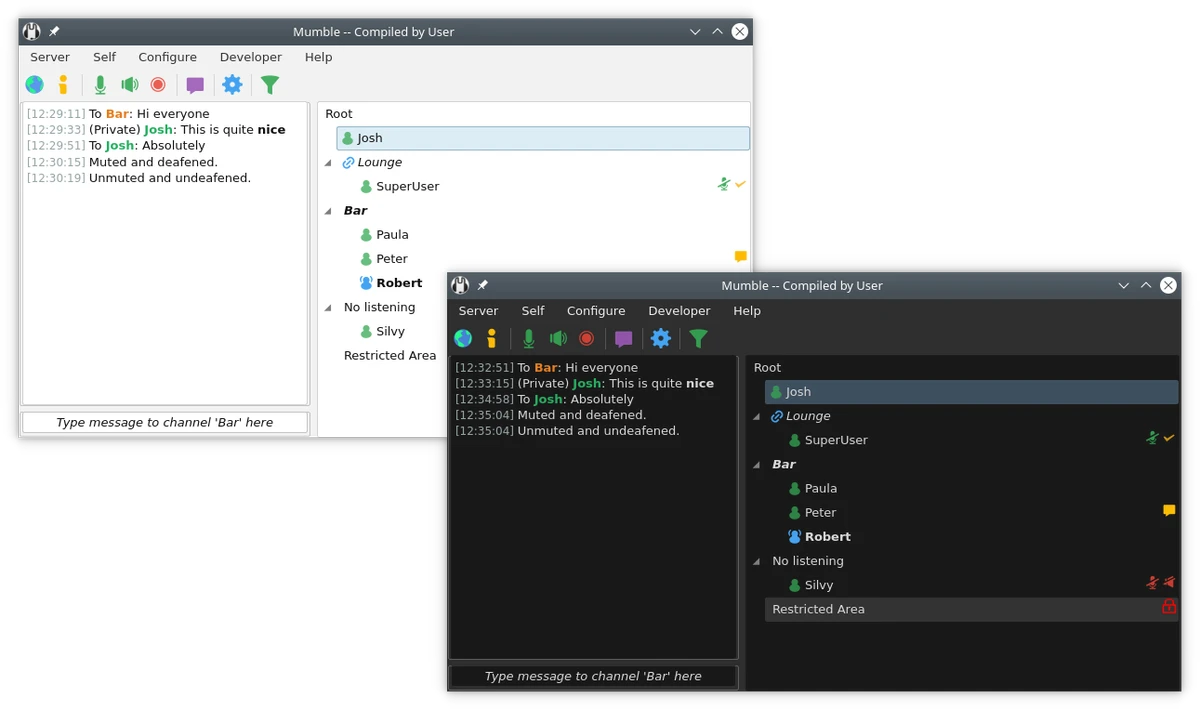
Mumble provides a practical interface focused on communication rather than unnecessary visual elements. Users can connect to voice servers, manage participants, and adjust audio settings through a straightforward layout. For gamers, the in-game overlay adds convenience by allowing important voice chat information to remain accessible while playing. Audio features such as noise suppression, echo removal, and automatic microphone balancing reduce the need for constant manual adjustments, helping conversations stay clear during group sessions.

The application may require some initial configuration depending on the user's setup, especially when using advanced features such as positional audio or server permissions. Once configured, Mumble delivers a reliable voice communication experience with minimal delay.

Who Should Use Mumble?

  • Gamers who need fast voice communication during gameplay
  • Gaming communities managing private voice servers
  • Users looking for encrypted voice chat software
  • Groups that need low-bandwidth communication
  • Users who prefer open-source alternatives to proprietary voice chat apps

Conclusion

Mumble remains a strong choice for users who need fast, secure, and efficient voice communication. Its low latency, encrypted connections, positional audio, and audio enhancement features make it especially appealing for gaming groups and communities that require reliable teamwork communication.

Pros & Cons

✓

Pros

  • Very low latency for real-time communication
  • Encrypted voice communication
  • Excellent voice quality with audio processing features
  • Positional audio improves supported gaming experiences
  • Low bandwidth usage
  • Open-source and privacy-focused
  • Includes noise suppression and echo removal
✕

Cons

  • Some advanced features require configuration
  • Positional audio only works with supported games
  • Primarily focused on voice communication rather than broader collaboration tools

Frequently Asked Questions

What is Mumble used for?

Mumble is used for real-time voice communication, especially among gamers and online communities that need low-latency conversations during activities such as multiplayer gaming.

Is Mumble free to use?

Yes. Mumble is open-source software and is available as a free voice communication application.

Does Mumble support encrypted voice communication?

Yes. Mumble provides encrypted communication to help protect voice conversations between users.

What is positional audio in Mumble?

Positional audio allows users in supported games to hear other players based on their in-game location, creating a more immersive voice communication experience.

Does Mumble reduce background noise?

Yes. Mumble includes noise suppression and echo removal features designed to improve voice clarity and reduce unwanted audio distractions.

Does Mumble have an in-game overlay?

Yes. Mumble includes an overlay feature that allows users to view voice chat information while playing supported games.

Recommended apps [Freeware]:
  • HWMonitor 1.65 HWMonitor logo a free system tool that monitors CPU, GPU, voltages, temperatures, and fan speeds in real time.
  • Microsoft Edge 150.0.4078.83 Microsoft Edge logo modern Chromium-based browser offering fast performance, strong security, privacy controls, and cross-platform support
  • Digital Clock 5.2.2 Digital Clock logo customizable desktop clock app with skins, alarms, opacity control, and system tray support
  • AVG Clear 26.6.11050 AVG Clear logo completely removes AVG antivirus products, files, settings, and registry entries from Windows systems
  • Pale Moon 34.3.1 Pale Moon logo fast, open-source web browser based on Firefox technology, offering customization, stability, and efficient performance
  • Google Drive 127.0.1 Google Drive logo secure cloud storage, file syncing, collaboration tools, and 15GB of free storage
Recommended apps [Shareware]:
  • Royal TS 7.4.50622 Royal TS logo centralizes remote connections, credential management, automation, and secure team collaboration.
  • SyncBackPro 12.0.17 SyncBackPro logo advanced backup, restore, synchronization, encryption, FTP support, and automation tools
  • YoloX 1.11 YoloX logo a lightweight crosshair overlay tool for Windows featuring custom designs, animations, audio reactions, and game profiles
  • Microsoft Office 2606 Build 20131.20112 Microsoft Office logo Create documents, spreadsheets, presentations, and emails with Microsoft Office, the industry-standard productivity suite
  • ProfiCAD 13.5.8 ProfiCAD logo easy-to-use CAD tool for creating electrical, electronic, control, pneumatic, and hydraulic diagrams
  • WinSnap 6.2.4 WinSnap logo Capture and edit screenshots quickly with advanced shadows, transparency support, image effects, and flexible saving options.