


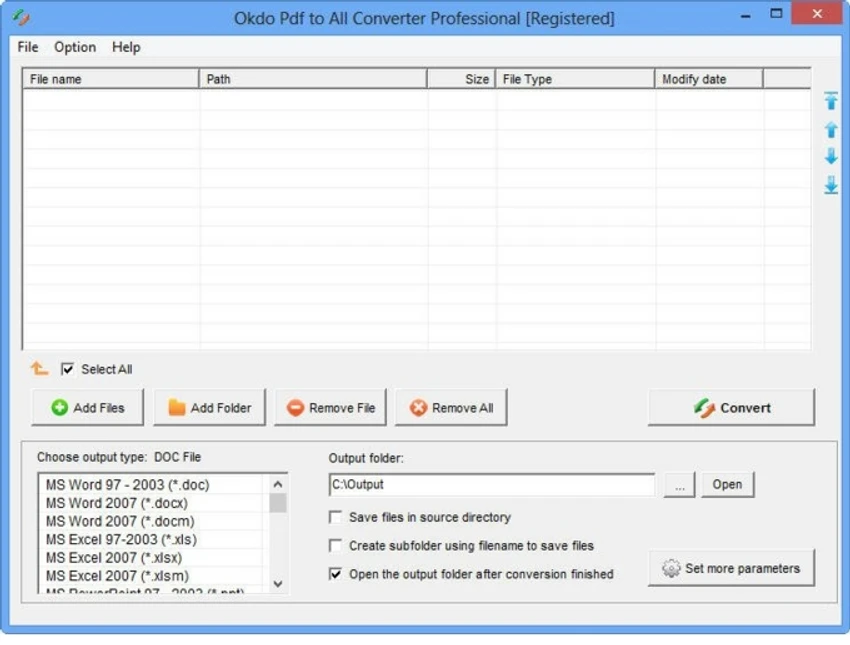

Okdo PDF to All Converter Professional is a dedicated PDF conversion tool designed to transform PDF documents into a wide range of editable and shareable formats. Supporting everything from Microsoft Office documents and spreadsheets to images, HTML files, text documents, and even SWF files, the software aims to be an all-in-one PDF conversion solution. Its strongest selling point is broad format compatibility combined with batch processing capabilities, allowing users to convert multiple PDF files simultaneously while preserving original layouts, images, text, and formatting wherever possible.
Features of Okdo PDF to All Converter Professional
PDF to Document Conversion
- Convert PDF to DOC
- Convert PDF to DOCX
- Convert PDF to DOCM
- Convert PDF to RTF
- Preserve editable document layouts
- Maintain text flow for easier editing
PDF to Spreadsheet Conversion
- Convert PDF to XLS
- Convert PDF to XLSX
- Convert PDF to XLSM
- Recover PDF tables for Excel editing
- Combine PDF pages into a single worksheet
PDF to Presentation Conversion
- Convert PDF to PPT
- Convert PDF to PPTX
- Convert PDF to PPTM
- Convert multi-page PDFs into multi-page presentations
PDF to Image Conversion
- Convert PDF to JPEG/JPG
- Convert PDF to BMP
- Convert PDF to GIF
- Convert PDF to TIFF
- Convert PDF to PNG
- Convert PDF to EMF
- Convert PDF to WMF
- Convert PDF to ICO
- Convert PDF to JP2/J2K
- Convert PDF to PCX
- Convert PDF to RLE
- Convert PDF to TGA
- Convert each PDF page into individual images
Additional Output Formats
- Convert PDF to TXT
- Convert PDF to HTML (HTM)
- Convert PDF to SWF
Batch Processing
- Convert multiple PDF files simultaneously
- Process entire folders
- Bulk conversion support
- Save time with automated workflows
PDF Handling Features
- Support for encrypted PDF files
- Extract text content from PDFs
- Preserve original layouts
- Maintain images and vector graphics
- Retain document formatting
Customization Options
- Add image watermarks
- Adjust output page sizes
- Zoom images proportionally
- Customize output file names
- Open output folder automatically after conversion
- Save output files in source folders
- Create separate output directories for converted files
File Management
- Save conversion lists
- Load previously saved conversion lists
- Add entire folders for processing
Standalone Operation
- No Adobe Acrobat required
User Experience
Okdo PDF to All Converter Professional is designed for users who frequently work with PDF documents and need flexible export options. The interface follows a straightforward workflow: add files, choose an output format, and start the conversion process. One of the software's major strengths is the variety of supported formats. Rather than focusing solely on Word or Excel exports, it covers a broad range of office documents, image formats, text files, web formats, and presentation files. This versatility makes it suitable for different document management scenarios. Batch conversion is particularly useful for business users and administrators dealing with large numbers of PDFs. The ability to process entire folders and save conversion lists helps streamline repetitive tasks.
The software also includes multiple conversion modes for certain output formats, such as Word, Excel, and PowerPoint. These options provide additional flexibility when working with PDFs that contain complex layouts or tables. Another practical advantage is its standalone nature. Users do not need Adobe Acrobat installed to perform conversions, simplifying deployment across multiple systems. While the software offers extensive conversion functionality, its primary focus remains on format transformation rather than PDF editing. Users looking for advanced PDF creation or annotation tools may require separate software.
Who Should Use Okdo PDF to All Converter Professional?
- Office professionals
- Business users
- Document managers
- Administrative staff
- Students and educators
- Data migration specialists
- Users converting large PDF collections
- Anyone needing PDF-to-Office document conversion
Conclusion
Okdo PDF to All Converter Professional delivers a powerful PDF conversion toolkit capable of transforming PDF files into a wide range of editable and accessible formats. With support for batch processing, encrypted PDFs, Office formats, image exports, and flexible output settings, it provides a practical solution for both personal and professional document conversion needs.


