CalendarTask logo

CalendarTask 3.29.287.9038

  • User Rating:
    ★★★★★
    ★★★★★
    0.0 0Votes
  • Requirements:
    Windows
  • Version: 3.29.287.9038
  • Latest updated: 6 hours ago
  • License: Freeware  
  • Publisher: Beijing Xiaowei Cloud Inc
  • Size: 7 MB
×

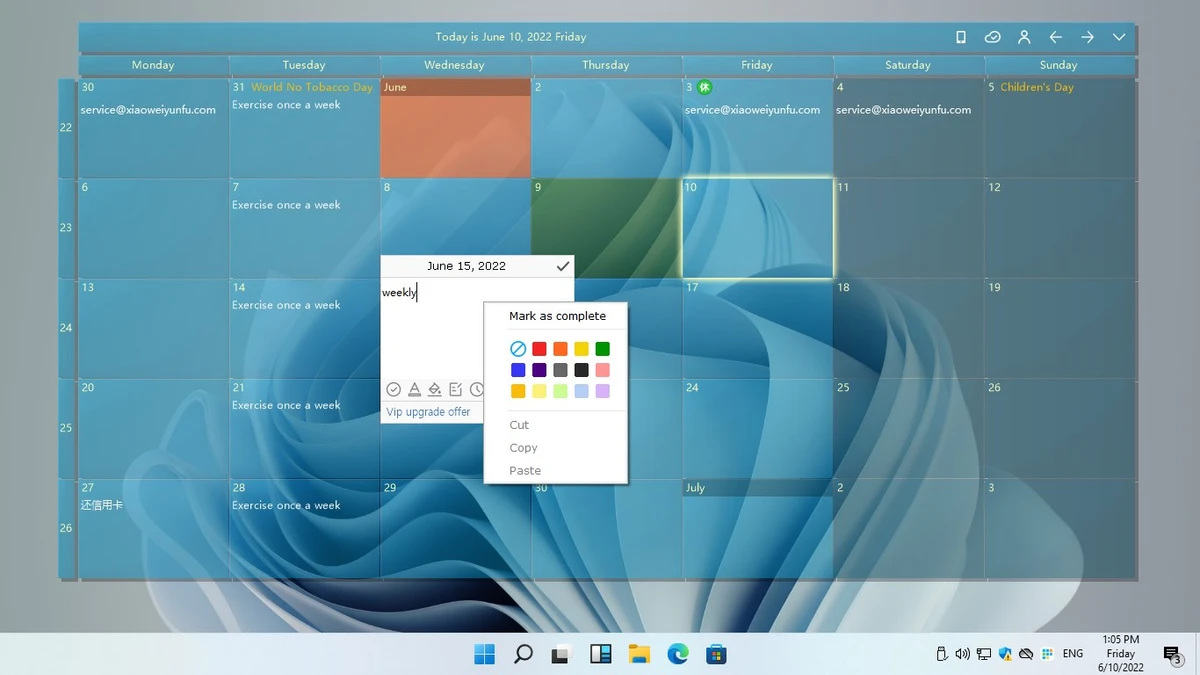
CalendarTask, formerly known as DesktopCal, is a lightweight desktop calendar application that integrates directly into your Windows desktop without blocking access to desktop icons. Designed for scheduling, note-taking, and personal organization, it allows users to add notes directly to calendar dates and manage daily activities from a convenient desktop interface.

The software combines calendar management with productivity features such as cloud synchronization, data import/export tools, customizable appearance settings, and information about holidays, festivals, and lunar calendar dates.

Features of CalendarTask

  • Desktop calendar integrated directly into the Windows desktop
  • Double-click any date to quickly add notes and appointments
  • Navigate easily to past and future dates
  • Import and export data between devices
  • Cloud synchronization for data backup and accessibility
  • Support for lunar calendar information
  • Displays holidays, festivals, and common anniversaries
  • Custom background color settings for important dates
  • Wallpaper rotation using images from local folders
  • Highly customizable calendar appearance and settings

CalendarTask successfully combines a desktop calendar, note-taking tool, and lightweight planning solution into a simple package. Its seamless desktop integration, customization options, and cloud synchronization features make it a practical productivity tool for everyday use. While it is not intended to replace professional project management software, it excels as a personal organizer.

Conclusion

CalendarTask is an excellent choice for users who want a simple yet capable desktop calendar solution. Its ability to integrate directly into the desktop, combined with note-taking, cloud synchronization, and customization features, makes it a useful productivity companion for everyday planning.

Pros & Cons

Pros

    • Integrates directly into the desktop without blocking icons
    • Quick note-taking on calendar dates
    • Cloud synchronization support
    • Import and export tools for easy data migration
    • Displays holidays, festivals, and lunar calendar information
    • Customizable appearance and date highlighting
    • Lightweight installation size
    • Easy to use for everyday scheduling

Cons

    • Focused primarily on personal scheduling rather than team collaboration
    • Limited advanced project management capabilities
    • Users seeking full productivity suites may require additional tools
    • Some features depend on personal preference for desktop-based calendars

Frequently Asked Questions

What is CalendarTask used for?

CalendarTask is a desktop calendar application designed for scheduling appointments, adding notes to dates, organizing tasks, and tracking important events directly from the desktop.

Is CalendarTask the same as DesktopCal?

Yes. CalendarTask is the new name for the software previously known as DesktopCal.

Can I add notes directly to calendar dates?

Yes. You can double-click a date and quickly add notes, reminders, appointments, or other information.

Does CalendarTask support cloud synchronization?

Yes. The software includes cloud synchronization features to help keep your data accessible and protected.

Can I transfer my calendar data to another device?

Yes. CalendarTask provides import and export tools that simplify moving data between devices.

Does CalendarTask display holidays and lunar calendar information?

Yes. The software includes information about lunar calendar dates, holidays, festivals, and commonly recognized anniversaries.

Recommended apps [Freeware]:
  • All in One Runtimes 2.5.0 All in One Runtimes logo Package essential Windows runtime environment packages to improve software compatibility and system stability.
  • iTop Easy Desktop 4.3.0.342 iTop Easy Desktop logo declutter, organize, and manage Windows desktop items efficiently and quickly
  • TreeSize 9.8.1.2302 TreeSize logo Windows disk space analyzer to scan, visualize, and clean storage efficiently with reports.
  • FBackup 9.9.1044 FBackup logo a free Windows backup tool offering automatic backups, cloud support, encryption, and easy file recovery options
  • OCCT 16.1.11.99 OCCT logo hardware monitoring and stress testing tool for CPU, GPU, memory, and power supply performance analysis.
  • Visual Studio Code 1.124.2 Visual Studio Code logo Free and powerful code editor from Microsoft with extensions, debugging, Git support, and multi-language development
Recommended apps [Shareware]:
  • Amazing Laptop Cooling Wizard 1.1.5.8 Amazing Laptop Cooling Wizard logo Reduce laptop overheating by optimizing CPU and fan cooling performance on Windows.
  • Coolutils Print Maestro 4.2.0.0 Coolutils Print Maestro logo print folder contents, export directory trees, and generate detailed file reports quickly
  • Wondershare PDFelement Professional 12.1.23 Wondershare PDFelement Professional logo a PDF editor for editing, converting, signing, and managing documents easily.
  • COAA PlanePlotter 6.7.5.9 COAA PlanePlotter logo a Windows tool that decodes live aircraft data like ADS-B and ACARS and displays real-time radar-style tracking
  • Syncovery 12.0.5.29 Syncovery logo fast backup and file synchronization tool with real-time sync, versioning, and advanced automation features
  • Charles 5.2.0 Charles logo HTTP proxy tool for web debugging, allowing developers to inspect, modify, and analyze network traffic in real time