


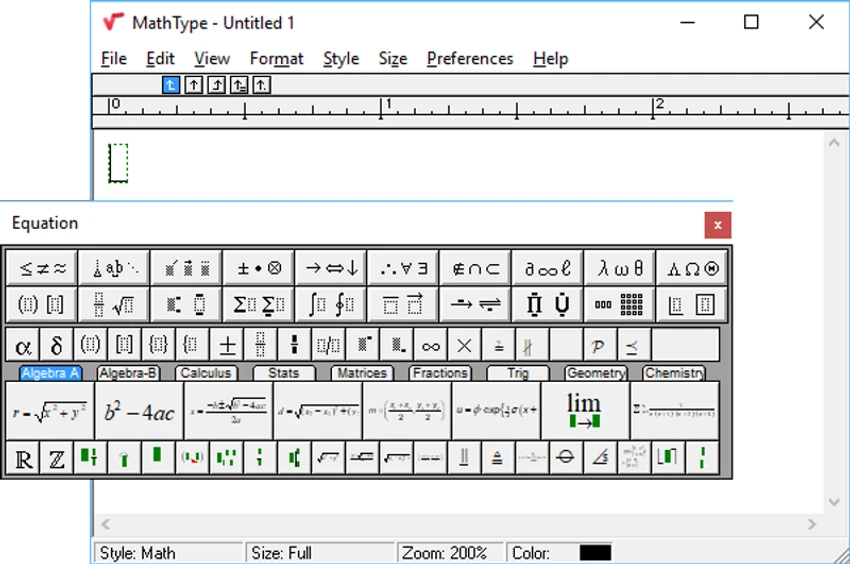

Writing mathematical equations in standard word processors can be challenging, especially when dealing with complex formulas or scientific notation. MathType simplifies this process by providing a dedicated equation editor that integrates with popular office applications and publishing workflows. Designed for educators, students, researchers, and professionals, MathType offers an extensive library of mathematical symbols, customizable formatting options, and support for industry-standard formats such as LaTeX and MathML.
Overview
MathType is a mathematical equation editor for Windows that enables users to create, edit, and format mathematical expressions for documents, presentations, websites, e-learning content, and publishing projects. The software integrates with Microsoft Word, PowerPoint, Apple Pages, and many other applications, allowing users to insert mathematical equations directly into their documents. It also supports TeX, LaTeX, MathML, and XML-based publishing workflows, making it suitable for both education and professional publishing. With a large collection of symbols, handwriting input, automatic formatting, and customizable styles, MathType streamlines the process of producing high-quality mathematical content.
Features of MathType
Comprehensive Equation Editor
- Create simple and advanced mathematical equations
- Extensive collection of mathematical symbols and expressions
- More than 1,000 mathematical and Euclidean geometry symbols
- Automatic equation formatting
- Advanced ruler for precise formatting
Office Integration
- Integrates with:
- Microsoft Word
- Microsoft PowerPoint
- Apple Pages
- Detects Microsoft Office during installation
- Adds a dedicated ribbon tab in supported Office applications
Broad Compatibility
- Works with over 800 applications, software programs, and websites
- Supports word processors and text editors
- Compatible with XML publishing workflows
LaTeX and MathML Support
- Import and export LaTeX content
- Supports TeX and MathML
- Suitable for academic publishing
- XML export support
Handwriting Input
- Math Input Panel for drawing equations by hand
- Converts handwritten equations into editable mathematical expressions
- Supported on Windows 7 and later using the Microsoft Math Input Panel
Equation Management
- Batch equation export
- Drag-and-drop equation editing
- Convert and format all equations in a Word document using a single command
- Copy and paste equations between applications
Customization
- Create custom equation styles
- Modify fonts, colors, spacing, and sizes
- Customize function lists
- Add or remove recognized functions
- Save frequently used equations to the toolbar
- Create custom keyboard shortcuts
- Configure output translators for compatibility with other software
User Experience
MathType is designed to make mathematical writing more efficient than relying on built-in equation tools alone. The interface provides organized toolbars filled with symbols, templates, and formatting options that simplify building equations of varying complexity. One of its biggest advantages is its integration with Microsoft Office applications. Instead of switching between separate tools, equations can be inserted directly into Word or PowerPoint, making document creation much more seamless.
The handwriting input feature is another practical addition, especially for users working on touch-enabled Windows devices. Drawing an equation and having it converted into editable mathematical notation can be faster than manually selecting individual symbols. Customization is another strength. Users can define personal equation styles, adjust fonts and spacing, create shortcuts, and even customize recognized mathematical functions. This flexibility allows MathType to adapt to different academic, scientific, and publishing standards.
Support for LaTeX, MathML, XML, and TeX workflows also makes the software suitable for researchers and publishers who work across multiple platforms and document formats. Although MathType offers many advanced capabilities, its organized interface and documentation help make the software approachable for both beginners and experienced users.
Who Should Use MathType?
- Teachers and lecturers
- Students
- Researchers
- Engineers
- Scientists
- Technical writers
- Academic publishers
- Anyone who regularly creates mathematical equations and scientific documents
Conclusion
MathType remains one of the most comprehensive equation editors available for Windows. Its extensive symbol library, seamless integration with Microsoft Office, handwriting recognition, and support for LaTeX and MathML make it a versatile solution for academic, educational, and professional use.


