


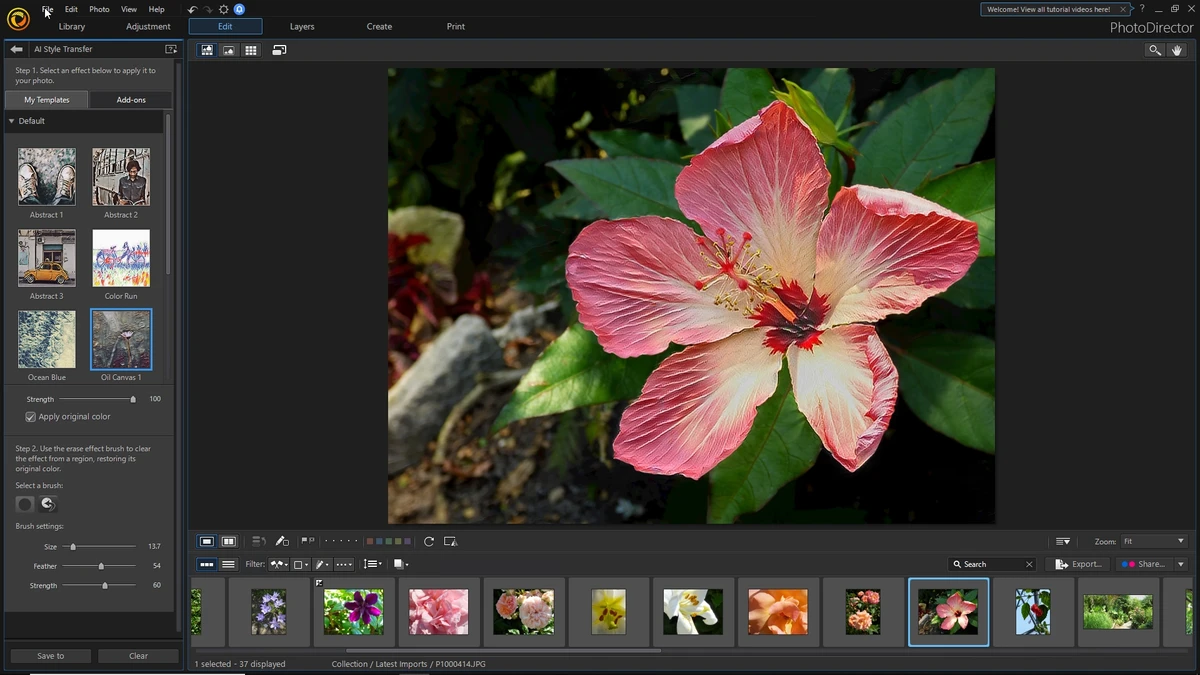

CyberLink PhotoDirector is a feature-rich photo editing software designed for both photography enthusiasts and creative professionals. It combines traditional image editing tools with modern AI-powered enhancements, allowing users to correct imperfections, enhance visual quality, and apply creative effects with relative ease. During my review, what stood out immediately was the balance between usability and depth. The interface is designed to be visually clean and organized, with editing tools grouped into tabs for easy access. This layout helps streamline the workflow, whether you're performing basic color adjustments or working with more advanced retouching features.
Beyond standard editing, PhotoDirector also includes AI-driven tools that automate complex tasks such as object removal and sky replacement, making it easier to achieve professional-looking results without extensive manual editing.
Features of CyberLink PhotoDirector
- AI-powered photo editing and enhancement tools.
- Basic adjustments for color, brightness, contrast, and exposure.
- Advanced retouching tools for portraits and facial enhancement.
- AI Sky Replacement with blending, relighting, and positioning options.
- Glitch and creative visual effects for artistic editing.
- Layer-based editing for combining multiple elements.
- Bokeh effects, lighting enhancements, and sparkle effects.
- Object and unwanted element removal using AI tools.
- RAW image file support for professional photography workflows.
- Precision color editing and tone adjustment tools.
- Slideshow creation with transitions and background music.
- Text overlay and annotation tools for images and slideshows.
- Option to share edited photos directly to social media platforms.
- Support for professional camera file formats.
Interface and Usability
CyberLink PhotoDirector offers a modern and well-structured interface that feels intuitive even for users new to photo editing. Tools are logically grouped into tabs, with the main editing workspace centered on the image, allowing for a distraction-free editing experience. During use, switching between editing modes such as color correction, retouching, and effects felt smooth and responsive. The AI tools reduce manual effort for complex tasks, while still allowing fine control when needed. The layout strikes a good balance between beginner-friendly design and professional-level functionality.
Who Should Use CyberLink PhotoDirector?
- Photography enthusiasts
- Content creators and social media users
- Professional and semi-professional photographers
- Graphic designers working with photo manipulation
- Users looking for AI-assisted photo editing tools
- Anyone who wants an easy-to-use yet powerful photo editor
Conclusion
CyberLink PhotoDirector is a well-rounded photo editing solution that blends traditional editing capabilities with modern AI-powered enhancements. Its interface is approachable, yet it still offers enough depth for professional-level creative work. With tools like AI sky replacement, object removal, RAW support, and layer-based editing, it provides a complete workflow for photo enhancement and creative design. If you're looking for a versatile photo editor that can handle both quick edits and advanced projects, PhotoDirector is a strong choice.


