QOwnNotes logo

QOwnNotes 26.7.6

  • User Rating:
    ★★★★★
    ★★★★★
    0.0 ★ 0Votes
  • Requirements:
    Windows
  • Version: 26.7.6
  • Latest updated: 2 weeks ago
  • License: Open Source  
  • Publisher: Patrizio Bekerle
  • Size: 48 MB
× app stores

QOwnNotes is a free, open-source note-taking application designed for users who prefer storing their notes as plain text files. Available for Windows, macOS, and Linux, the application focuses on simplicity, portability, and giving users complete ownership of their data. Unlike many cloud-first note-taking apps, QOwnNotes saves notes locally as plain text files. This makes them easy to back up, edit with other text editors, or synchronize using your preferred file synchronization service. For users of ownCloud or Nextcloud, the application offers optional integration that allows notes to be synchronized across devices while remaining under your control.

The application also supports Markdown editing, image attachments, HTML pasting, media embedding, and optional note encryption, making it suitable for both everyday note-taking and more advanced documentation workflows.

Features of QOwnNotes

  • Free and open-source (GPL)
  • Available for Windows, macOS, and Linux
  • Stores notes as plain text files
  • Markdown editing support
  • Full ownership of your notes and files
  • Optional integration with ownCloud Notes
  • Optional integration with Nextcloud Notes
  • Synchronize notes across desktop and mobile devices
  • Compatible with third-party synchronization services such as Dropbox, Syncthing, Seafile, and BitTorrent Sync
  • Image attachment support
  • HTML paste support
  • Media attachment support
  • Optional note encryption
  • Search notes quickly
  • Edit notes locally or through supported web services

Interface and Usability

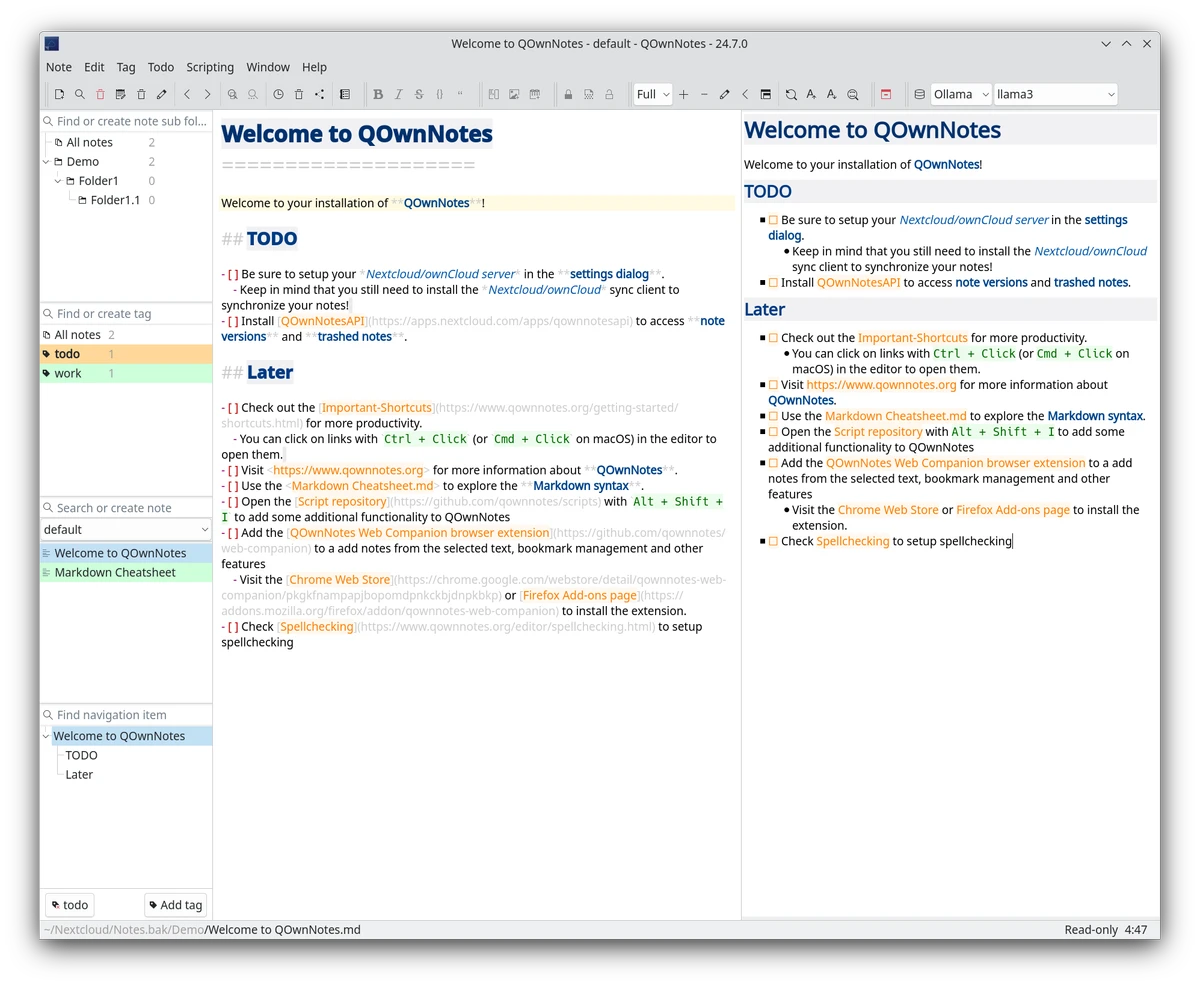
QOwnNotes follows a clean and practical design that prioritizes writing over visual complexity. The interface is straightforward, allowing you to create, edit, organize, and search notes without unnecessary distractions. During everyday use, storing notes as plain text feels surprisingly flexible. Because every note is simply a text file, there is no vendor lock-in, and files remain accessible even outside the application. This approach also makes backups and synchronization simple.

Markdown editing works naturally for users who prefer lightweight formatting, while support for images and HTML content adds flexibility when creating richer notes. For users already using Nextcloud or ownCloud, synchronization integrates smoothly into an existing workflow.

Who Should Use QOwnNotes?

  • Markdown users
  • Writers and bloggers
  • Developers documenting projects
  • Students taking organized notes
  • Privacy-conscious users
  • Nextcloud and ownCloud users
  • Anyone who prefers owning their note files instead of storing them exclusively in proprietary cloud services

Conclusion

QOwnNotes is a thoughtfully designed note-taking application that prioritizes openness, portability, and user control. By storing notes as plain text files and supporting Markdown, it provides a reliable workspace that remains compatible with numerous synchronization solutions and workflows. Its optional integration with Nextcloud and ownCloud, combined with features such as encryption, image attachments, and fast searching, makes it suitable for personal note-taking as well as professional documentation.

Pros & Cons

✓

Pros

  • Completely free and open source
  • Stores notes as plain text files
  • Markdown support
  • Cross-platform compatibility
  • Works with Nextcloud and ownCloud
  • Supports multiple synchronization services
  • Optional encryption for notes
  • Fast search functionality
  • No proprietary file format
✕

Cons

  • Interface focuses on functionality rather than modern visuals
  • Advanced cloud collaboration features are limited compared to some commercial note-taking platforms
  • Synchronization depends on external services

Frequently Asked Questions

What is QOwnNotes used for?

QOwnNotes is an open-source Markdown note-taking application that stores notes as plain text files. It is designed for creating, organizing, searching, and synchronizing notes across multiple devices.

Is QOwnNotes free?

Yes. QOwnNotes is free and open-source software released under the GPL license.

Does QOwnNotes support Markdown?

Yes. Markdown is one of the application's core features, allowing users to write formatted notes using simple plain-text syntax.

Can QOwnNotes synchronize notes across devices?

Yes. QOwnNotes can synchronize notes using ownCloud or Nextcloud. It also works with file synchronization services such as Dropbox, Syncthing, Seafile, and BitTorrent Sync.

Are my notes stored locally?

Yes. All notes are stored as plain text files on your computer, giving you full ownership and making backups or migration straightforward.

Does QOwnNotes support encrypted notes?

Yes. QOwnNotes includes optional note encryption, allowing you to protect sensitive notes while continuing to manage them within the application.

Recommended apps [Freeware]:
  • Zortam Mp3 Media Studio 33.97 Zortam Mp3 Media Studio logo Manage, tag, rip, organize, convert, and play MP3 files with the all-in-one Zortam Mp3 Media Studio
  • Training Manager 2026 v4.10.4002 Training Manager logo Track employee training, compliance, certifications, and class schedules with centralized training management tools
  • WD Drive Utilities 2.1.6.511 WD Drive Utilities logo Manage, diagnose, and optimize Western Digital external hard drives with WD Drive Utilities for Windows
  • Tor Browser 15.0.18 Tor Browser logo anonymous web browsing with privacy protection, IP masking, and access to the Tor network
  • Drupal 11.4.2 Drupal logo open-source CMS and web development framework that powers enterprise websites, digital platforms, and scalable web applications
  • Intel Graphics Driver 32.0.101.8860 Intel Graphics Driver logo Download the latest Intel Graphics Driver for improved graphics performance, security updates, and Windows compatibility
Recommended apps [Shareware]:
  • Amazing Laptop Cooling Wizard 1.1.5.8 Amazing Laptop Cooling Wizard logo Reduce laptop overheating by optimizing CPU and fan cooling performance on Windows.
  • Bulk Image Downloader 6.64 Bulk Image Downloader logo Download full-size images and videos from galleries, forums, and image hosts with Bulk Image Downloader
  • Lyric Video Studio 1.5.49 Lyric Video Studio logo a Windows app for creating lyric videos with AI tools, subtitles, motion tracking, and 4K video editing
  • Secure Delete 2026 v221 Secure Delete logo a Windows tool that permanently erases files and folders, making them unrecoverable with multiple security levels
  • PRTG - Free Network Monitor 26.2.120.1477 PRTG - Free Network Monitor logo Monitor network performance, track traffic usage, and detect system issues with a free network monitoring solution for businesses.
  • 3delite Duplicate Picture Finder 1.0.112.122 3delite Duplicate Picture Finder logo Find duplicate and similar pictures on your PC with image comparison, previews, EXIF details, and multi-threaded scanning tools.