Adobe Acrobat Reader DC logo

Adobe Acrobat Reader DC 2026.001.21691

  • User Rating:
    ★★★★★
    ★★★★★
    0.0 0Votes
  • Requirements:
    Windows
  • Version: 2026.001.21691
  • Latest updated: 5 days ago
  • License: Freeware  
  • Publisher: Adobe
  • Size: 719 MB
× app stores

Adobe Acrobat Reader DC is the official PDF viewer from Adobe, widely recognized as the industry standard for opening, reading, and interacting with PDF documents. It offers a clean interface, strong security features, and reliable performance across Windows devices.

Overview

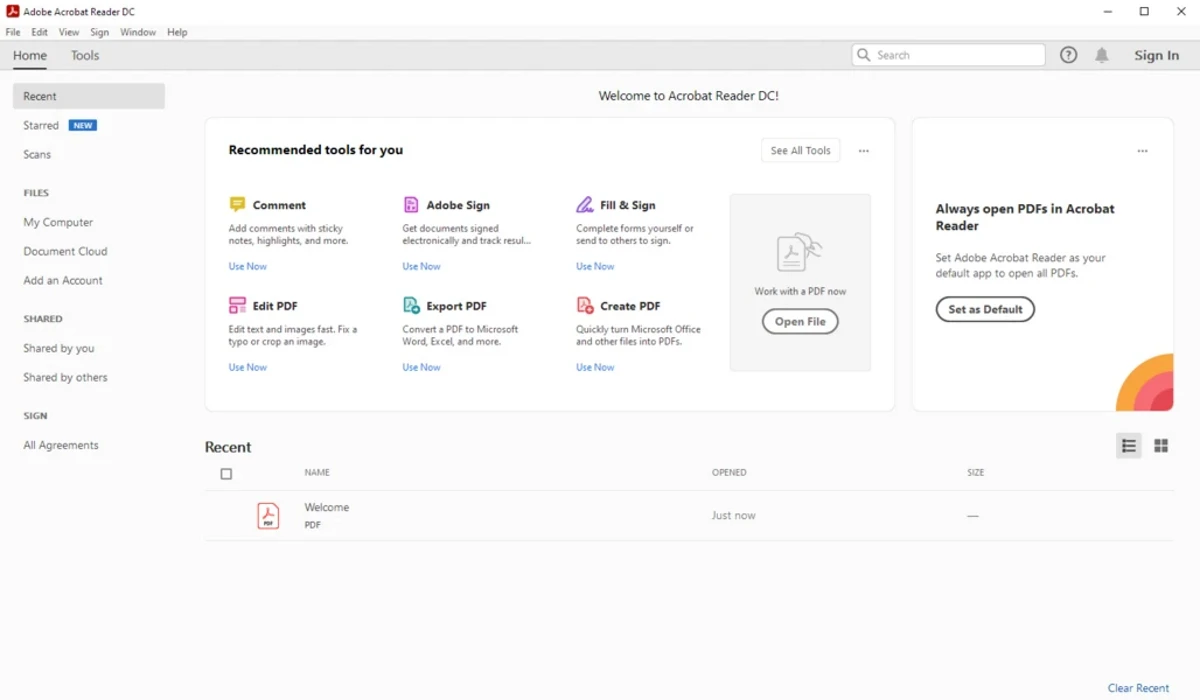
Adobe Acrobat Reader DC is designed to provide a consistent and secure way to work with PDF files. It allows users to open, view, print, and annotate PDFs while maintaining document integrity and layout accuracy. One of its key strengths is its clean and structured interface, which separates reading space from tools like comments and annotations. This makes it easier to focus on content while still having access to powerful document interaction features. It also includes cloud integration, allowing users to access recent files across multiple devices, making it useful for both personal and professional workflows.

Features of Adobe Acrobat Reader DC

  • Open and view PDF documents with high accuracy
  • Add comments, notes, and annotations
  • Print PDF files with customizable settings
  • Highlight and select text within documents
  • Create bookmarks for navigation
  • Advanced PDF search functionality
  • Supports CAD and geospatial PDF content
  • Cloud synchronization across devices
  • Protected Mode for secure document viewing
  • Enhanced security to prevent malicious code execution
  • Customizable preferences and reading settings
  • Tools for accessibility and document interaction
  • Integration with Adobe Document Cloud
  • Reliable rendering of complex PDF layouts

User Experience

Adobe Acrobat Reader DC offers a smooth and stable experience when working with PDF documents. The interface is clean and well-organized, separating reading space from editing tools to reduce distractions. Searching within documents is fast and accurate, even in large or complex PDFs. The annotation tools are easy to access and useful for collaboration, especially in business or academic environments. Security features run in the background, helping protect users from potentially harmful PDF content without requiring manual intervention.

Who Should Use Adobe Acrobat Reader DC?

  • Office professionals working with PDF documents
  • Students reading and annotating study materials
  • Businesses handling contracts and reports
  • Users needing secure and reliable PDF viewing
  • Anyone who frequently works with PDF files

System requirements:

  • 1.5 GHz or faster processor
  • Windows Server 2008 R2 (64-bit), 2012 (64-bit), 2012 R2 (64-bit), or 2016 (64-bit); Windows 7 SP1 (32-bit and 64-bit), Windows 8, 8.1 (32-bit and 64-bit), or Windows 10 (32-bit and 64-bit)
  • 1 GB RAM
  • 2 GB of available hard disk space
  • 1024×768 screen resolution
  • Internet Explorer 11

Conclusion

Adobe Acrobat Reader DC is a dependable and secure PDF solution that sets the standard for PDF viewing and basic interaction. Its balance of usability, security, and compatibility makes it suitable for nearly all users.

Pros & Cons

Pros

  • Industry-standard PDF viewer with high compatibility
  • Clean and user-friendly interface
  • Strong security and protected mode features
  • Fast PDF search and navigation
  • Cloud synchronization across devices
  • Reliable rendering of complex documents
  • Free core functionality available

Cons

  • Heavier than some lightweight PDF readers
  • Some advanced features require paid subscription
  • Occasional prompts for Adobe services or upgrades

Frequently Asked Questions

What is Adobe Acrobat Reader DC used for?

It is used to view, print, and annotate PDF documents.

Is Adobe Acrobat Reader DC free?

Yes. The basic PDF viewing and annotation features are free to use.

Can I edit PDFs with Adobe Acrobat Reader DC?

You can add comments and annotations, but full PDF editing requires a paid version.

Does Adobe Acrobat Reader DC support cloud storage?

Yes. It supports Adobe Document Cloud for syncing files across devices.

Is Adobe Acrobat Reader DC safe to use?

Yes. It includes Protected Mode and enhanced security features to prevent malicious PDF content from harming your system.

Can it handle large or complex PDFs?

Yes. It is optimized to handle large files and complex layouts, including CAD and geospatial PDFs.

What operating systems does it support?

It supports Windows 10, Windows 11, and Windows Server editions (64-bit).

Recommended apps [Freeware]:
  • DriversCloud 12.1.6 DriversCloud logo scan system hardware, update drivers, monitor performance, and analyze blue screen errors (BSODs) on Windows.
  • NirLauncher Package 1.30.24 NirLauncher Package logo a portable Windows utility suite with 180+ NirSoft tools for system, network, and recovery tasks
  • Cyberduck 9.5.0.45237 Cyberduck logo Manage FTP, SFTP, and cloud storage services like Google Drive, Dropbox, and Amazon S3 with Cyberduck for Windows
  • FluentCleaner 26.06.04 FluentCleaner logo a lightweight Windows cleaning tool designed to remove unnecessary files using a modern, minimal WinUI 3 interface
  • MSI Center 2.0.71.0 MSI Center logo a system utility for MSI devices that manages performance, gaming modes, monitoring, RGB, and hardware optimization tools
  • Prime95 31.06 Build 1 Prime95 logo CPU stress testing tool used for overclocking stability checks and Mersenne prime number calculations
Recommended apps [Shareware]:
  • Total PDF Converter 6.5.0.171 Total PDF Converter logo converts PDF to DOC, XLS, images, TXT, PDF/A and more with batch processing and advanced tools.
  • Drive SnapShot 1.51.0.1811 Drive SnapShot logo creates complete disk image backups while Windows runs, allowing fast system recovery and file restoration
  • Pazu StreamGet 3.1.5 Pazu StreamGet logo Download movies and TV shows from major streaming platforms to MP4 or MKV
  • NTFS Permissions Auditor 26.6.27 NTFS Permissions Auditor logo analyze Windows folder permissions, audit NTFS access rights, and export detailed security reports
  • Advanced Installer 23.8 Advanced Installer logo Windows MSI packaging tool for developers to build, customize, and deploy reliable installers
  • MailWasher Pro 8.0.119 MailWasher Pro logo blocks spam, scams, and unwanted emails before download with advanced filtering tools