


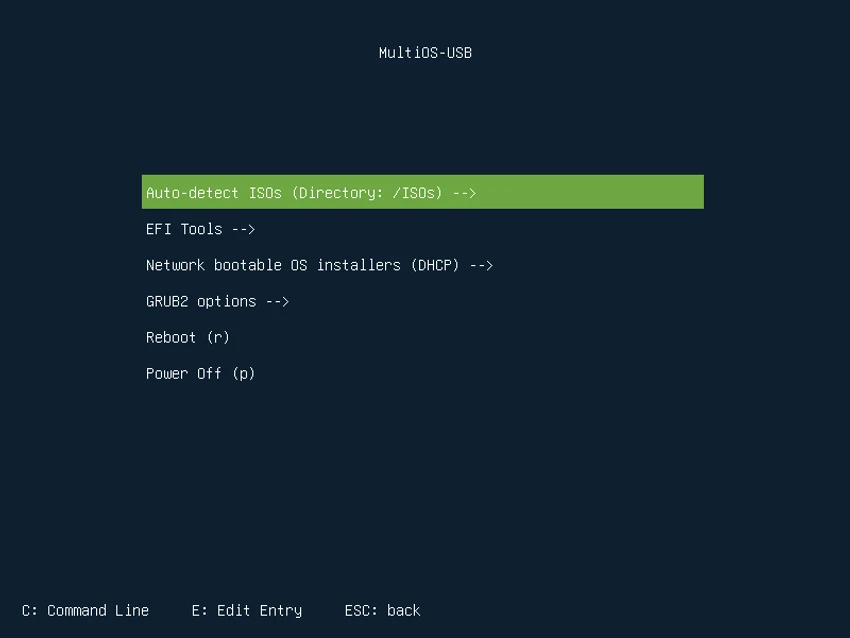

MultiOS-USB is a specialized USB boot management tool designed for users who need to store and boot multiple ISO files from a single USB drive. Instead of creating separate bootable USB drives for different operating systems or installation environments, users can keep multiple ISO images on one device and select the required option during startup.
The tool is primarily designed for advanced users who frequently work with operating system installations, testing environments, or system recovery tasks. After setting up the USB drive, users can copy supported ISO files to the device and access them through a boot menu when starting a computer.
MultiOS-USB supports a wide range of boot environments, including BIOS and UEFI systems, Secure Boot support, UEFI drivers, and various bootloaders. It can boot Linux distributions from ISO files, launch Windows 10/11 installers from ISO images, and support locally installed operating systems such as Linux and Windows.
The software also provides automatic detection of compatible ISO files through GRUB loopback functionality and allows users to customize the ISO boot menu, including kernel options. It supports the exFAT filesystem and works with various storage devices, including USB drives, SSDs, NVMe devices, MMC storage, and virtual disks. Setting up MultiOS-USB requires additional image-writing software to prepare the USB drive and some manual configuration steps. Because of this, it is better suited for experienced users who are comfortable managing boot media and system installation tools.
Features of MultiOS-USB
- Create a single USB drive containing multiple ISO files
- Boot different operating systems and installation environments
- Support for BIOS and UEFI systems
- Secure Boot support with UEFI key management
- Load UEFI drivers
- Launch EFI executables and other bootloaders
- Boot Linux systems from ISO files
- Boot Windows 10/11 installation ISO files
- Support Linux installers from network sources (experimental)
- Boot locally installed Linux and Windows systems
- Automatic configuration file updates
- No background services required
- Support for exFAT filesystem
- Automatic detection of compatible ISO files
- GRUB loopback support
- Customizable ISO boot menu options
- Support for USB, SSD, NVMe, MMC, loop, NBD, and virtual disks
Interface and Usability
MultiOS-USB is designed with functionality in mind rather than a simplified beginner-focused workflow. The setup process requires users to prepare the USB drive, write the required image file using additional software, configure the storage partition, and copy the necessary files and ISO images.
Once configured, the boot process becomes more convenient because users can access multiple ISO files from a single boot menu. The automatic ISO detection feature helps identify compatible images, reducing the need for repeated manual configuration. The tool provides extensive customization options, including boot menu adjustments and support for different boot environments. However, the initial setup requires technical knowledge, making it more appropriate for advanced users familiar with operating systems, partitions, and boot configurations.
Who Should Use MultiOS-USB?
- System administrators managing multiple operating system installers
- Advanced users testing different operating systems
- IT professionals creating multi-purpose boot drives
- Linux users working with multiple distributions
- Users who regularly reinstall or troubleshoot operating systems
Conclusion
MultiOS-USB provides a powerful solution for users who need multiple operating systems and tools available from one USB drive. Its wide compatibility with BIOS, UEFI, Secure Boot, multiple filesystems, and different storage devices makes it a flexible option for advanced boot management tasks.


