FileLegit Windows Utilities System Tools Ultimate Power Assistant
Ultimate Power Assistant logo

Ultimate Power Assistant 1.1.28.0

  • User Rating:
    ★★★★★
    ★★★★★
    0.0 ★ 0Votes
  • Requirements:
    Windows
  • Version: 1.1.28.0
  • Latest updated: 2 weeks ago
  • License: Free Trial  
  • Publisher: ComputerSluggish
  • Size: 1 MB
× app stores

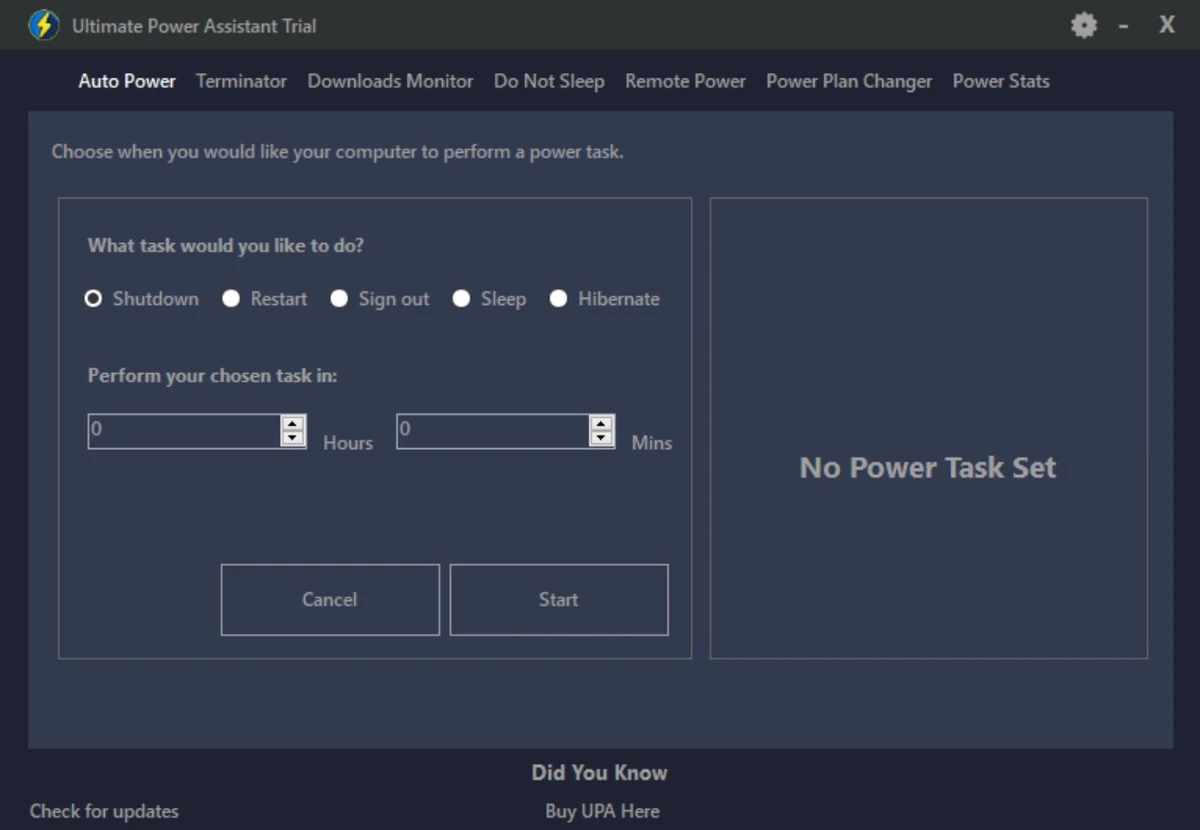
Ultimate Power Assistant is a Windows system tool designed to make managing computer power settings and related tasks easier. The software provides a convenient way to schedule and apply different power options without manually changing Windows settings each time. From my experience using this type of utility, having quick access to automated power actions can be useful for users who regularly download files, run demanding applications, or want better control over when their computer stays active. Ultimate Power Assistant focuses on practical power management features, including changing power plans based on running programs, preventing the system from becoming idle, turning off the display quickly, and scheduling process termination. With its lightweight size of 1 MB, the application is designed as a simple utility for users who want more control over everyday Windows power behavior.

Features of Ultimate Power Assistant

  • Automatic shutdown after downloads finish: Allows the computer to shut down after a game launcher or web browser completes a download, helping avoid unnecessary power usage.
  • Automatic power plan changes: Changes the selected Windows power plan when specific programs or games are detected, then returns to the previous power plan after the process closes.
  • Prevent idle or sleep mode: Helps keep the system active by preventing the display from turning off, screensaver activation, or standby mode.
  • One-click monitor shutdown: Provides a quick option to turn off the display without manually waiting for Windows timeout settings.
  • Scheduled process termination: Lets users schedule the ending of a program or game after a chosen period of time.

Interface and Usability

Ultimate Power Assistant is focused on functionality rather than complexity. The available features are centered around managing power-related actions, making the purpose of the tool easy to understand. The software is lightweight and provides straightforward controls for users who need quick access to automation options. Because the application focuses on a specific purpose, users looking for a simple way to manage Windows power tasks may find the feature set easy to approach. It avoids being a large system management suite and instead concentrates on power scheduling and automation.

Who Should Use Ultimate Power Assistant?

  • Users who leave downloads running for long periods.
  • Gamers who want power plans to change automatically when launching certain programs.
  • Users who need to prevent their computer from entering idle or sleep states.
  • Anyone looking for a lightweight system tool for basic power automation.

Conclusion

Ultimate Power Assistant is a lightweight System Tools application that focuses on improving control over Windows power management. Its features are practical for users who want automated actions such as shutdown after downloads, automatic power plan switching, and scheduled process management.

Pros & Cons

✓

Pros

  • Lightweight application with a listed size of 1 MB.
  • Provides several useful power automation options.
  • Supports automatic power plan switching based on programs.
  • Includes scheduling features for shutdown-related tasks and process termination.
✕

Cons

  • Designed specifically for power management, so it does not provide broader system optimization tools.
  • The available information does not mention compatibility details beyond Windows-related usage.

Frequently Asked Questions

What is Ultimate Power Assistant?

Ultimate Power Assistant is a Windows system tool that helps users manage computer power settings and automate different power-related tasks. It allows users to schedule actions such as changing power plans, preventing idle states, and managing shutdown options.

What can I do with Ultimate Power Assistant?

Ultimate Power Assistant can be used for several power management tasks, including shutting down the computer after downloads finish, changing power plans when specific programs or games are running, preventing sleep or idle mode, turning off the display quickly, and scheduling programs to close after a set period.

Can Ultimate Power Assistant automatically change Windows power plans?

Yes. Ultimate Power Assistant can detect selected programs or games and automatically switch the Windows power plan to a chosen option. When the program closes, the software can return the system to its previous power plan.

Does Ultimate Power Assistant prevent my computer from going to sleep?

Yes. The software includes a feature that helps prevent the system from becoming idle. This can stop actions such as the screen turning off, screensaver activation, or the computer entering standby mode.

Can Ultimate Power Assistant shut down my PC after a download finishes?

Yes. Ultimate Power Assistant includes an option to automatically shut down the computer after a download is completed by a game launcher or web browser, helping reduce unnecessary power usage.

Is Ultimate Power Assistant free to use?

The provided information does not include pricing or licensing details for Ultimate Power Assistant, so availability and cost cannot be confirmed.

Recommended apps [Freeware]:
  • K-Lite Codec Pack Full 19.8.2 K-Lite Codec Pack Full logo Play all audio and video formats on Windows with K-Lite Codec Pack Full, a lightweight and reliable codec package
  • darktable 5.6.0 darktable logo a free open-source RAW photo editor and photography workflow tool for professional image management
  • Ventoy 1.1.16 + LiveCD Ventoy logo create bootable USB drives and boot directly from ISO files without extraction or reformatting
  • Wireless Network Watcher 2.45 Wireless Network Watcher logo a lightweight utility that scans your Wi-Fi network and lists connected devices
  • Avast Clear 26.6.11052 Avast Clear logo Remove Avast antivirus completely with Avast Clear, the official uninstall utility that cleans leftover files and registry entries
  • Qmmp 2.3.3 Qmmp logo Free cross-platform audio player with broad format support, multiple audio outputs, and a classic interface for efficient music playback.
Recommended apps [Shareware]:
  • Adobe Photoshop 2026 Adobe Photoshop logo powerful image editing and graphic design tool for creating, enhancing, and transforming photos, illustrations
  • DiskGenius 6.2.0.1829 DiskGenius logo a Windows tool for partition management, data recovery, disk cloning, and backup with advanced features.
  • Royal TS 7.4.50622 Royal TS logo centralizes remote connections, credential management, automation, and secure team collaboration.
  • MathType 7.11.1.462 MathType logo a powerful equation editor for creating mathematical formulas in Word, LaTeX, and more
  • Abelssoft YouTube Song Downloader 2026 v26.13 Abelssoft YouTube Song Downloader logo Download YouTube music and videos in multiple formats with Abelssoft YouTube Song Downloader for Windows
  • FileSearchEX 1.1.0.9 FileSearchEX logo Quickly locate files, folders, and document content with a lightweight Windows search tool supporting network shares and PDF searches.