iNMR logo

iNMR 7.1.9

  • User Rating:
    ★★★★★
    ★★★★★
    0.0 0Votes
  • Requirements:
    Windows
  • Version: 7.1.9
  • Latest updated: 3 weeks ago
  • License: Freemium  
  • Publisher: Nucleomatica
  • Size: 1.5 MB
× app stores

iNMR is a professional Nuclear Magnetic Resonance (NMR) spectroscopy application designed for researchers, chemists, and laboratories that require comprehensive tools for processing and analyzing NMR data. Available for both Windows and macOS, it combines advanced spectroscopy capabilities with a clean, responsive interface that focuses on productivity rather than unnecessary complexity.

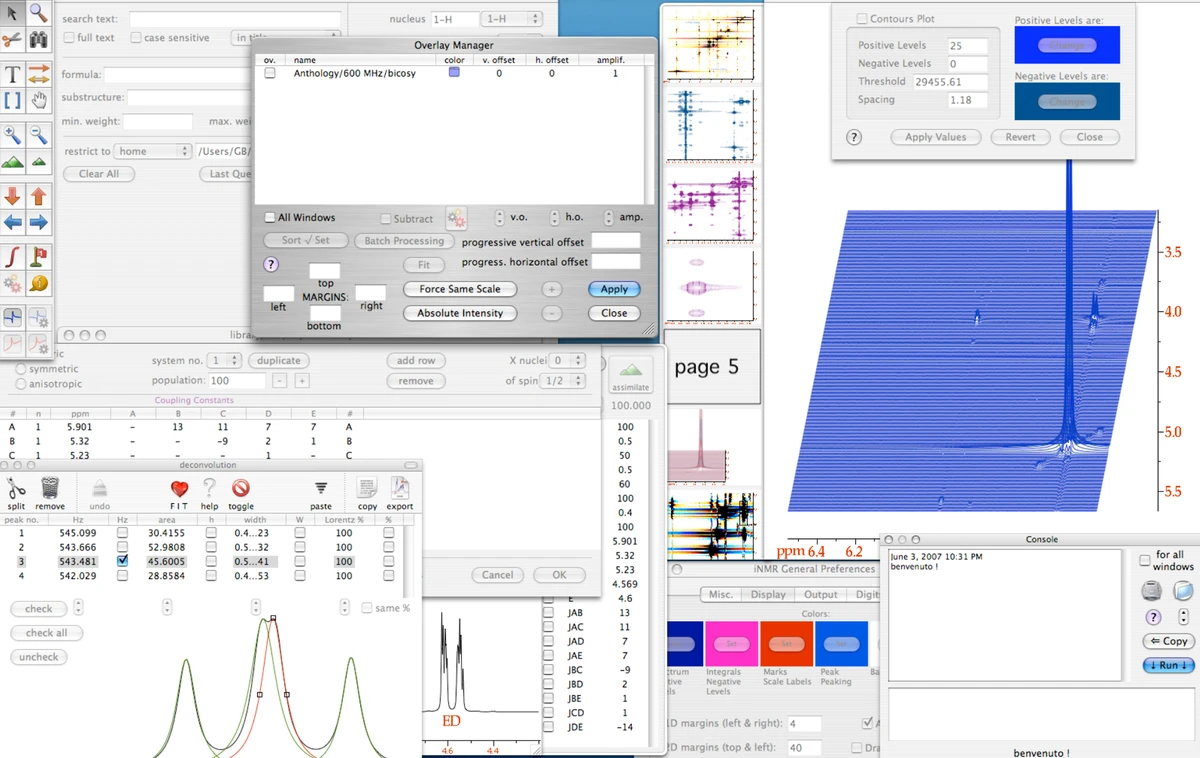
During my review, what stood out most was the breadth of analytical tools included in a single license. Instead of separating advanced functionality into paid modules, iNMR bundles its processing, simulation, reporting, scripting, and visualization features into one application. The software also emphasizes compatibility by supporting numerous industry-standard spectrometer formats while allowing users to continue working with their original data files.

For users performing routine NMR analysis or more advanced spectroscopy workflows, iNMR provides a comprehensive environment with support for 1D, 2D, and 3D data processing, automated corrections, simulations, scripting, and batch processing.

Features of iNMR

  • Process 1D, 2D, and 3D NMR spectra.
  • Automatic phase correction and baseline correction.
  • Advanced processing tools including:
    • Solvent suppression
    • Linear prediction
    • Weighting functions
    • Hilbert transform
    • Covariance
    • Reference deconvolution
    • Symmetrization
    • Binning
  • Extract chemical shifts and coupling constants (J values).
  • Generate formatted reports and data tables.
  • Overlay spectra and perform synchronized plotting.
  • Spectral editing and annotation tools.
  • Simulate coupled spin systems with automatic fitting.
  • Line-shape and volume fitting.
  • Cross Peaks Manager for 2D spectroscopy.
  • DOSY processing support.
  • Relaxation time measurements.
  • Batch processing for repetitive workflows.
  • Embedded Lua scripting for workflow automation.
  • Support for numerous NMR file formats, including Bruker, Varian, JEOL, JCAMP-DX, NMRPipe, CARA-Xeasy, Tecmag, and more.
  • Export data to formats such as JCAMP-DX, JPEG, XPS (Windows), and others.

Interface and Usability

iNMR offers a streamlined interface that prioritizes spectroscopy data over unnecessary interface elements. During use, navigation feels responsive, and common analysis tools are easy to access without overwhelming the workspace.

The software is designed as a native Windows application, helping maintain good responsiveness while keeping resource usage relatively low. Users who frequently perform repetitive analyses can also automate tasks through the built-in Lua scripting engine, while batch processing helps improve efficiency for larger datasets. Although the feature set is extensive, the application includes task-oriented documentation and web tutorials to help users become familiar with its workflow.

Who Should Use iNMR?

  • Chemists
  • NMR spectroscopists
  • Academic researchers
  • Laboratory professionals
  • Pharmaceutical researchers
  • Universities and research institutions
  • Industrial laboratories working with NMR spectroscopy

Conclusion

iNMR is a feature-rich NMR spectroscopy application that combines advanced processing, simulation, scripting, and reporting tools within a single package. Its extensive format compatibility, efficient interface, and automation capabilities make it suitable for both academic research and industrial laboratories.

Pros & Cons

Pros

  • Comprehensive 1D, 2D, and 3D NMR processing tools
  • Supports a wide range of industry-standard file formats
  • Includes scripting through an embedded Lua interpreter
  • Batch processing improves workflow efficiency
  • Advanced simulation and spectral analysis capabilities
  • Clean and responsive interface
  • Single license includes all available modules
  • Cross-platform support for Windows and macOS

Cons

  • Designed primarily for users familiar with NMR spectroscopy
  • Some platform-specific features are only available on macOS or Windows

Frequently Asked Questions

What is iNMR used for?

iNMR is professional software for processing, analyzing, and visualizing Nuclear Magnetic Resonance (NMR) spectroscopy data. It is commonly used by chemists, researchers, universities, and laboratories for spectral analysis and scientific research.

What types of NMR data can iNMR process?

iNMR supports 1D, 2D, and 3D NMR data. It also provides advanced processing functions such as phase correction, baseline correction, solvent suppression, DOSY processing, line fitting, and spectral simulations.

Which file formats are supported by iNMR?

iNMR supports numerous industry-standard formats, including JCAMP-DX, Bruker, Varian, JEOL, NMRPipe, CARA-Xeasy, Tecmag, Siemens, Philips, and several others. It can also export data to formats such as JCAMP-DX, JPEG, and XPS on Windows.

Does iNMR support scripting and automation?

Yes. iNMR includes an embedded Lua scripting engine that enables users to automate repetitive tasks and extend the software's functionality with custom scripts.

Is iNMR available for both Windows and macOS?

Yes. iNMR is available for both Windows and macOS. Some features, such as PDF export or QuickLook integration, are platform-specific.

What are the system requirements for iNMR?

According to the available information, the Windows version of iNMR supports Windows 7, Windows 10, and Windows 11.

Recommended apps [Freeware]:
  • Winhance 26.06.12 Winhance logo Windows optimization tool to debloat apps, tweak settings, and customize Windows 10/11
  • 3D Youtube Downloader 1.26.7 3D Youtube Downloader logo download videos, playlists, and subtitles from YouTube and other sites
  • RustDesk 1.4.9 RustDesk logo open-source remote desktop solution with self-hosting, cross-platform support, and customizable remote access tools
  • Wise Disk Cleaner 11.3.6.856 Wise Disk Cleaner logo Free up storage, remove junk files, and optimize your PC with Wise Disk Cleaner for faster Windows performance
  • Foxit Reader 2026.1.2.36540 Foxit Reader logo Read, annotate, fill forms, and print PDF files with Foxit Reader, a lightweight and feature-rich PDF tool for Windows
  • 360 Total Security 11.0.0.1314 360 Total Security logo 360 Total Security provides antivirus protection, malware detection, system cleanup, and online security tools
Recommended apps [Shareware]:
  • All Video Downloader Pro 10.4.7 All Video Downloader Pro logo Download videos, playlists, subtitles, and audio from popular sites with built-in conversion and playback tools
  • Araxis Merge 2026.0 Araxis Merge logo a powerful file comparison and merging tool for developers, legal teams, and professionals handling version control
  • Google Antigravity 2.3.0 Google Antigravity logo AI-powered IDE that uses autonomous agents to automate coding, testing, and software development workflows
  • MathType 7.11.1.462 MathType logo a powerful equation editor for creating mathematical formulas in Word, LaTeX, and more
  • MusConv 4.10.471 MusConv logo music transfer tool that helps users move playlists between Spotify, Apple Music, and other streaming services easily
  • Actual Multiple Monitors 8.15.4 Actual Multiple Monitors logo multi-monitor setups with taskbars, window control, gaming tools, wallpapers, and desktop management features