Draftable Desktop logo

Draftable Desktop 26.6.200

  • User Rating:
    ★★★★★
    ★★★★★
    0.0 ★ 0Votes
  • Requirements:
    Windows
  • Version: 26.6.200
  • Latest updated: 2 weeks ago
  • License: Free Trial  
  • Publisher: Draftable
  • Size: 584 MB
× app stores

Draftable Desktop is a professional document comparison tool designed for Windows users who need to compare files quickly, accurately, and securely. It supports a wide range of formats including PDF, Word, Excel, PowerPoint, and plain text files.

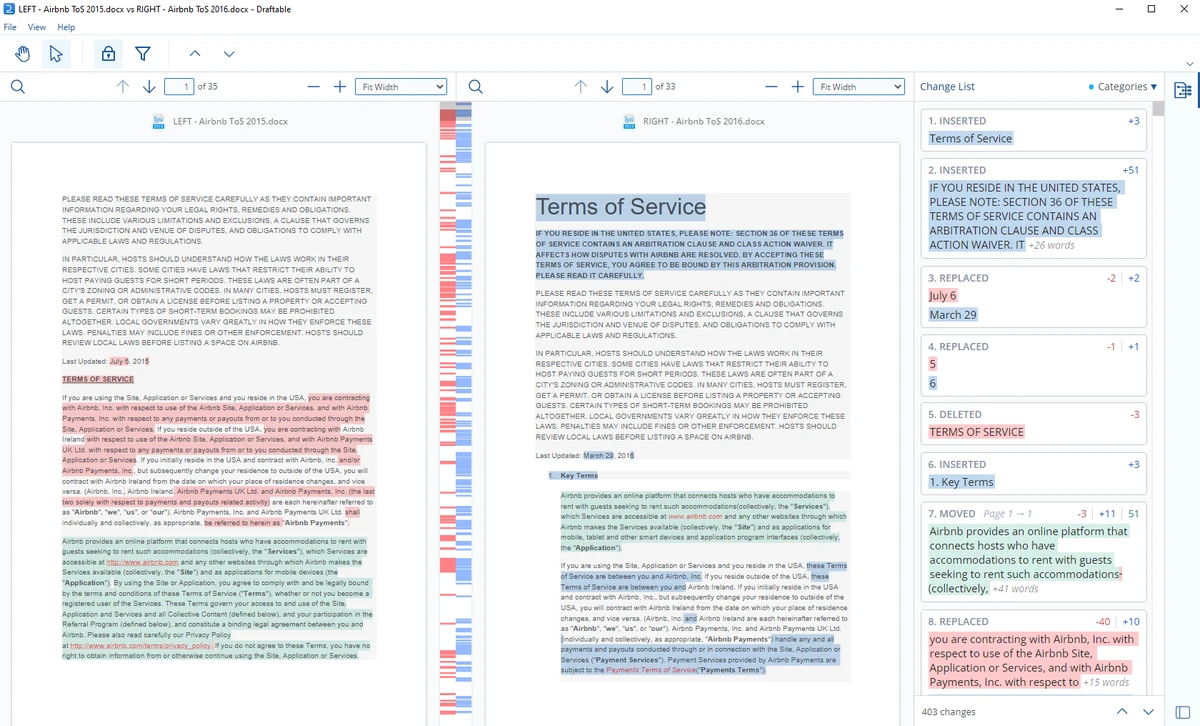
One of its key strengths is privacy: all comparisons are processed locally on your computer, meaning your documents are never uploaded to the internet. This makes it especially suitable for legal, corporate, and confidential workflows where data security is essential. The software allows users to view differences side by side, in single-page redline mode, or as a change list, making it easier to identify even small edits across complex documents.

Features of Draftable Desktop

  • Compare documents locally without uploading files to the internet
  • Supports multiple file formats:
    • PDF (.pdf)
    • Word (.doc, .docx, .docm, .rtf)
    • PowerPoint (.ppt, .pptx, .pptm)
    • Excel (.xls, .xlsx, .csv)
    • Text (.txt)
  • Side-by-side comparison view with synchronized scrolling
  • Single-page redline view for detailed change tracking
  • Change list view showing all differences in one place
  • Export comparison results to PDF format
  • Password-protected PDF export for secure sharing
  • Detects text changes, formatting differences, and style edits
  • Works offline for full document confidentiality
  • Requires Microsoft Office for advanced file compatibility features

Interface and Usability

Draftable Desktop offers a clean and professional interface focused on productivity. Users can easily load two documents and instantly see differences highlighted in a structured layout. The side-by-side view is particularly useful for comparing revisions, as both documents scroll together in sync. For users who prefer a more condensed overview, the change list provides a quick summary of all edits.

The learning curve is minimal, especially for users familiar with document editing tools. Most features are accessible through a straightforward toolbar, making the software suitable for both technical and non-technical users.

Who Should Use Draftable Desktop?

  • Legal professionals comparing contract versions
  • Business users reviewing document revisions
  • Editors and writers tracking content changes
  • Finance teams working with spreadsheets and reports
  • Students comparing research or academic drafts
  • Anyone needing secure offline document comparison

Conclusion

Draftable Desktop is a reliable and secure document comparison solution designed for professional use. Its ability to work fully offline while supporting multiple file formats makes it a strong choice for users who handle sensitive or frequently revised documents.

Pros & Cons

✓

Pros

  • Works completely offline for full document privacy
  • Supports PDF, Word, Excel, PowerPoint, and text files
  • Multiple comparison views (side-by-side, redline, change list)
  • Accurate detection of content and formatting changes
  • Export results to PDF with password protection
  • Smooth and intuitive user interface
✕

Cons

  • Requires Microsoft Office for full compatibility with some formats
  • Not a free-form editing tool (comparison only)
  • Large documents may require higher system memory
  • Export to Track Changes requires newer Office versions

Frequently Asked Questions

What is Draftable Desktop used for?

Draftable Desktop is used to compare two versions of documents such as PDFs, Word files, Excel spreadsheets, and PowerPoint presentations to identify changes and differences.

Does Draftable Desktop work offline?

Yes. All comparisons are processed locally on your computer, and no documents are uploaded to the internet.

What file formats does Draftable Desktop support?

It supports PDF, Word, Excel, PowerPoint, and plain text files, allowing flexible comparisons across different document types.

Can I share comparison results with others?

Yes. You can export comparisons as PDF files, including password protection for secure sharing.

Does Draftable Desktop show formatting changes?

Yes. It detects not only text changes but also formatting differences such as font, size, bold, and italics.

Do I need Microsoft Office to use Draftable Desktop?

Microsoft Office is required for comparing Word, Excel, and PowerPoint files, especially for full compatibility and advanced features.

Recommended apps [Freeware]:
  • WonderPen 3.2.0.8457 WonderPen logo writing app with Markdown support, tree structure organization, and export tools for Windows users
  • Advanced Trigonometry Calculator 2.1.7 Advanced Trigonometry Calculator logo Solve advanced trigonometry, scientific notation, complex numbers, and equations with Advanced Trigonometry Calculator
  • Waterfox 6.6.16.1 Waterfox logo Browse faster with a 64-bit Firefox-based browser optimized for performance, security, extensions, bookmarks, and downloads.
  • TKO Auto Clicker 2.0 TKO Auto Clicker logo Automate mouse clicks and record macros on Windows with customizable intervals, hotkeys, and precise cursor controls.
  • LibreOffice 26.2.4 LibreOffice logo A free, open-source office suite with tools for documents, spreadsheets, presentations, databases, and broad file compatibility.
  • NoMachine 9.8.2 NoMachine logo Access and control remote computers securely with a fast desktop sharing tool for working, accessing files, and remote management.
Recommended apps [Shareware]:
  • Teorex FolderIco 9.3.1 Teorex FolderIco logo Change folder colors or icons in one click and organize your files visually, so you can find everything instantly
  • FileCenter 12.5.36 FileCenter logo organize documents, scan files, manage PDFs, and build an efficient digital filing system
  • Shield Antivirus 5.6.6 Shield Antivirus logo real-time protection against viruses, ransomware, spyware, and malware with scheduled scans and system tools
  • LanSend 26.06 LanSend logo LAN messaging tool for system administrators to send instant messages to multiple Windows users without installing client software
  • VovSoft PDF to Text Converter 1.5 VovSoft PDF to Text Converter logo convert PDF files to editable TXT documents offline with batch processing
  • HTMLPad 2025 v18.7.0.277 HTMLPad logo Fast HTML editor with CSS and JavaScript tools, code completion, FTP support, validation, and browser preview for Windows.